Add URL to a Graphic
Add URL to a Graphic
To add a url to a graphic that is to be part of an blast, double click on the image in the form letter and go to the link tab as per the picture below. You can have any number of images in an eblast and each can have their own link.
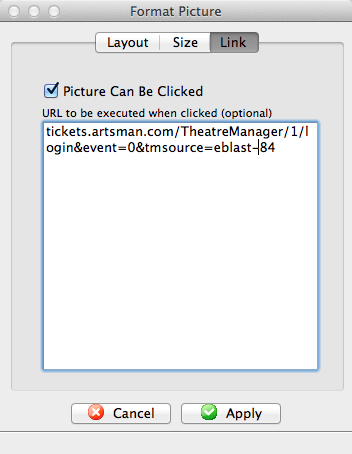
There are two selections to make.
| Item | Values |
| Picture can be clicked | If this is enabled (clicked), then when the picture is placed in an email, the user will be able to click on it and activate the URL. If this is disabled, entering the URL will have no effect |
| URL |
The URL is the link that you want execute if the user clicks on the picture. You can enter email addresses, actual URL's to any web site, or feeds.
The link should contain an accepted web prefix like https://, mailto:, or tel: (being explicit is better). If the link does not have a prefix, the patrons email client may try to interpret what it should be based on content. This can be a link to your ticketing web site, in which case we recommend the use the tmsource= parameter to know which eblast resulted in a sale. Examples of URL's are:
|