Donor Summary - Campaign & Year (Program)
Donor Summary - Campaign & Year (Program)
The Donor Summary - Campaign & Year (Program) can be found under the Donation Reports & Receipts category. Below the image are detailed notes to help you in using the report.
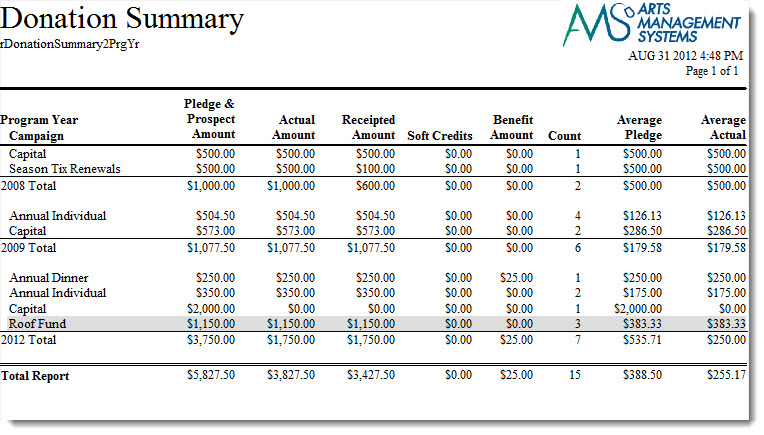
Click here for information on generating a report. Click here for information on the Finished Report window.
Purpose of the Report
You use the Donor Summary - Campaign & Year (Program) to summarize the total donations and print the totals by program year and donation campaign.
Departments Who Benefit From This Report
| Development | Use this report to evaluate donation campaigns over the course of a number of program years. |
Criteria Hints
It is recommended that this report be run for the program year as the criteria.
| Parameter Field | Condition | Value |
| Campaign Seq # | is one of | (Campaign) |
Use the SHIFT key to select a series of campaigns, or the OPTION key (Mac) or CTRL key (Windows) to select multiple individual campaigns.