Audit Trail - Donor & Receipt Summary - Patron
Audit Trail - Donor & Receipt Summary - Patron
The Audit Trail - Donor & Receipt Summary - Patron can be found under the Donation Reports & Receipts category. Below the image are detailed notes to help you in using the report.
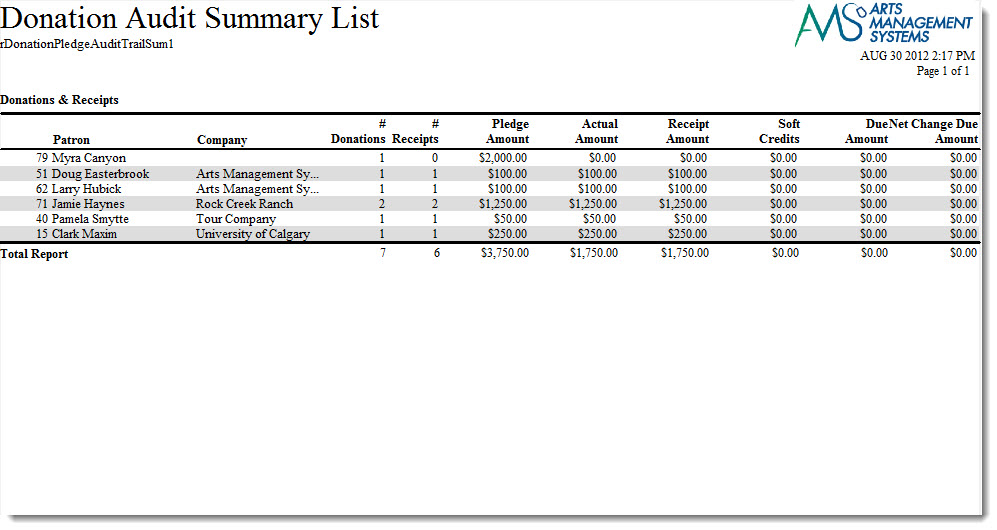
Click here for information on generating a report. Click here for information on the Finished Report window.
Purpose of the Report
You use the Donor Detail - Year (Program) to tally data within a given time period (usually daily) based on the donations and payments recveived within a specified time frame. It is best run after the end of day wizard has been finished, because this is when all the sales postings have been finalized for the prior day and all payments have been deposited. This report can be run for a date range that is more than one day, for part of a day, or a time period that crosses two days.
Departments Who Benefit From This Report
| Development | To print the donations in order of fiscal year. A complete summary is printed, even notes and comments |
Criteria Hints
It is recommended that this report be run using:
| Parameter Field | Condition | Value |
| Donation Year | = | Desired Year |
| Donation Date | is | Date Entered |
| Campaign # | is one of | desired campaign |