Attendance and Front of House Reports
Attendance and Front of House Reports
Graphic Map by Performance
Graphic Map by Performance
The Graphic Map by Performance report is found under the Attendance for House and Calendar Reports category.
Click here for information on generating a report. Click here for information on the Finished Report window.
Purpose of the Report
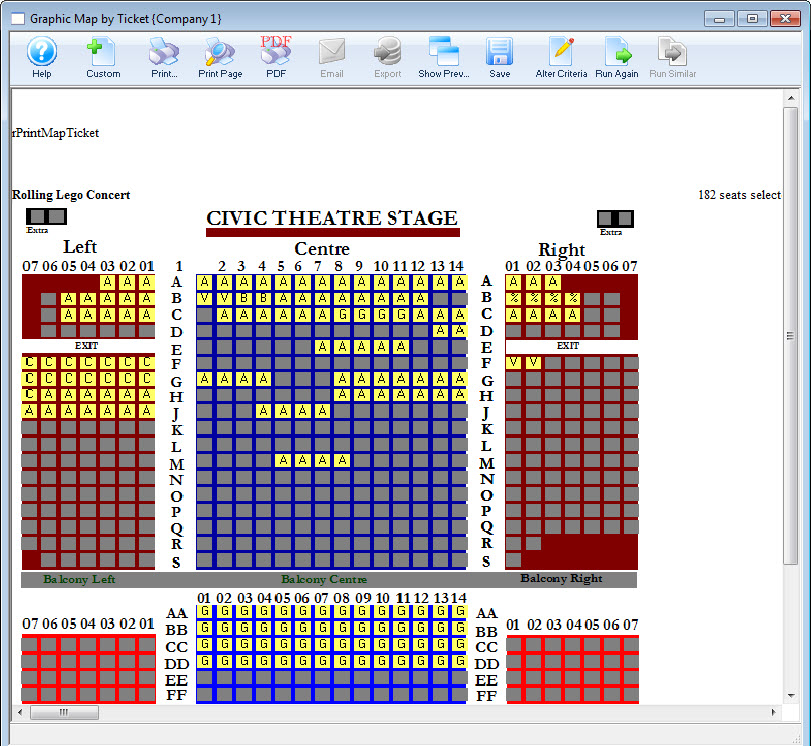
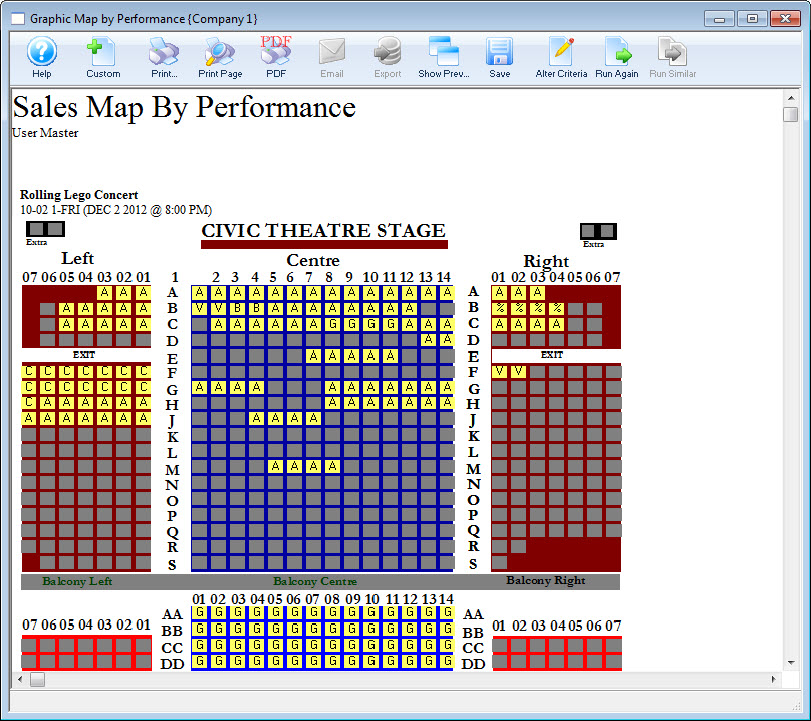
This report generates a graphical map of a reserved performance showing sold seats for ALL tickets, held, and unsold seats. Sold seats are denoted by either Price Code or Promotion depending on system setup.
Departments Who Benefit From This Report
| Box Office | This report can help Front of House allocate Seats on a last minute rush basis. |
| House Management | Use this report to see the empty seats in the theatre and assign patrons properly. |
| Marketing | Use this report to see areas of the venue that need more patrons and adjust marketing accordingly. |
| Stage Management | Use this report to let actors know where the heavy concentrations of audience members will be for the performance. |
Criteria Hints
It is recommended that this report be run using only one performance as the criteria.
| Parameter Field | Condition | Value |
| Event # | is one of | (Event Title) |
| Performance Date | = | (Date) |
| Performance Time | = | (Time) |
Print Graphic Map by Performance Report from Event
Print Graphic Map by Performance Report from Event
This report is most commonly printed from within the Play / Event.
To run this report from a Play / Event, you perform the following steps:
- From the main Theatre Manager toolbar / ribbon bar, click the Play
 button.
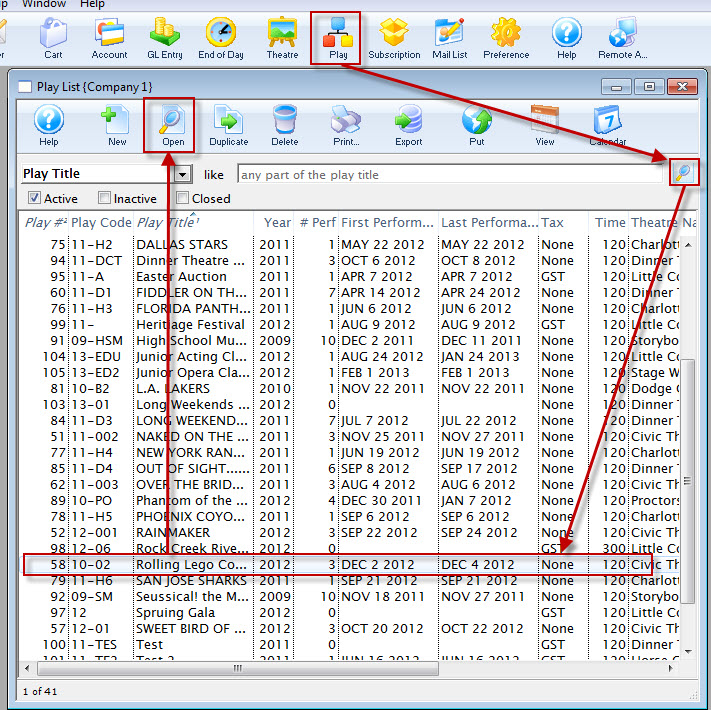
The Play List window opens.
- Open the Play / Event.
Click here for more information on Finding Events.
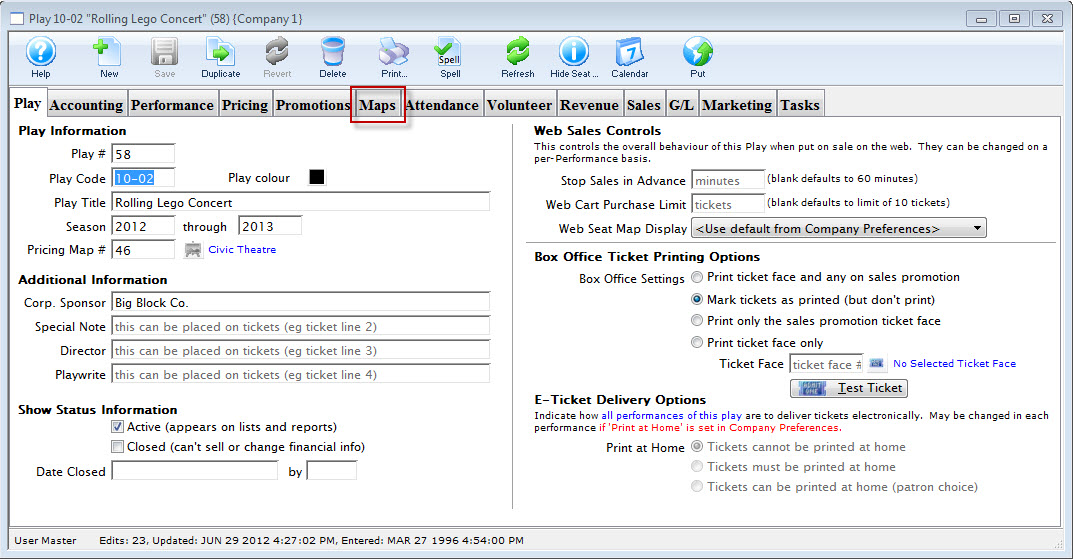
- Select the Map tab.
- Single click on the performance.
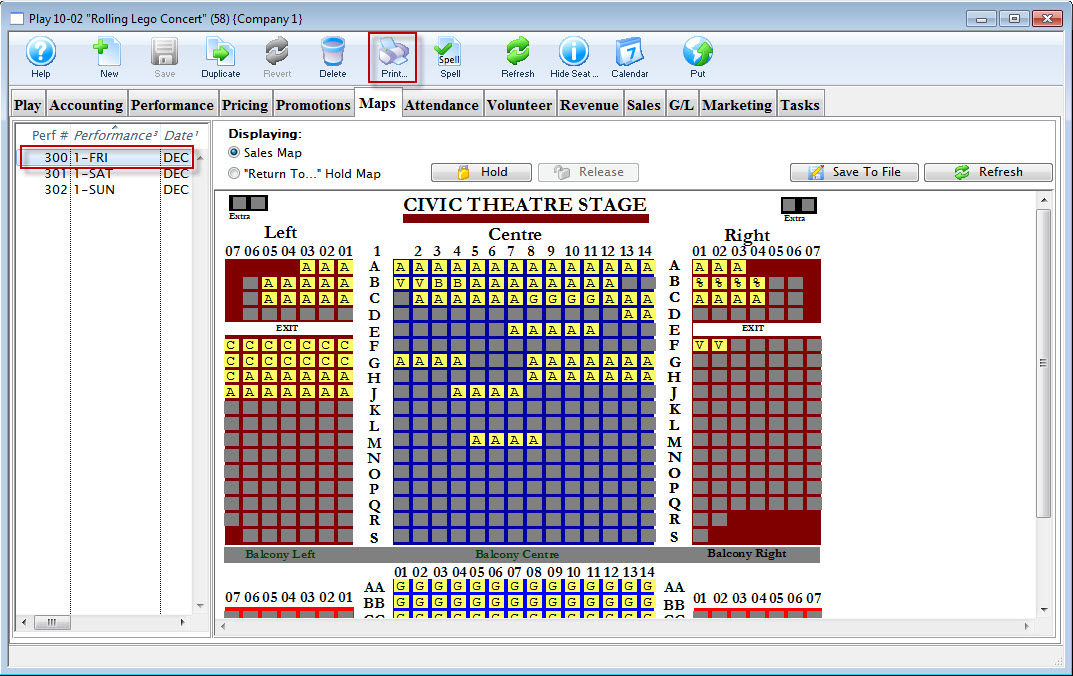
- Click the Print
 button.
The Graphic Map by Performance prints.
Graphic Map by Ticket
Graphic Map by Ticket
The Graphic Map by Ticket can be found under the Attendance for House and Calendar category. Below the image are detailed notes to help you in using the report.
Click here for information on generating a report. Click here for information on the Finished Report window.
Purposeof the Report
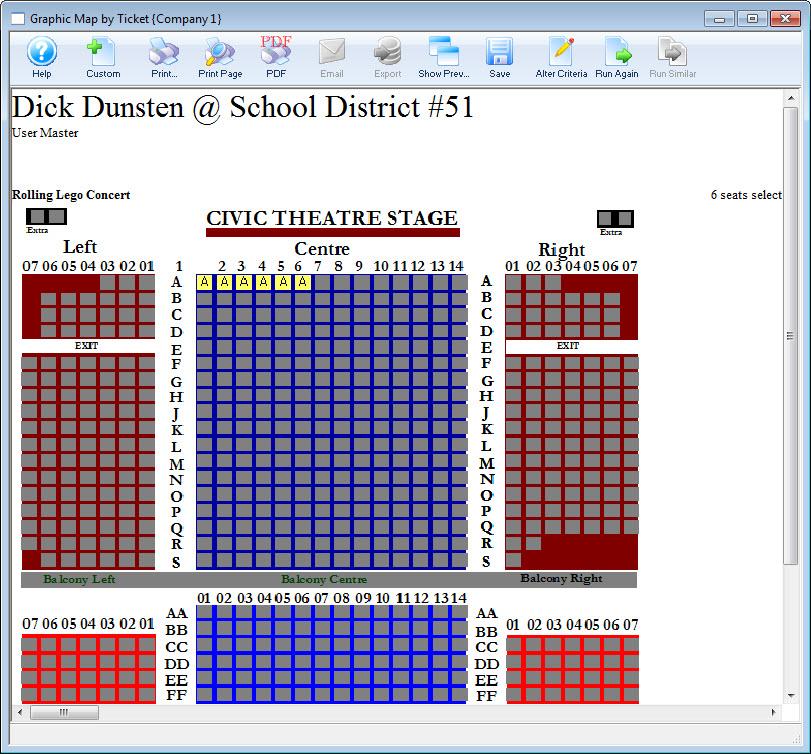
This report generates a graphical map ofa reserved performance showing all sold, held, and unsold seats. Sold seats are denoted by either Price Code or Promotion depending on system setup.
Departments Who Benefit From This Report
| Box Office | Use this report to assist with placing patrons to properly "dress" the house. |
| House Management | Use this report to see the heavily seated areas of the theatre and assign ushers properly. |
| Marketing | Use this report to see areas of the venue that need more patrons and adjust marketing accordingly. |
| Stage Management | Use this report to let actors know where the heavy concentrations of audience members will be for the performance. |
Criteria Hints
It is recommended that this report be run using only one performance as the criteria.
| Parameter Field | Condition | Value |
| Event # | is one of | (Event Title) |
| Performance Date | = | (Date) |
| Performance Time | = | (Time) |
Print Graphic Map by Ticket
Print Graphic Map by Ticket
You can easly print a Graphic Map by Ticket from the Patron Record.
You perform the following steps:
- Open the patron record.
There are a number of different methods to open a patron record from a number of different places inside Theatre Manager
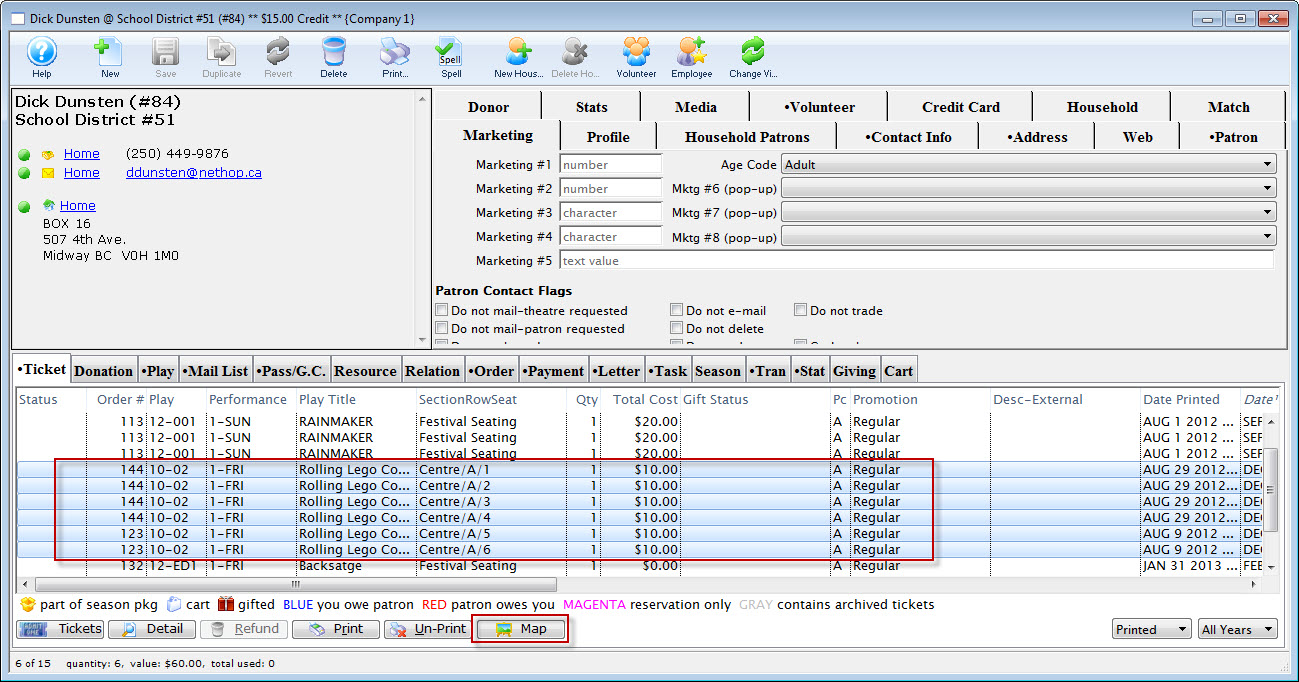
- Highlight the tickets you want to have printed on the map.
- Click the Map
 button.
The Report opens.
House Report - Available Seats
House Report - Available Seats
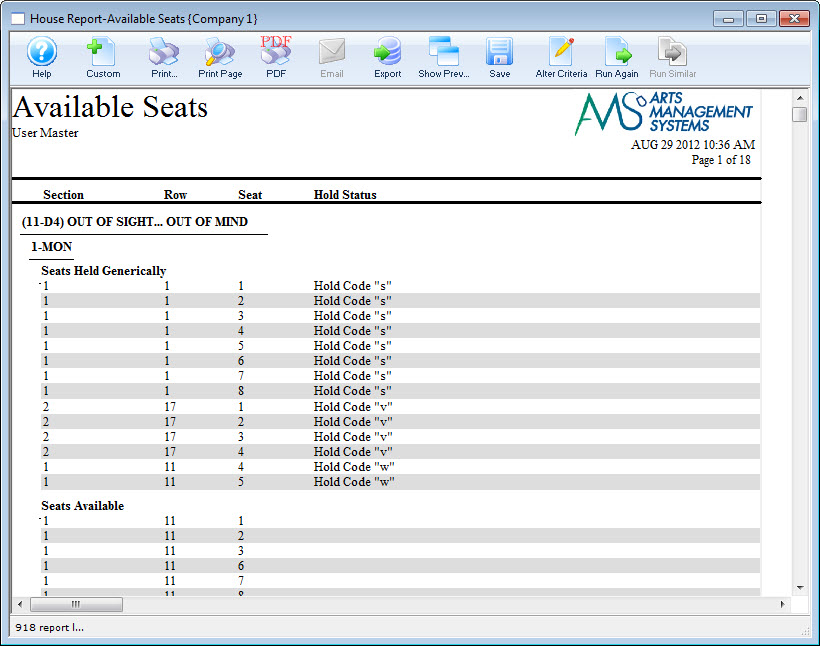
The House Report - Available Seats can be found under the Attendance for House and Calendar category. Below the image are detailed notes to help you in using the report.
Click here for information on generating a report. Click here for information on the Finished Report window.
Purpose of the Report
You use the House Report - Available Seats to print a list of seats available for reserved seating performances. This can be printed by seat assignment to help front of house.
Departments Who Benefit From This Report
| Box Office | |
| House Management | |
| Marketing | |
| Stage Management |
Criteria Hints
It is recommended that this report be run using .
| Parameter Field | Condition | Value |
House Report - By Order (With Mailing Address and Notes)
House Report - By Order (With Mailing Address and Notes)
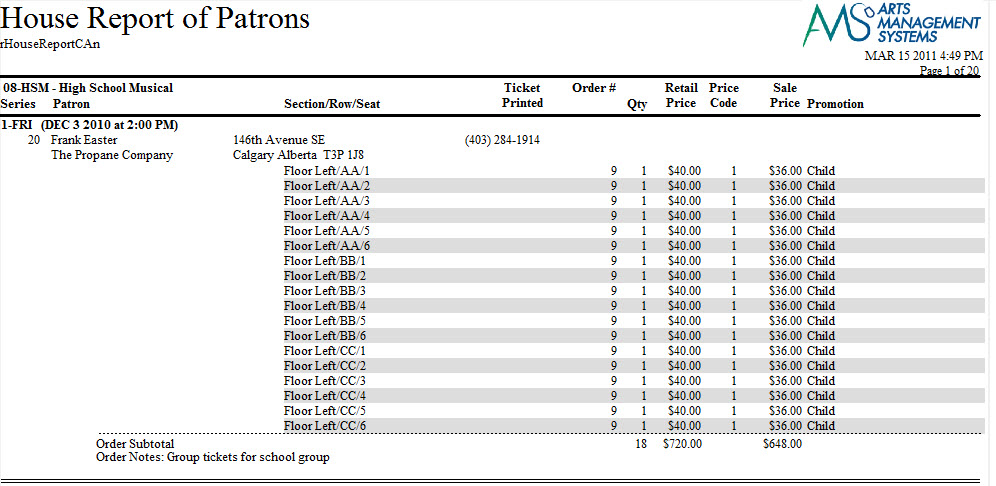
The House Report - By Order (With Mailing Address and Notes) can be found under the Attendance for House and Calendar category. Below the image are detailed notes to help you in using the report.
- Click here for information on generating a report.
- Click here for information on the Finished Report window.
Purpose of the Report
This report is a detailed listing of patrons attending a performance of an event separated by order. It includes address information, details about the order the patron placed and notes for both the order and patron.
Departments Who Benefit From This Report
| Box Office | Use this report to check on order balances for a performance. Orders with balances will not batch print tickets. |
| House Management | Use this report to see a listing of patrons attending a performance along with a detail of tickets purchased and notes for the patron. This includes special needs notes. |
Criteria Hints
It is recommended that this report be run using only one performance as the criteria.
| Parameter Field | Condition | Value |
| Event # | is one of | (Event Title) |
| Performance Date | = | (Date) |
| Performance Time | = | (Time) |
House Report - By Order (With Mailing Address)
House Report - By Order (With Mailing Address)

- Click here for information on generating a report.
- Click here for information on the Finished Report window.
Purpose of the Report
This report is a detailed listing of patrons attending a performance of an event separated by order. It includes shipping address information (instead iof primary address), details about the order the patron placed and notes for both the order and patron.
Departments Who Benefit From This Report
| Box Office | Use this report to check on order balances for a performance. Orders with balances will not batch print tickets. |
| House Management | Use this report to see a listing of patrons attending a performance along with a detail of tickets purchased and notes for the patron. This includes special needs notes. |
Criteria Hints
It is recommended that this report be run using only one performance as the criteria.
| Parameter Field | Condition | Value |
| Event # | is one of | (Event Title) |
| Performance Date | = | (Date) |
| Performance Time | = | (Time) |
House Report - By Order (With Primary Address and without Notes)
House Report - By Order (With Primary Address and without Notes)
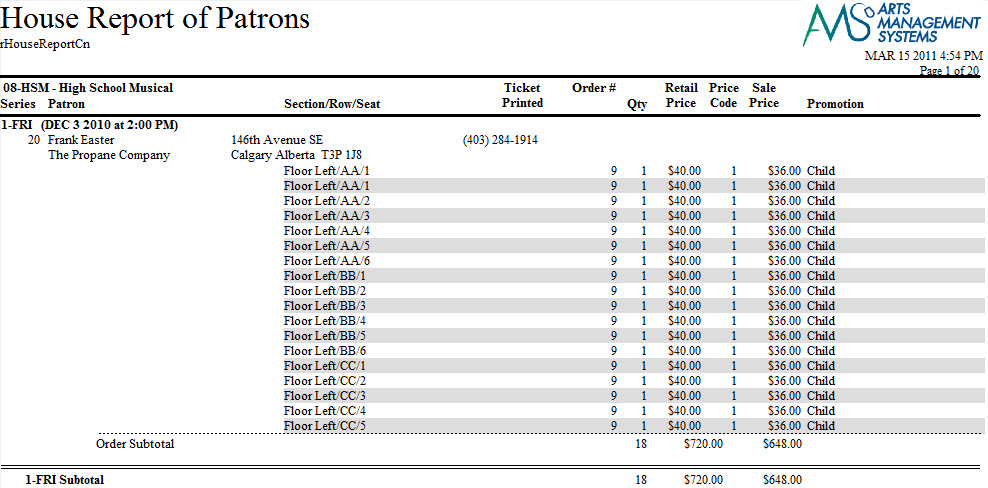
The House Report - By Order (With Address) can be found under the Attendance for House and Calendar category. Below the image are detailed notes to help you in using the report.
- Click here for information on generating a report.
- Click here for information on the Finished Report window.
Purpose of the Report
This report is a detailed listing of patrons attending a performance of an event separated by order. It includes address information and details about the order the patron placed.
Departments Who Benefit From This Report
| Box Office | Use this report to check on order balances for a performance. Orders with balances will not batch print tickets. |
| House Management | Use this report to see a listing of patrons attending a performance along with a detail of tickets purchased. |
Criteria Hints
It is recommended that this report be run using only one performance as the criteria.
| Parameter Field | Condition | Value |
| Event # | is one of | (Event Title) |
| Performance Date | = | (Date) |
| Performance Time | = | (Time) |
House Report - By Order (With Shipping Address and without Notes)
House Report - By Order (With Shipping Address and without Notes)

- Click here for information on generating a report.
- Click here for information on the Finished Report window.
Purpose of the Report
This report is a detailed listing of patrons attending a performance of an event separated by order. It includes shipping address information and details about the order the patron placed.
Departments Who Benefit From This Report
| Box Office | Use this report to check on order balances for a performance. Orders with balances will not batch print tickets. |
| House Management | Use this report to see a listing of patrons attending a performance along with a detail of tickets purchased. |
Criteria Hints
It is recommended that this report be run using only one performance as the criteria.
| Parameter Field | Condition | Value |
| Event # | is one of | (Event Title) |
| Performance Date | = | (Date) |
| Performance Time | = | (Time) |
House Report - By Order (Without Notes)
House Report - By Order (Without Notes)
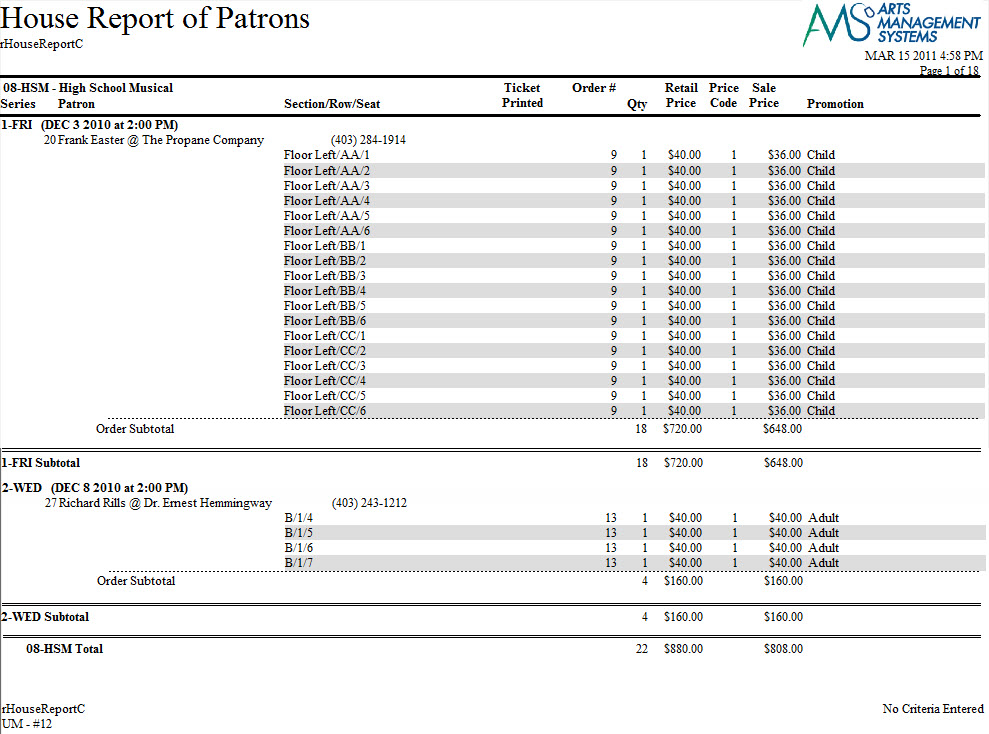
The House Report - By Order (Without Notes) can be found under the Attendance for House and Calendar category. Below the image are detailed notes to help you in using the report.
Click here for information on generating a report. Click here for information on the Finished Report window.
Purposeof the Report
This report is a detailed listing of patrons attending a performance of an event separated by order. It includes details about the order the patron placed.
Departments Who Benefit From This Report
| Box Office | Use this report to check on order balances for a performance. Orders with balances will not batch print tickets. |
| House Management | Use this report to see a listing of patrons attending a performance along with a detail of tickets purchased. |
Criteria Hints
It is recommended that this report be run using only one performance as the criteria.
| Parameter Field | Condition | Value |
| Event # | is one of | (Event Title) |
| Performance Date | = | (Date) |
| Performance Time | = | (Time) |
House Report - By Patron (With Notes)
House Report - By Patron (With Notes)
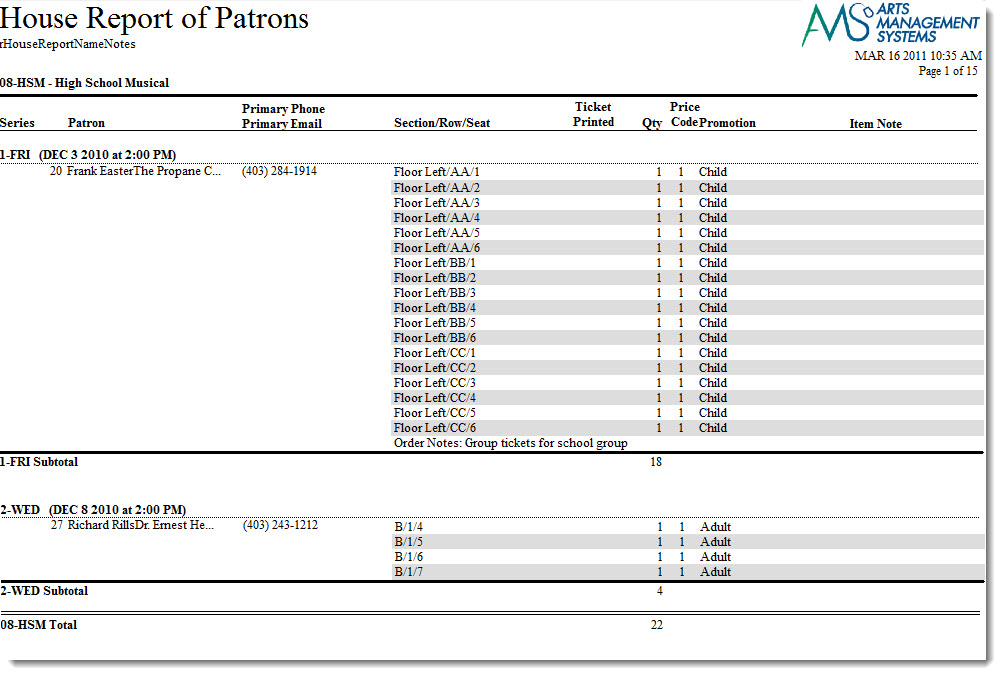
The House Report - By Patron (With Notes) can be found under the Attendance for House and Calendar category. Below the image are detailed notes to help you in using the report.
Click here for information on generating a report. Click here for information on the Finished Report window.
Purpose of the Report
This report is a detailed listing of patrons attending a performance of an event. It includes a listing of the tickets the patron purchased for the event and order notes.
Departments Who Benefit From This Report
| Box Office | Use this report to see a listing of all patrons attending a performance along with a detail of the tickets they have purchased and order notes. Orders with an outstanding balance will not print with batch tickets. |
| House Management | Use this report to see a listing of all patrons attending a performance along with a detail of the tickets that they have purchased and order notes. |
Criteria Hints
It is recommended that this report be run using only one performance as the criteria.
| Parameter Field | Condition | Value |
| Event # | is one of | (Event Title) |
| Performance Date | = | (Date) |
| Performance Time | = | (Time) |
House Report - By Patron (Without Notes)
House Report - By Patron (Without Notes)
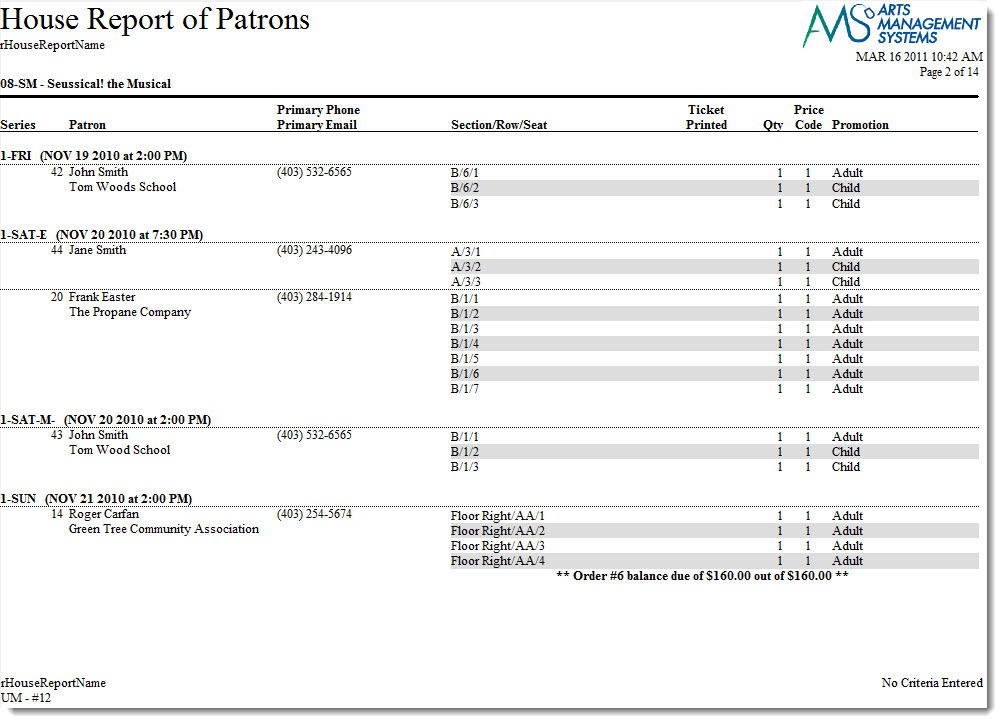
The House Report - By Patron (Without Notes) can be found under the Attendance for House and Calendar category. Below the image are detailed notes to help you in using the report.
Click here for information on generating a report. Click here for information on the Finished Report window.
Purposeof the Report
This report is a detailed listing of patrons attending a performance of an event. It includes a listing of the tickets the patron purchased for the event.
Departments Who Benefit From This Report
| Box Office | Use this report to see a listing of all patrons attending a performance along with a detail of the tickets they have purchased. |
| House Management | Use this report to see a listing of all patrons attending a performance along with a detail of the tickets that they have purchased. |
Criteria Hints
It is recommended that this report be run using only one performance as the criteria.
| Parameter Field | Condition | Value |
| Event # | is one of | (Event Title) |
| Performance Date | = | (Date) |
| Performance Time | = | (Time) |
House Report - By Ticket (With Notes)
House Report - By Ticket (With Notes)
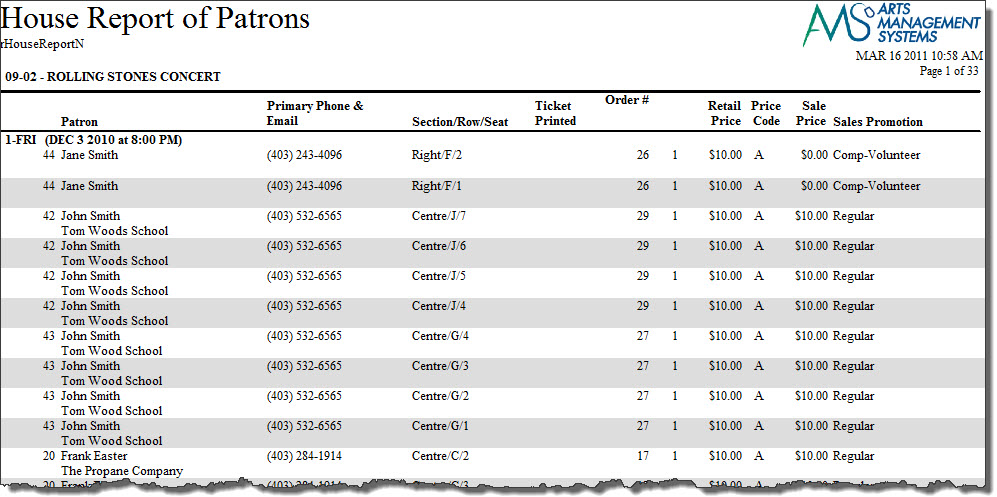
The House Report - By Ticket (With Notes) can be found under the Attendance for House and Calendar category. Below the image are detailed notes to help you in using the report.
Click here for information on generating a report. Click here for information on the Finished Report window.
Purpose of the Report
This report is a detailed listing of tickets for the performance and includes patron and order information and notes.
Departments Who Benefit From This Report
| Box Office | Use this report to see a listing of all tickets for a performance along with patron, order information and order notes. Orders with an outstanding balance will not print with batch tickets. |
| House Management | Use this report to see a listing of all tickets for a performance along with patron, order information and order notes. |
Criteria Hints
It is recommended that this report be run using only one performance as the criteria.
| Parameter Field | Condition | Value |
| Event # | is one of | (Event Title) |
| Performance Date | = | (Date) |
| Performance Time | = | (Time) |
House Report - By Ticket (Without Notes)
House Report - By Ticket (Without Notes)
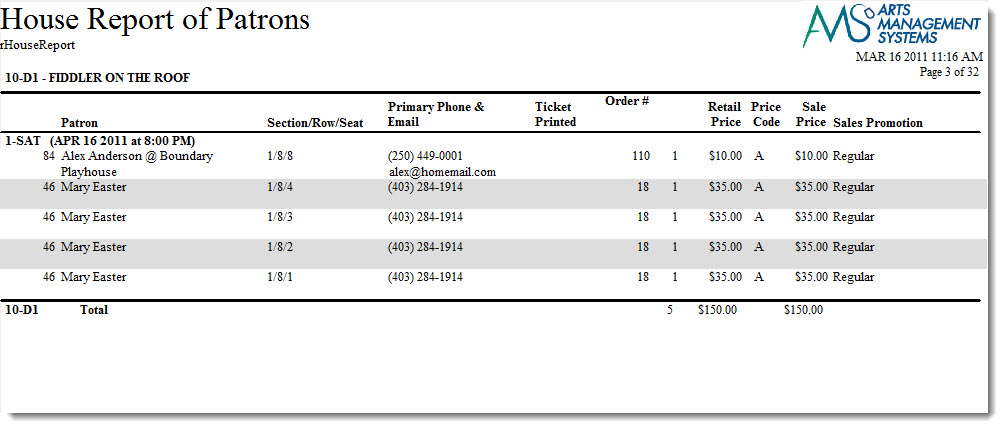
The House Report - By Ticket (Without Notes) can be found under the Attendance for House and Calendar category. Below the image are detailed notes to help you in using the report.
Click here for information on generating a report. Click here for information on the Finished Report window.
Purpose of the Report
This report is a detailed listing of tickets for the performance and includes patron information.
Departments Who Benefit From This Report
| Box Office | Use this report to see a listing of all tickets for a performance along with patron information. |
| House Management | Use this report to see a listing of all tickets for a performance along with patron information. |
Criteria Hints
It is recommended that this report be run using only one performance as the criteria.
| Parameter Field | Condition | Value |
| Event # | is one of | (Event Title) |
| Performance Date | = | (Date) |
| Performance Time | = | (Time) |
House Report - Dinner Table Tents
House Report - Dinner Table Tents
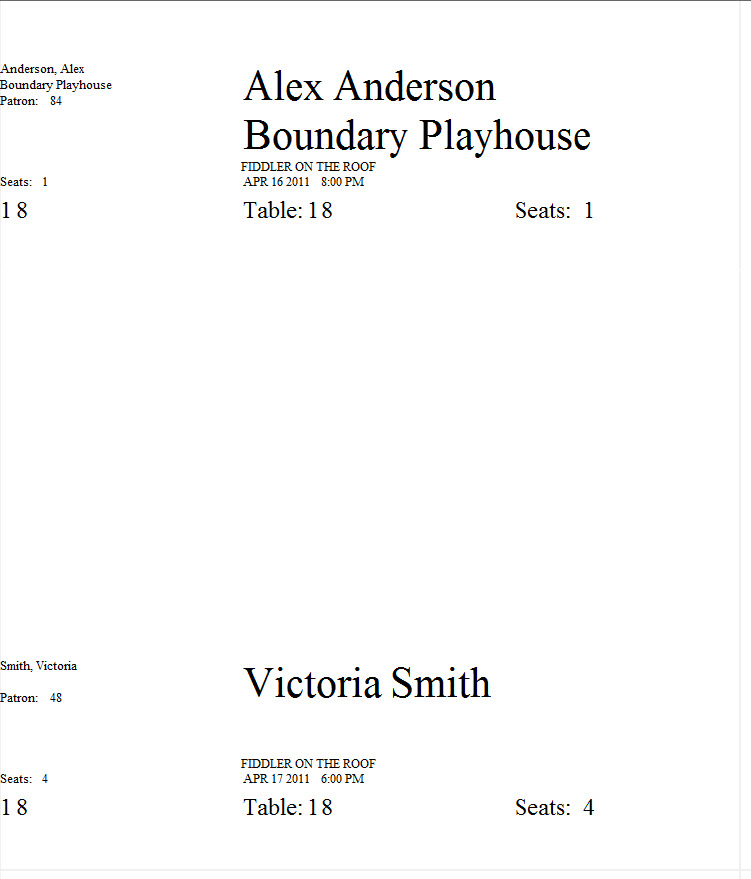
The House Report - Dinner Table Tents can be found under the Attendance for House and Calendar category. Below the image are detailed notes to help you in using the report.
Click here for information on generating a report. Click here for information on the Finished Report window.
Purposeof the Report
This report generates a listing of patrons attending the performance in a format that can be printed, separated, and placed on a dinner table as a marker.
Departments Who Benefit From This Report
| House Management | Use this report to create placeholders for dinner tables so patrons can easily locate their seats. |
Criteria Hints
It is recommended that this report be run using only one performance as the criteria.
| Parameter Field | Condition | Value |
| Event # | is one of | (Event Title) |
| Performance Date | = | (Date) |
| Performance Time | = | (Time) |
House Report - Reservation List (With Notes)
House Report - Reservation List (With Notes)
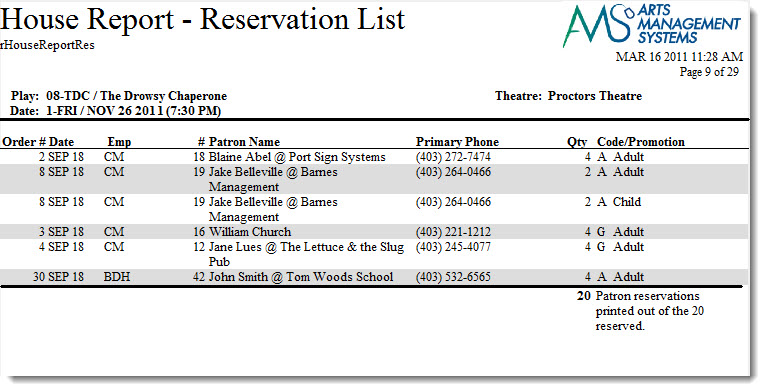
The House Report - Reservation List (With Notes) can be found under the Attendance for House and Calendar category. Below the image are detailed notes to help you in using the report.
Click here for information on generating a report. Click here for information on the Finished Report window.
Purpose of the Report
This report shows a summary of all order reservations for the performance along with ticket quantity, patron notes and order notes. All reservations are included in this report along with confirmed orders.
Departments Who Benefit From This Report
| Box Office | Use this report for a quick summary of all reservations for the performance and to check for order notes. Orders with outstanding balances will not print with batch tickets. |
| House Management | Use this report for a quick summary of all reservations for the performance and to check order and patron notes. This includes special needs notes. |
Criteria Hints
It is recommended that this report be run using only one performance as the criteria.
| Parameter Field | Condition | Value |
| Event # | is one of | (Event Title) |
| Performance Date | = | (Date) |
| Performance Time | = | (Time) |
House Report - Reservation List (With Order Balance)
House Report - Reservation List (With Order Balance)
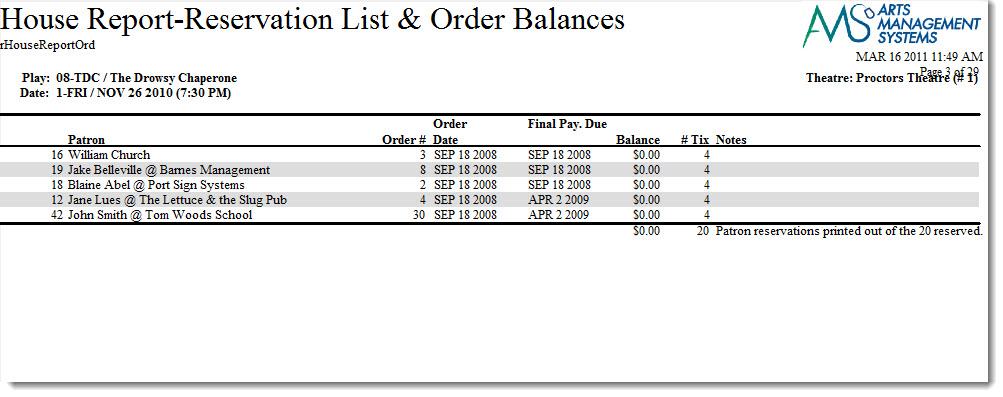
The House Report - Reservation List (With Order Balance) can be found under the Attendance for House and Calendar category. Below the image are detailed notes to help you in using the report.
Click here for information on generating a report. Click here for information on the Finished Report window.
Purpose of the Report
This report shows a summary of all order reservations for the performance along with balance information. All reservations are included in this report along with confirmed orders.
Departments Who Benefit From This Report
| Box Office | Use this report for a quick summary of all reservations for the performance and to check outstanding order balances. Orders with outstanding balances will not print with batch tickets. |
Criteria Hints
It is recommended that this report be run using only one performance as the criteria.
| Parameter Field | Condition | Value |
| Event # | is one of | (Event Title) |
| Performance Date | = | (Date) |
| Performance Time | = | (Time) |
House Report - Reservation List (Without Notes)
House Report - Reservation List (Without Notes)
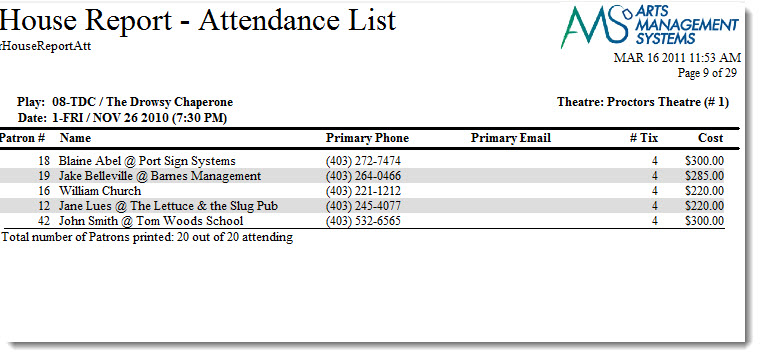
The House Report - Reservation List (Without Notes) can be found under the Attendance for House and Calendar category. Below the image are detailed notes to help you in using the report.
Click here for information on generating a report. Click here for information on the Finished Report window.
Purpose of the Report
This report shows a summary of all order reservations for the performance along with ticket quantity, patron notes and order totals. All reservations are included in this report along with confirmed orders.
Departments Who Benefit From This Report
| Box Office | Use this report for a quick summary of all reservations for the performance and to check for order totals. |
Criteria Hints
It is recommended that this report be run using only one performance as the criteria.
| Parameter Field | Condition | Value |
| Event # | is one of | (Event Title) |
| Performance Date | = | (Date) |
| Performance Time | = | (Time) |
House Report - Reservation List by Order (With Notes)
House Report - Reservation List by Order (With Notes)
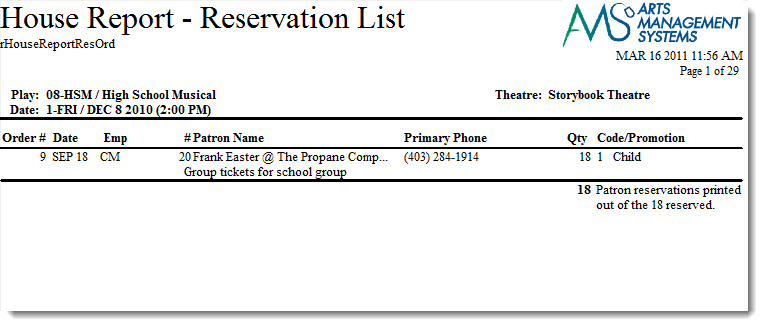
The House Report - Reservation List by Order (With Notes) can be found under the Attendance for House and Calendar category. Below the image are detailed notes to help you in using the report.
Click here for information on generating a report. Click here for information on the Finished Report window.
Purposeof the Report
This report shows a summary of all ordersfor the performance along with ticket quantity, patron notes and order notes.
Departments Who Benefit From This Report
| Box Office | Use this report for a quick summary of all reservations for the performance and to check for order notes. Orders with outstanding balances will not print with batch tickets. |
| House Management | Use this report for a quick summary of all reservations for the performance and to check order and patron notes. This includes special needs notes. |
Criteria Hints
It is recommended that this report be run using only one performance as the criteria.
| Parameter Field | Condition | Value |
| Event # | is one of | (Event Title) |
| Performance Date | = | (Date) |
| Performance Time | = | (Time) |
House Report - Reservation List by Order (Without Notes)
House Report - Reservation List by Order (Without Notes)
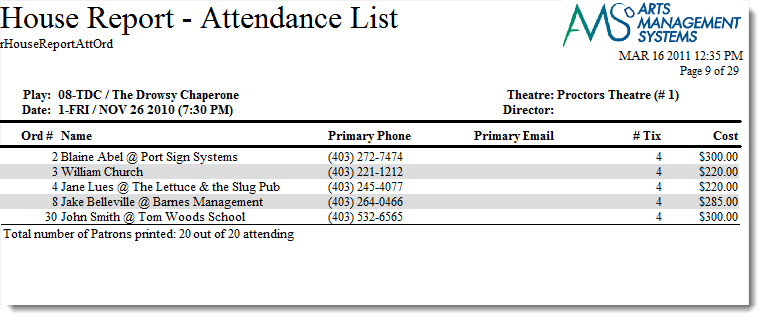
The House Report - Reservation List by Order (Without Notes) can be found under the Attendance for House and Calendar category. Below the image are detailed notes to help you in using the report.
Click here for information on generating a report. Click here for information on the Finished Report window.
Purposeof the Report
This report shows a summary of all orders for the performance along with ticket quantity, patron notes and order totals.
Departments Who Benefit From This Report
| Box Office | Use this report for a quick summary of all reservations for the performance and to check for order totals. |
Criteria Hints
It is recommended that this report be run using only one performance as the criteria.
| Parameter Field | Condition | Value |
| Event # | is one of | (Event Title) |
| Performance Date | = | (Date) |
| Performance Time | = | (Time) |
House Report - Revenues by Patron
House Report - Revenues by Patron
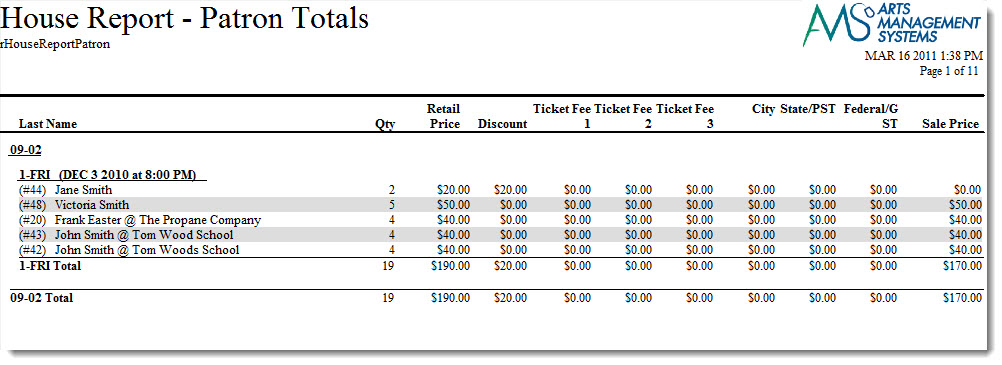
The House Report - Revenues by Patron can be found under the Attendance for House and Calendar category. Below the image are detailed notes to help you in using the report.
Click here for information on generating a report. Click here for information on the Finished Report window.
Purposeof the Report
This report shows a breakdown of the revenue for each order attached to a performance of an event.
Departments Who Benefit From This Report
| Box Office | Use this report for a detail of the revenue generated by each order. |
| General Manager | Use this report for a detail of the revenue generated by each order. |
Criteria Hints
It is recommended that this report be run using only one performance as the criteria.
| Parameter Field | Condition | Value |
| Event # | is one of | (Event Title) |
| Performance Date | = | (Date) |
| Performance Time | = | (Time) |
Play Detail
Play Detail
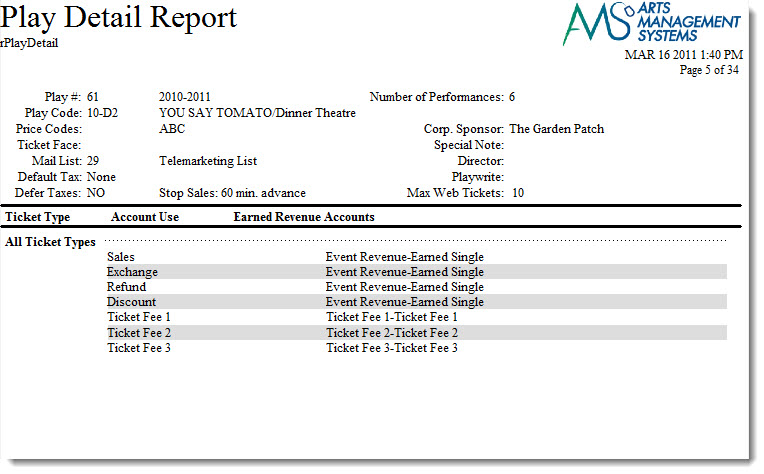
The Play Detail can be found under the Attendance for House and Calendar category. Below the image are detailed notes to help you in using the report.
Click here for information on generating a report. Click here for information on the Finished Report window.
Purpose of the Report
This report generates a detailed listing of an event including the G/L accounts assigned to the event.
Departments Who Benefit From This Report
| Box Office | Use this report to verify that all details have been set properly prior to the event going on sale. |
| Accounting | Use this report to verify that all G/L accounts have been properly assigned to the event. |
| General Manager | Use this report to verify that all details have been set properly prior to the event going on sale. |
Criteria Hints
It is recommended that this report be run using only one event as the criteria.
| Parameter Field | Condition | Value |
| Event # | is one of | (Event Title) |
Play List (With Notes)
Play List (With Notes)
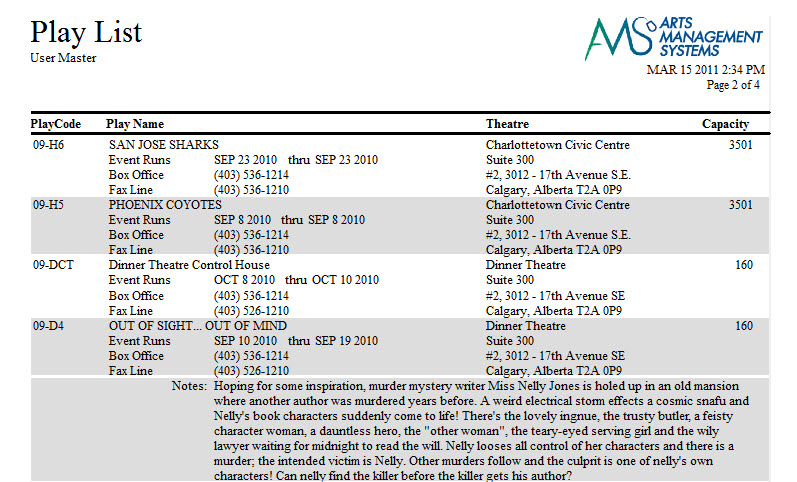
The Event List (With Notes) can be found under the Attendance for House and Calendar category. Below the image are detailed notes to help you in using the report.
Click here for information on generating a report. Click here for information on the Finished Report window.
Purpose of the Report
This report lists the events selected in a more detailed format than the Event List report. Additional contact information and event notes are included on the report.
Departments Who Benefit From This Report
| Every Department | Use this report as a quick guide to upcoming events and detailed information in regards to performance dates, venues, ticket purchasing, and event notes. |
Criteria Hints
It is recommended that this report be run using only one season as the criteria.
| Parameter Field | Condition | Value |
| Event # | is one of | (Event Title) or (Event Title) or (Event Title) |
Use the SHIFT key to select a series of events, or the OPTION key (Mac) or CTRL key (Windows) to select multiple individual events.
Play List
Play List
The Play List can be found under the Attendance for House and Calendar category. Below the image are detailed notes to help you in using the report.
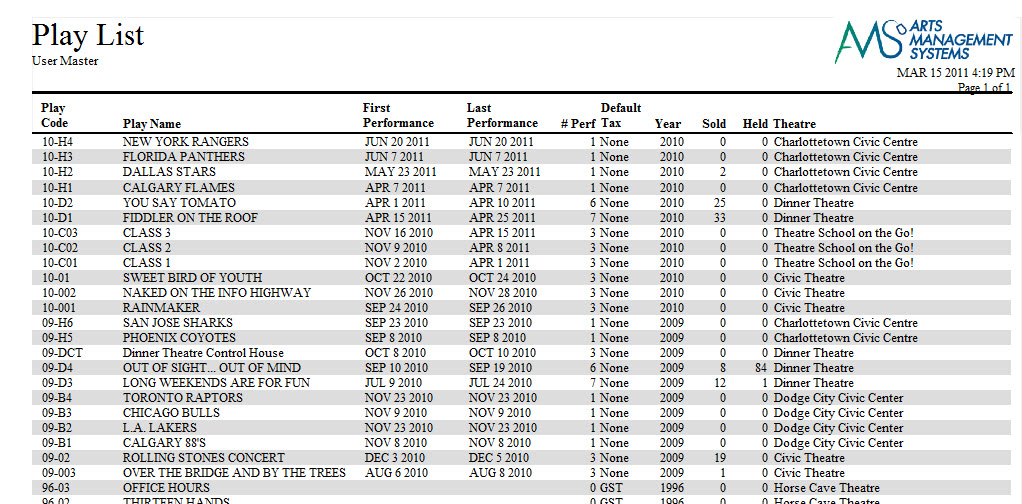
Click here for information on generating a report. Click here for information on the Finished Report window.
Purpose of the Report
This report creates a listing of events with a quick view of details for the event.
Departments Who Benefit From This Report
| Every Department | Use this report as a quick guide to upcoming events and basic information in regards to performance dates and venues. |
Criteria Hints
It is recommended that this report be run using only one season as the criteria.
| Parameter Field | Condition | Value |
| Event # | is one of | (Event Title) or (Event Title) or (Event Title) |
Use the SHIFT key to select a series of events, or the OPTION key (Mac) or CTRL key (Windows) to select multiple individual events.
Play Price Codes
Play Price Codes
The Event Price Codes can be found under the Attendance for House and Calendar category. Below the image are detailed notes to help you in using the report.
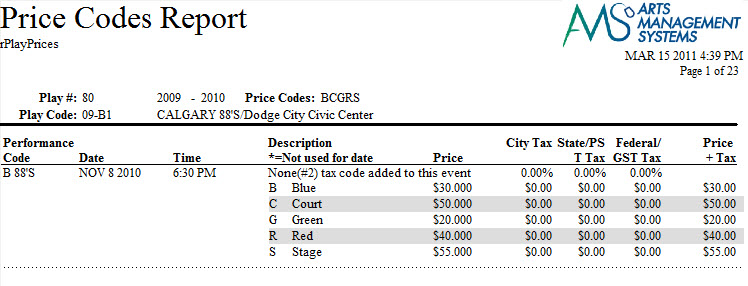
Click here for information on generating a report. Click here for information on the Finished Report window.
Purposeof the Report
This report lists a price code detail for each performance of an event.
Departments Who Benefit From This Report
| Box Office | Use this report to verify that the price codes for each performance of an event have properly been entered prior to going on sale. |
| Marketing | Use this report to view all price codes for each performance of an event. |
| General Manager | Use this report to verify that the price codes for each performance of an event have properly been entered prior to going on sale. |
Criteria Hints
It is recommended that this report be run using only one event as the criteria.
| Parameter Field | Condition | Value |
| Event # | is one of | (Event Title) |
Play and Series List
Play and Series List
The Play and Series List can be found under the Attendance for House and Calendar category. Below the image are detailed notes to help you in using the report.
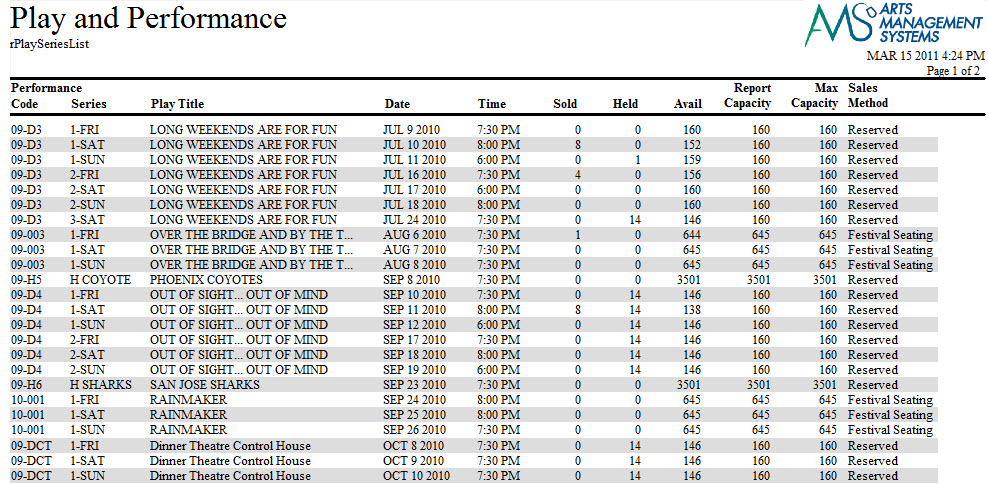
Click here for information on generating a report. Click here for information on the Finished Report window.
Purpose of the Report
This report provides a detail of all performances for an event and includes information in regards to sales method and venue.
Departments Who Benefit From This Report
| Box Office> | Use this report to verify that all performances are entered correctly for an event prior to going on sale.> |
| Marketing | Use this report to view a detail of all performance for an event. |
| General Manager | >Use this report to verify that all performances are entered correctly for an event prior to going on sale. |
| Every Department | >Use this report as a hardcopy of information on all performances of an event or for the season. |
Criteria Hints
It is recommended that this report be run using only one season or event as the criteria.
| Parameter Field | Condition | Value |
| Event #> | is one of> | (Event Title) or (Event Title) or (Event Title)> |
Use the SHIFT key to select a series of events, or the OPTION key (Mac) or CTRL key (Windows) to select multiple individual events.