Contractual Notes Tab
Contractual Notes Tab
Contractual Notes are used to maintain the order date, deposit date & amount, final payment date & amount, co-payer payment date & amount.
It is not applicable for most sales. It may be useful for educational or group sales where there is an initial deposit and a final payment due date. In addition, if a second patron is paying a portion of the ticket order (e.g. a granting agency for educational tickets), you can track who is to be co-invoiced.
For more information on entering contractual payments, click here
If a deposit date due (and amount) and final payment date due (and amount) are entered and the dates differ from the order date, they will be printed on the invoice. Exceptions to that are:
- The deposit due amount will not print if the patron has made payments that are in excess of the deposit amount. It make sense that the line should go away if the patron has at least paid at least the deposit
- The final payment amount will not print if the balance due is zero, meaning the order is fully paid.
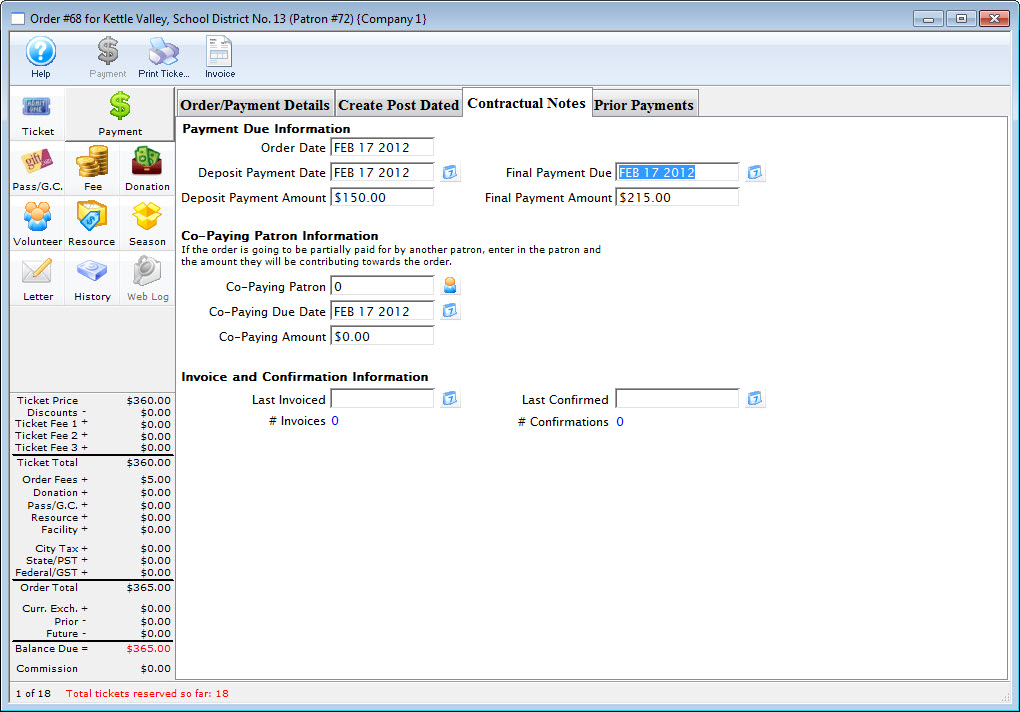
Payment Due Information |
|||
| Order Date | Date the order was placed | ||
| Deposit Payment Date | Date the deposit is due | ||
| Deposit Payment | Amount of the deposit | ||
| Final Payment Due date | Date the final payment is due
|
||
| Final Payment Amount | Amount of the final payment. This is directly based on the total, Deposit Payment and co-paying amount | ||
Co-Paying Patron Information |
|||
| Co-Paying Patron | The Patron who is sharing the cost of the order. Click the Patron  icon to open the contact list and select a patron. |
||
| Co-Paying Due Date | The date which the co-payment amount is due | ||
| Co-Paying Amount | The amount which the co-payer is paying | ||
Invoice and Confirmation Information |
|||
| Last Invoiced | The date of the last invoice. | ||
| Last Confirmed | The date of the last confirmation | ||
