Unprinting a Donation Receipt
Unprinting a Donation Receipt
If donation receipts have been printed by mistake or the wrong receipts have been printed, Theatre Manager will allow you to un-print those receipts. Theatre Manager will actually allow you to un-print any printed donation receipts, but it is recommended that receipts are only un-printed if necessary. If you need to reprint a donation receipt you must first un-print the receipt if it has already been printed then it can be printed again.
 |
You can also manually un-print and reprint donation receipts from the donation receipt tab on the donation window. |
|
An unprinted donation receipt generates a DU transaction with the old receipt number on it - which you can see in any transaction report or transaction window. |
- Click Setup >> Batch Functions.
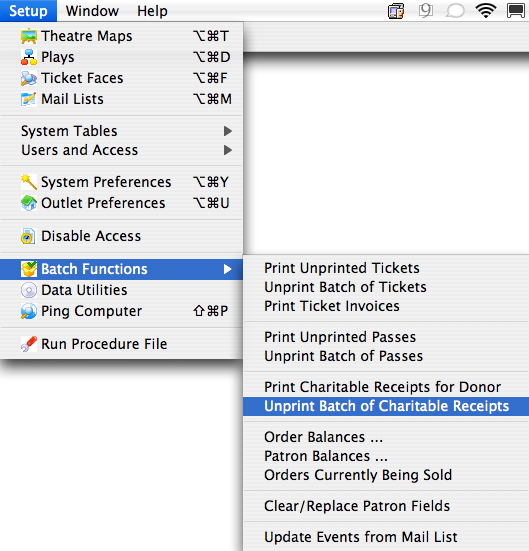
- Select Unprint Batch of Charitable Receipts.
The Donation List window opens.
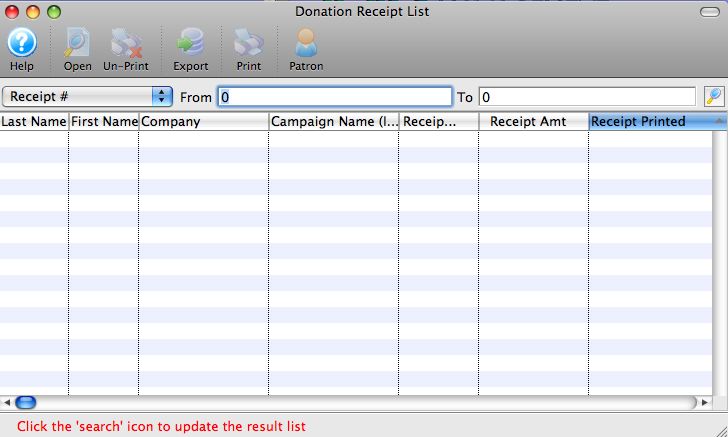
- Enter the Range of Donations Receipt # to
search for.
Use the drop down list to select the Donation Receipt #. For more detailed information about this window click here.
- Click the Search
 button.
For the purpose of this example receipt numbers between 1000 and 3000 have been searched for. A list of donation receipts matching the criteria will be displayed in the list window.
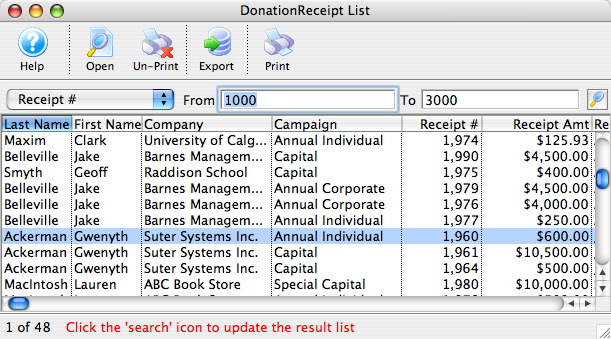
- Highlight the Receipts to Un-print
Click on a receipt to highlight it. To select multiple receipts hold the Ctrl or Appel key while clicking each receipt.
- Click the Un-Print
 button.
The following dialogue box will display.
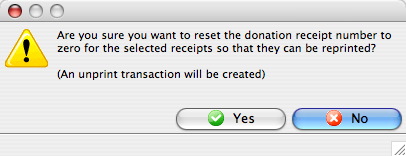
- Click the Yes
 button.
The Donation Receipts have now been un-printed. The Donation Receipt Number will reset to zero. The Receipt can now be reprinted if required using the steps in Printing a Donation Receipt.