Cart Tab
Cart Tab
The shopping cart tab on the patron window lists all of the internet shopping experiences for a patron. You can:
- look at the cart status to see if they checked out the cart or if there were some issues.
- open up and view details about the shopping cart.
- If the cart is active and the patron calls you for assistance, it is also possible to take over the shopping cart on their behalf and check them out.
You can also view all carts for all patrons.

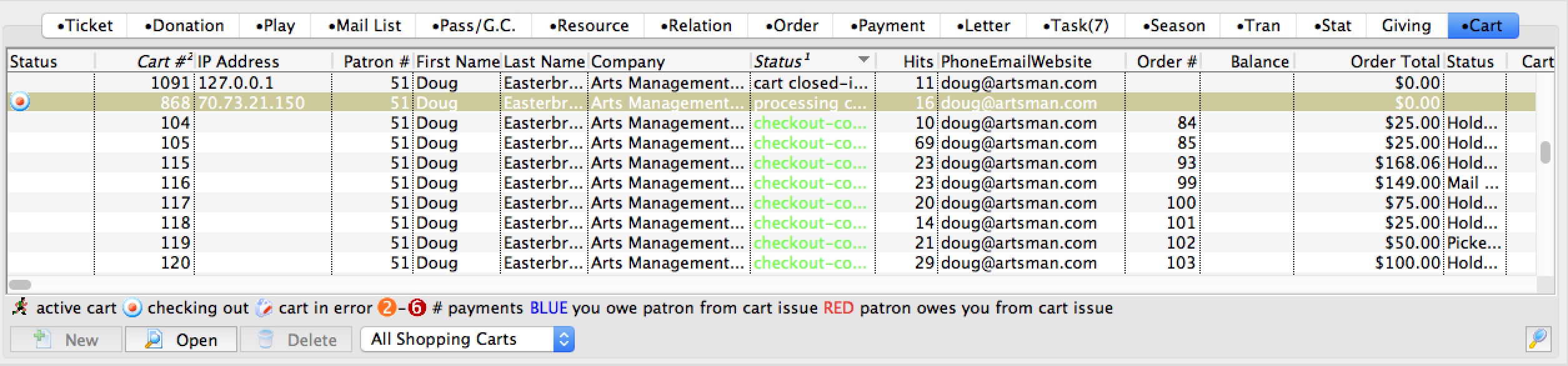
Parts of the Web Cart Tab
| Cart # | A unique number representing the patrons web shopping cart. |
| Patron # | The Patron identification number. |
| First Name | Patrons first name. |
| Last Name | Patrons last name. |
| Company | The name of the company the patron belongs to. |
| Status | The status of the shopping cart. Typically you might see:
|
| Hits | The number of web pages that the patron accessed for that shopping cart. It is possible to check out a couple of tickets in 8 page hits if the patron has an account. Average is probably about 20 as patron shop, especially for subscriptions. Any large number generally means that the patron was unsure. |
| Cart Value | Total value of the patrons cart. |
| Tix Qty | Number of tickets the in the cart. |
| Pass Qty | The number of passes in the cart. |
| Donation Qty | Number of donations in the cart. |
| Checkout Date | The date the patron paid for the iteams in the cart. |
 |
Not available - only web listener can create shopping carts. |
 |
Opens an existing shopping cart so that you can view the web logs, contents and possible 'check out' an active cart on behalf of a patron. |
 |
Deletes a shopping cart for the patron. |