Promotion Tab
Promotion Tab
The promotion tab assigns promotions to a performance. You can assign whatever promotion you want to any performance. A performance could have all available promotions or only specific promotions A performance must have at least one (1) promotion in order to sell tickets to the performance. In order to do this, there must be promotions created already. For detailed information about promotions Click Here.
 |
By default, ALL promotions are available to the performance when it is created. |
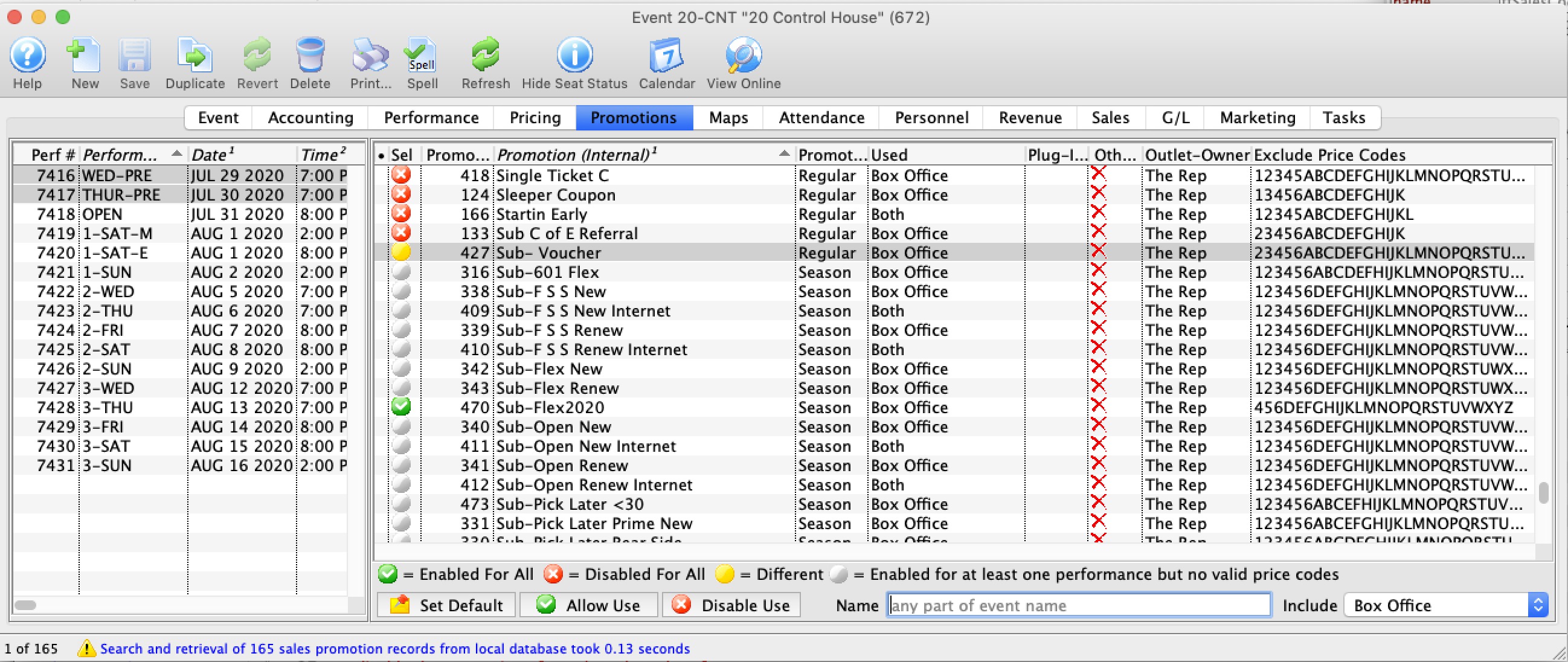
Parts of the Promotions Tab
| Performance # | Number of performance assigned in order of creation. |
| Performance Code | Code assigned based on the week and day of the performance. |
| Performance Date | The date of the performance. |
| Peformance Time | Time of the performance |
| Sel | Displays one of the four icons
|
| Seq# | System defined number for the Promotion |
| Promotion | Name of the Promotion |
| Promotion Type | Ticket Type for G/L Posting |
| Used | Where the Promotion can be used for a sale |
| Other Outlet | Indicates if the Promotion is available at another Outlet |
 |
Sets the Promotion as the default for the selected Performance |
 |
Allows the promotion for use with the selected performance. Click here for information on enabling promotions for a performance. |
 |
Disables the promotion for the selected performance. Click here for information on enabling promotions for a performance. |
| Name | Enter part of the sales promotion name to search for only those that match the filters below. |
|
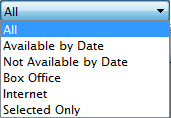
Gives you alternate selections to filter the list displayed. Choices are:
|
