
Main menu
You are here
Display Fields Tab

The Season Ticket Renewal Display Fields tab is used to determine the information that should be printed on the renewal notice.
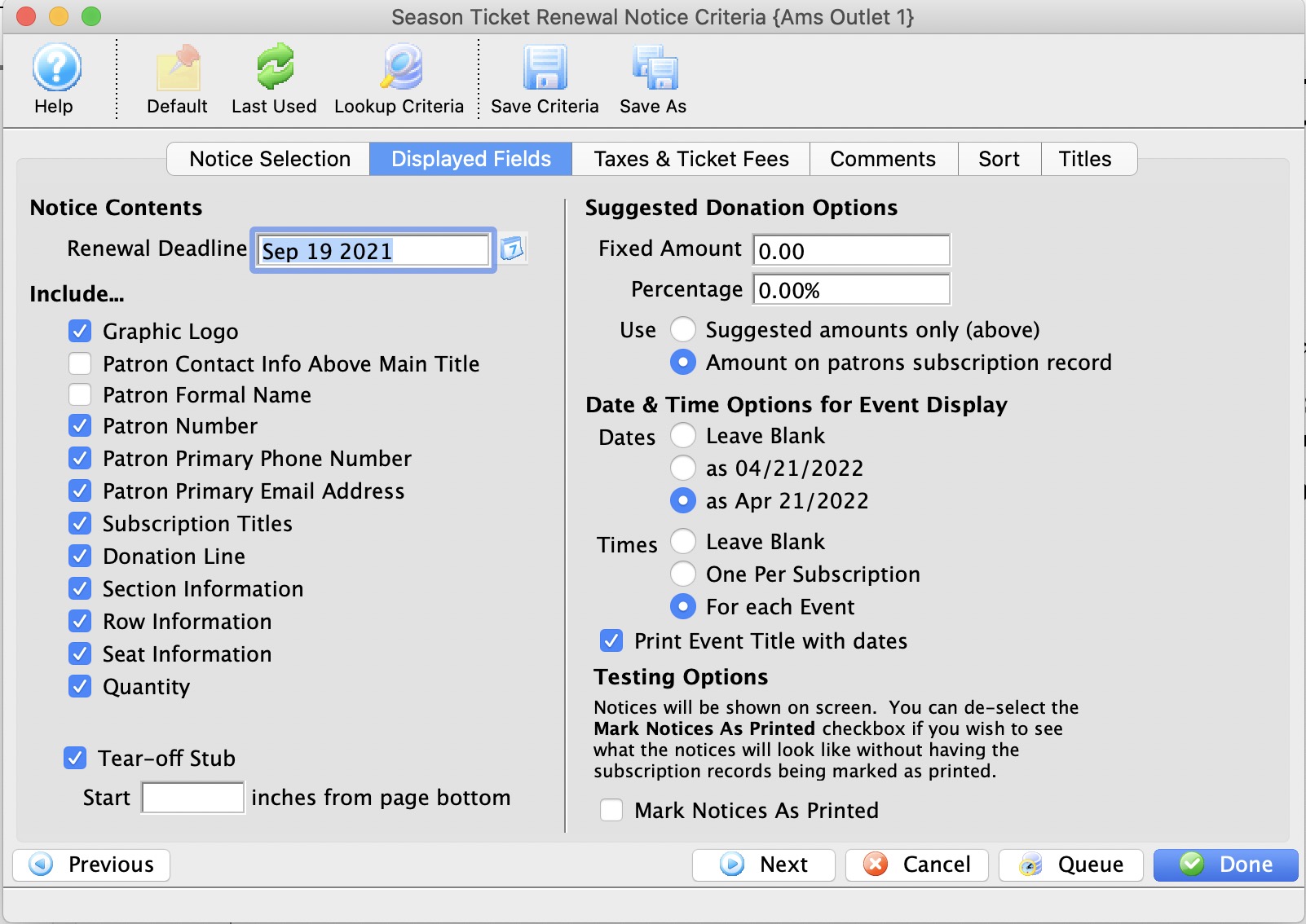
Parts of the Season Ticket Renewal Display Fields Tab
Notice Contents |
|
| Renewal Deadline | The date until which the patron's seats will be held for renewal. After this date, the seats will be made available to other patrons. |
 |
This button will open the mini-calendar for easier entry of dates. |
| Patron Contact Info Above Main Title | When checked, the patron's contact information will be moved above the title on the renewal notice. |
| Patron Number | When checked, the patron number of the patron will be included on the renewal notice. |
| Patron Primary Phone Number | When checked, the patron's primary phone number will be included on the renewal notice. |
| Patron Primary Email Address | When checked, the patron's primary email address will be included on the renewal notice. |
| Subscription Titles | When checked, the subscription titles will be included on the renewal notice. |
| Donation Line | When checked, the donation line will be included on the renewal notice. |
| Tear-Off Stub | When checked, a tear-off stub will be included on the renewal notice. |
| Section Information | When checked, the section information for the seats the patron holds will be included on the renewal notice. |
| Row Information | When checked, the row information for the seats the patron holds will be included on the renewal notice. |
| Seat Information | When checked, the seat information for the seats the patron holds will be included on the renewal notice. |
| Quantity | When checked, the quantity of seats will be included on the renewal notice. |
| Do not include taxes on the notice | When selected, taxes will not be included on the renewal notice. |
| Include taxes in ticket prices | When selected, the taxes will be included in the ticket prices on the renewal notice. |
| Include taxes on separate line item | When selected, the taxes will be listed as a separate item on the renewal notice. |
Suggested Donation Options |
|
| Fixed Amount | Allows for a fixed amount suggested donation to be included with the renewal notice. |
| Percentage | Allows for a percentage based suggested donation to be included with the renewal notice. |
Date & Time Options |
|
| Leave Blank | When selected there will be no date information printed on the renewal notice. |
| As Numerical (MM/DD/YYYY) | When selected, the date on the renewal notice will be listed in numerical format. |
| As Written (Month/DD/YYYY) | When selected, the date on the renewal notice will be listed in written format. |
| Leave Blank | When selected there will be no time information printed on the renewal notice. |
| One per subscription | When selected, the time will be listed once on the renewal notice. |
| For each event | When selected, the time for each performance will be listed on the renewal notice. |
| Print Event Title with Dates | If clicked, the event title will be printed along with the dates/times on the lower part of the renewal notices |
Testing Options |
|
| Mark Notices As Printed | When checked, the notices will be marked as printed once viewed on the screen. |
 |
Moves to the previous tab of the process. |
 |
Moves to the next tab of the process. |
 |
Cancels the renewal notices process. |
 |
Leave the criteria entry process and begins assembling the renewal notices. |