Arts Management Systems

Main menu

  • AMS Cloud Status
  • Product Info
  • Community
  • Contact Us
  • Mailing List / RSS Feed
  • Privacy Policy
  • Installing Theatre Manager
  • Upgrading Theatre Manager
  • Quick Reference Guides
  • Self-Guided Demo Tutorial
  • Theatre Manager Online Help
  • Form Letters and EBlasts
  • Facility Management
  • Reports
    • Generating a Report
    • Parts of the Reports Window
    • The Add/Edit Parameter Window
    • Customizing a Report
    • Using Custom Categories in Reports
      • The Custom Category List Window
      • The Report Category Detail Window
    • The Finished Report Window
    • Reports - PDF Generator
    • Viewing Queued Reports
    • Steps for Printing an Invoice
    • List of Available Reports
  • Reveal Dashboards
  • REST API Overview
  • Web Page Documentation
  • Frequently Asked Questions
  • Theatre Manager: Responding to COVID 19
  • Newsletters
  • AMS Cloud Status
  • Product Info
  • Community
  • Contact Us
  • Mailing List / RSS Feed
  • Privacy Policy

You are here

Home › Reports › Using Custom Categories in Reports

The Report Category Detail Window

Subscribe to Syndicate

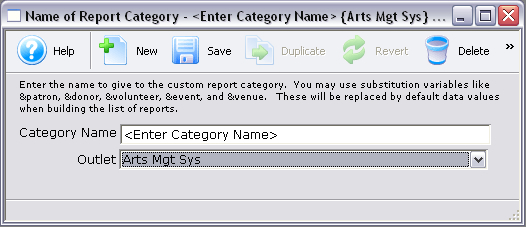
Parts of the Report Category Detail Window

Opens the Report Category Detail Window to create a new custom category.
Saves the custom category.
Duplicates the selected custom category.
Reverts to the last save.
Deletes the selected custom category.
Category Name The name of the custom category.
Outlet Owner The outlet that the custom category belongs to.

Book navigation

‹ The Custom Category List Window up The Finished Report Window ›
  • Printer-friendly version