Mandatory Data Tab
Mandatory Data Tab
This tab allows setting which fields are required on the creation of a new patron.
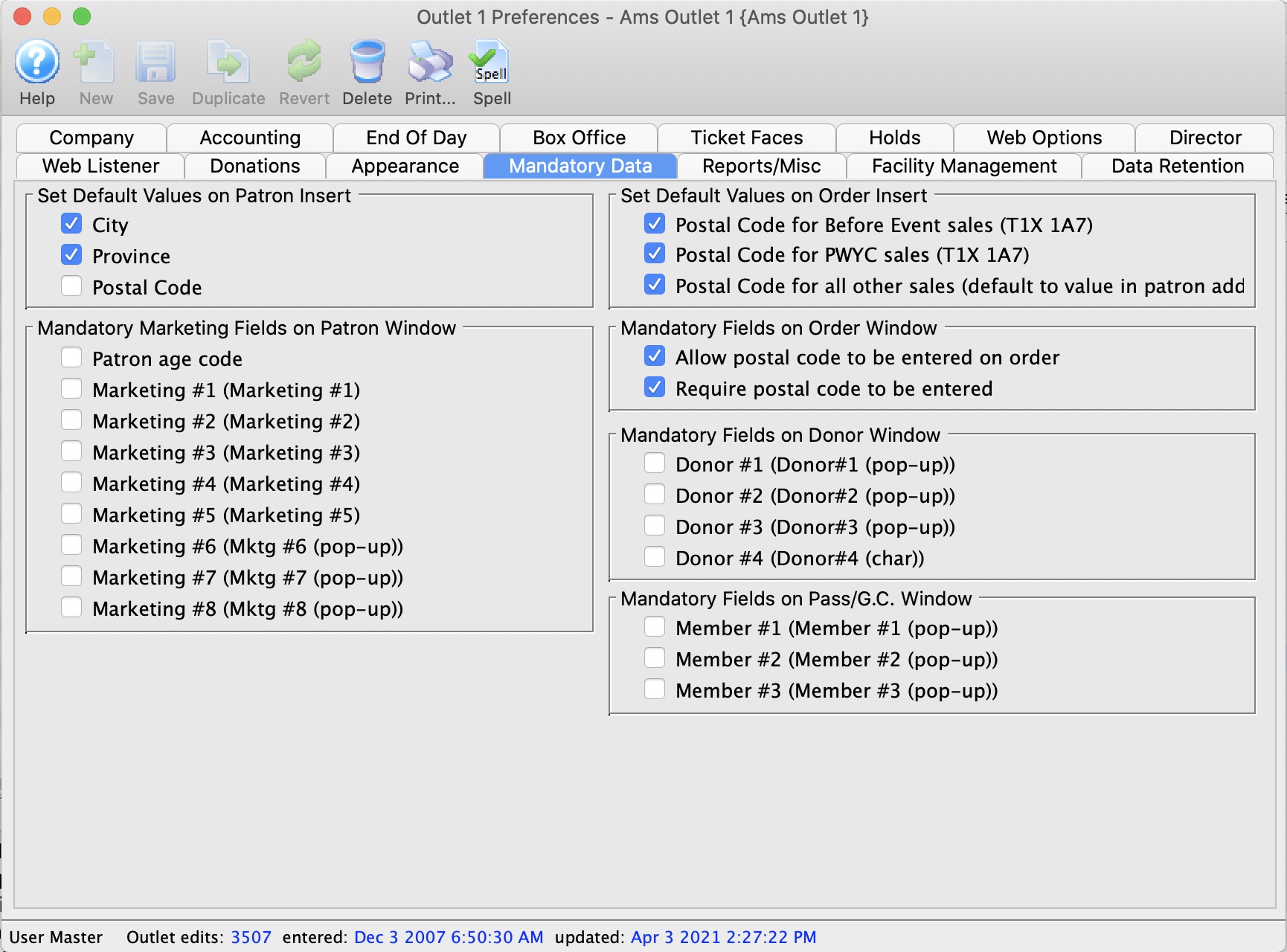
Default Data on Patron Insert |
|
| City | Enabling this box ensures a default City is entered into the City field when a new patron is inserted. The default City comes from the city field under the Company Tab. |
| Province | Enabling this box ensures a default Province/State is entered into the Province/State field when a new patron is inserted. The Province/State comes from the Province/State field under the Company Tab. |
| Postal Code | Enabling this box ensures a default Postal/Zip Code is entered into the Postal/Zip Code field when a new patron is inserted. The Postal/Zip Code comes from the Postal/Zip Code field under the Company Tab. |
Mandatory Marketing Data Fields on Patron Window |
|
| Patron age code | Patron Age Marketing field. |
| Marketing #1 | Customizable marketing field defined by the user. |
| Marketing #2 | Customizable marketing field defined by the user. |
| Marketing #3 | Customizable marketing field defined by the user. |
| Marketing #4 | Customizable marketing field defined by the user. |
| Marketing #5 | Customizable marketing field defined by the user. |
| Marketing #6 | Customizable marketing field defined by the user. |
| Marketing #7 | Customizable marketing field defined by the user. |
| Marketing #8 | Customizable marketing field defined by the user. |
Default Values for Postal Code on Order Insert |
|
| Postal Code for Before Event sales ("xx") | When checked, sales entered during Before Event Sales will all pull the postal code value from the Company Tab into the Postal Code field on the Order Window. |
| Postal Code for PWYC ("xx") | When checked, sales entered during Pay What You Can (PWYC) mode will all pull the postal code value from the Company Tab into the Postal Code field on the Order Window. |
| Postal Code for all other sales (default to value on patron address) | When checked, all sales will pull the value from the postal code in the patron's primary address into the postal code field on the Order window. |
Mandatory Fields On Order Window |
|
| Allow postal code to be entered on order | When selected, a field for the postal code will appear on the Order Window and may be filled in (but is not required). |
| Require postal code to be entered. | When selected, a field for the postal code will appear on the Order Window and must be filled in.
It can be defaulted in the Set Default Values for Order Insert section.
The key reason to use this field is to capture generalize location data if your venue draws from a wide area during walk up sales. |
Mandatory Fields On Donor Window |
|
| Donor #1 (Donor#1 (pop-up)) | Customizable pop-up donor field defined by the user. |
| Donor #2 (Donor#2 (pop-up)) | Customizable pop-up donor field defined by the user. |
| Donor #3 (Donor#3 (pop-up)) | Customizable pop-up donor field defined by the user. |
| Donor #4 (Donor#4 (Char)) | Customizable character donor field defined by the user. |
Mandatory Fields On Pass/GC Window |
|
| Member #1 (Member#1 (pop-up)) | Customizable pop-up membership classification field defined by the user that appears on the pass/gc data entry screen. |
| Member #2 (Member#2 (pop-up)) | Customizable pop-up membership classification field defined by the userthat appears on the pass/gc data entry screen. |
| Member #3 (Member#3 (pop-up)) | Customizable pop-up membership classification field defined by the user that appears on the pass/gc data entry screen. |