All Events in the Database
All Events in the Database
These include:
- ICS format - which can be imported into a web object that understands importing ICS files
https://tickets.yourvenue.org/TheatreManager/1/calendars/upcoming_events.ics
- full interactive web page - which might suitable for embedding in another web site or on your commerce web site
https://tickets.yourvenue.org/TheatreManager/1/calendars/upcoming_events?view=month&start=2018-07-01
The parameters are optional:
- view= can be one of: month (the default), week or list
- start=, if provided, should be in yyyy-mm-dd format. the default is this month.
- You can use a pseudo XML export format using the Export Events URL
- You can also use an event list export using the REST api. This is the only query that requires an API login since sales information could also be accessed
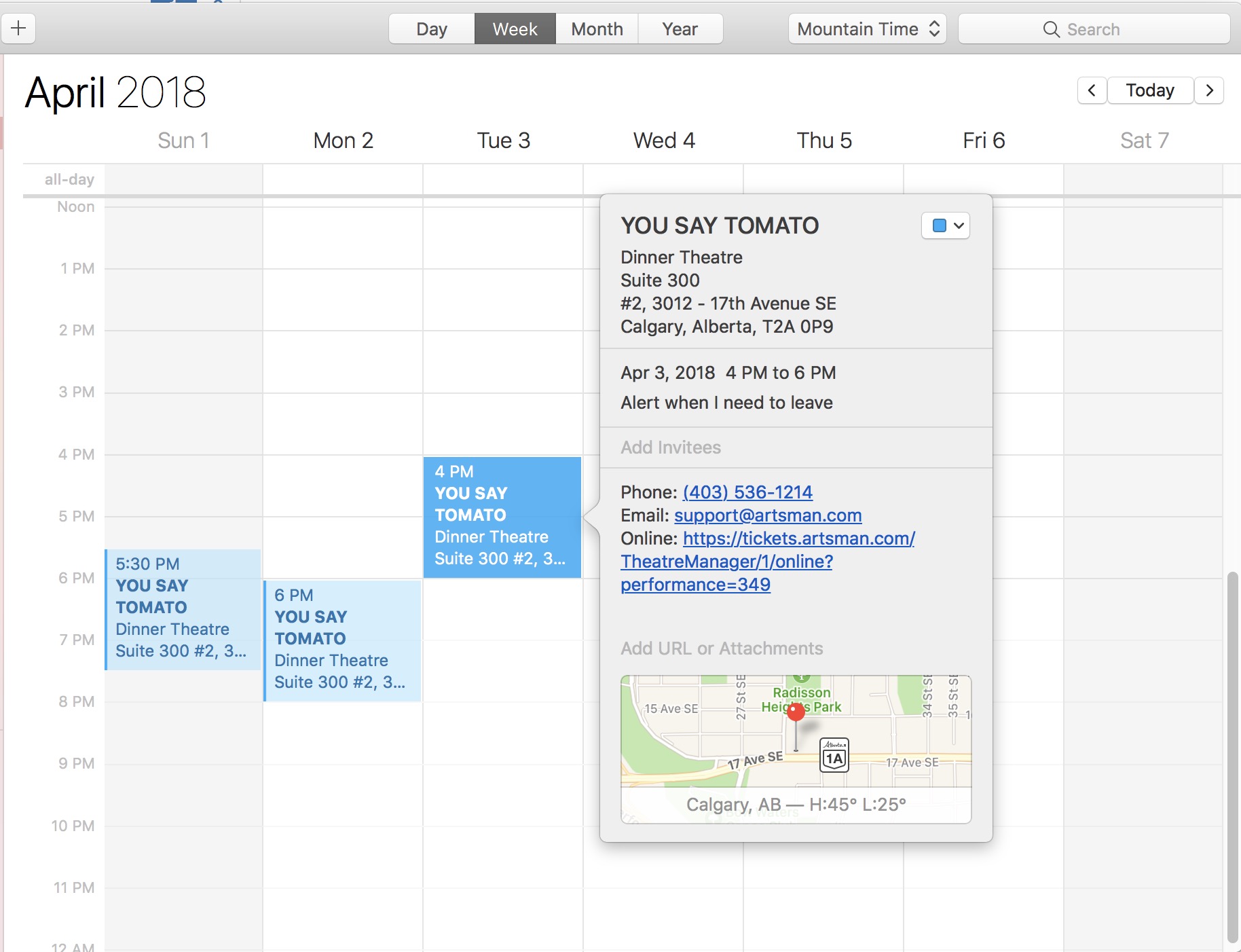
The sample calendar was pulled from our test database as an ICS file. It was opened in iCal to show the content:
- The date of the event
- The time that the event starts
- The duration of the event, based on the duration set in event setup->Marketing tab
- and in the detail, the person who downloaded the calendar can see the location, contact information, and a link to buy a ticket
Exporting Event Information for a marketing web site
Exporting Event Information for a marketing web site
 |
Please refer to the REST API introduced in Dec 2016. The REST API replaces this feature while providing more control over who can access data.
However, while exportevents still works on TM 10.07.xx, its use may be deprecated in the future depending on use. |
Exporting event lists
This feature (we suggest using the REST API going forward) can be used to export event details using an https request exportevents if you are using Theatre Manager's online sales. Online sales are a central location of data displaying details for upcoming events.
|
This data can be used to feed web pages specific information, such as titles, dates, times and ticket availability (e.g. good, limited, sold out, etc.) of events. The data is presented in an XML style layout and can be customized so the tags are compatible with how you want them exported.
You can use the extracted information to publish data from TM into a custom calendar object and automate creation of buy now links. |
The address used to view the export is:
https://tickets.yourvenue.org/TheatreManager/1/exportevents (** deprecated)
NOTE: Refer to the REST API equivalent showing event id, name and sales notes.
where:- tickets.yourvenue.org is the name of your ticketing web site
is required - 1 is the outlet number at the site you normally use
- exportevents is the function you want the TM server to do
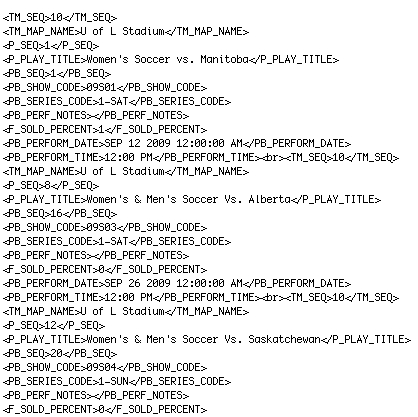
You can preview this information in a browser prior to programming a custom interface. To review the data, right click on the displayed list and select View Source. This will display the beginning and ending XML tags for each field and a <br> tag after each set of record rows. A sample of the data is below:
Formatting an Export
You can reformat data to appear in a different order. Fields can be removed or additional event and performance related fields added. Calculations can be set based on existing data to provide required information for customized fields. Some of the field references are:
TM_SEQ - Map Number
TM_MAP_NAME - Map Name
P_SEQ - Event Number
P_PLAY_TITLE - Event Title
PB_SEQ - Performance Number
PB_SHOW_CODE - Event Code
PB_SERIES_CODE - Performance Code
PB_PERF_NOTE - Performance Notes
F_SOLD_PERCENT - Percent of Seats Sold for this Performance
PB_PERFORMANCE_DATE - Performance Date
PB_PERFORMANCE_TIME - Performance Time
To alter the information exported, you need to edit rowTicketEventExportCustom.html
You can have have several variations of this page to be used for different exports. When a desired format is required, the page names can be altered so the required export is using the name rowTicketEventExportCustom.html.
The rowTicketEventExportCustom.html page is referenced by the TMticketsExportCustom.html page.
Customizing an Export
The export address can be altered to include or exclude certain information.
For example:
This export address will export only information for Event number 246 if it takes place in venue 18, is in the year 2012 and is available for sale online.
Additional options that can be added to the address are listed below:
&year=YYYY - displays the performances for the specific year where YYYY is the desired year
&event=X - displays the performances for the specific event where X is the event sequence number from Theatre Manager
&venue=Z - displays the performances for the indicated venue only, where Z is the venue sequence number from Theatre Manager
&abletosell=1 - displays ONLY the events available for sale online (this is the default if not supplied)
&abletosell=0 - displays events that are available for sale and/or those events that are not yet available for sale online