Hosted Paypage Basic Configuration
Hosted Paypage Basic Configuration
You will need to log into your Moneris Resource Center online account at https://www3.moneris.com/mpg/index.php
Once you are logged into the online account setup, select Admin->Hosted PayPage config option.
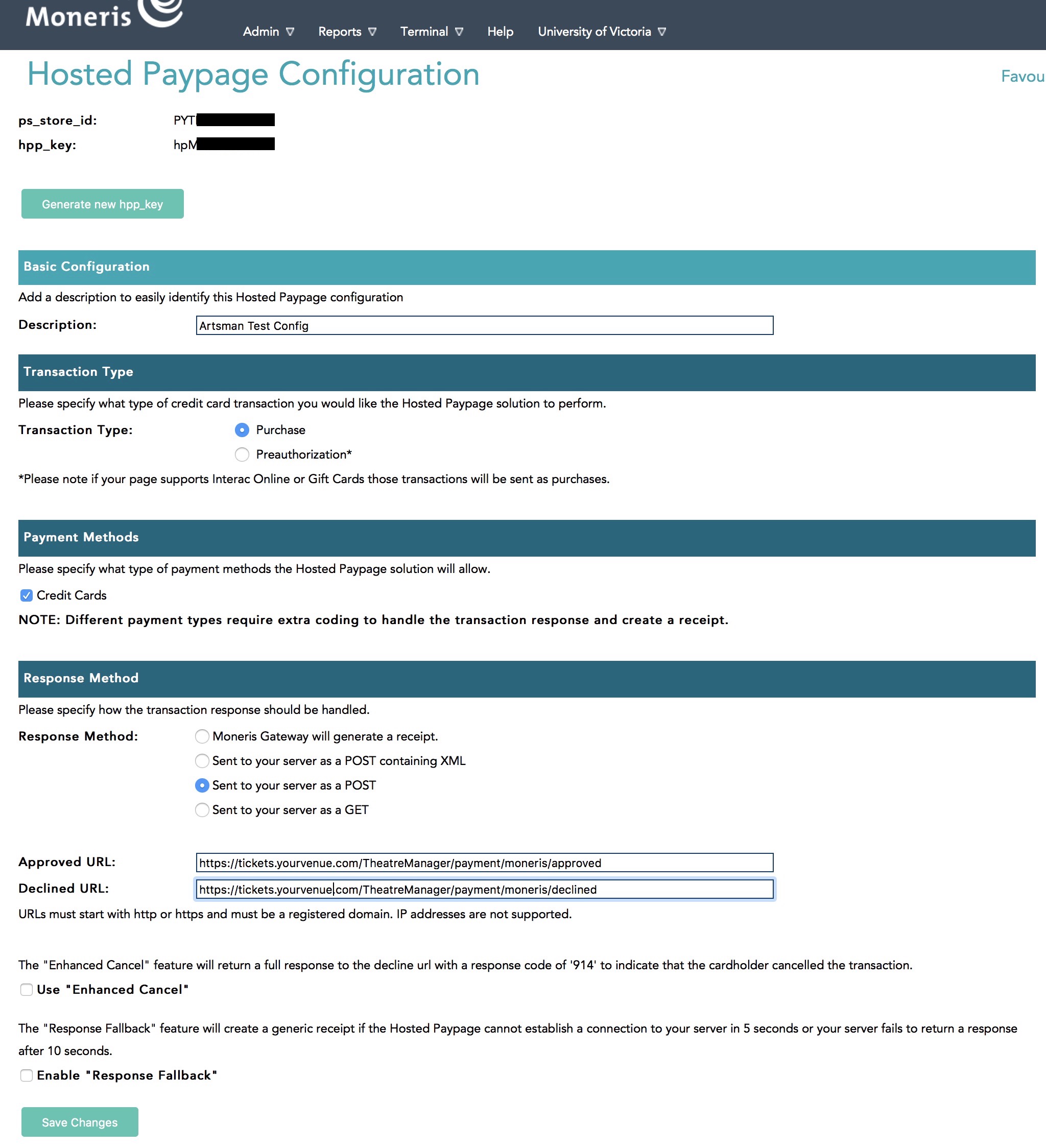
Once you see your ps_store_id, click the 'Edit Button and you will see a screen similar to below.
Data Setup
Enter data into the window above per the instructions:
- Description - enter a description of the hosted payment page - it could be your venue's name or bank.
- Transaction Type - must be set to Purchase
- Payment Methods - must be Credit Cards
- Response Method - must be Sent to your server as a POST
- Approved URL - must be https://tickets.yourvenue.org/TheatreManager/payment/moneris/approved
- Declined URL - must be https://tickets.yourvenue.org/TheatreManager/payment/moneris/declined
- Use "Enhanced Cancel" - should NOT be checked
- Enable "Response Fallback" - should NOT be checked.
If you change anything on this page, be sure to click Save Changes under this section.