REST API Adding Alias Names to Column
REST API Adding Alias Names to Column
If you wish, you can rename the columns from the Theatre Manager standard names by adding an alias. This is done by adding a : and your alias name after specifying the column in the URL. You can use this feature if you want a different name when transporting the data to another service.
patron.id:patno renames patron.id to patno on output
Examples:
-
https://127.0.0.1/api/v1/contact_links?only=patron.id:patno+patron.first_name:fname+patron.last_name:lname+patron.date_updated:updated+contact.contents:email
renames:
- patron.id to patno
- patron.first_name to fname
- patron.last_name to lname
- patron.date_updated to updated
- contact.contents to email
-
https://127.0.0.1/api/v1/contact_links?only=patron.id:patno+patron.first_name:fname+patron.last_name:lname+patron.date_updated:updated+contact.contents:email+contact.type_id:type&q=contact.type_id:2
adds
- an alias for the contact.type_id to be type and
- searches for only email addresses using q=contact.type_id:2, where type_id = 2 means emails
-
https://127.0.0.1/api/v1/contact_links?only=patron.id:patno+patron.first_name:fname+patron.last_name:lname+patron.date_updated:updated+contact.contents:email+contact.type_id:type&q=contact.type_id:2+patron.date_updated:>='2016-01-01'
adds a compound query:
- q=contact.type_id:2+patron.date_updated:>='2016-01-01'
- looking for email addresses for patrons that were updated after jan 1, 2016
-
https://127.0.0.1/api/v1/contact_links?only=patron.id:patno+patron.first_name:fname+patron.last_name:lname+patron.date_updated:updated+contact.contents:email+contact.type_id:type&q=contact.type_id:2+contact.date_updated:>='2016-01-01'
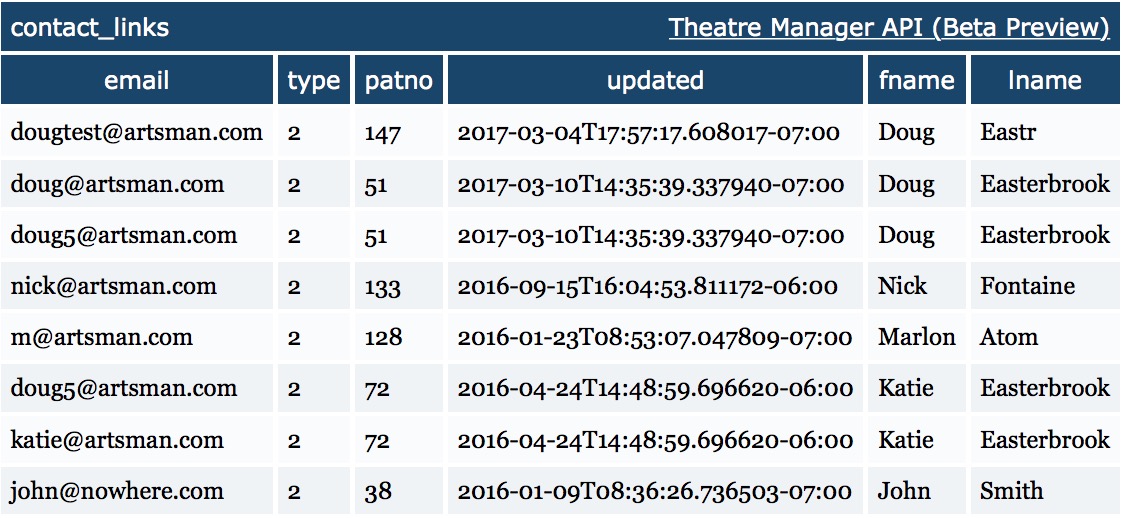
subtly changes the previous example by:
- using a compound query q=contact.type_id:2+contact.date_updated:>='2016-01-01'
- looking for email addresses where it was the email address that was updated after jan 1, 2016 since it is looking for when the contact.date_updated changed.