Finding the Elavon Balance
Finding the Elavon Balance
If you are using Elavon for credit card authorization, you will need to access your merchant account via the web to obtain transaction totals and transaction counts while doing the end of data process.
 |
Theatre Manager assumes you have turned off auto-settle in the admin settings and that Theatre Manager will do the settlement. Do not settle the batch using the Elavon interface. |
To find the batch total, you will need to:
- log into the Elavon VirtualMerchant for your merchant account with your user id and password.
- Click on the Current Batches link at the left of the web page
- Click on the Main link (you may see info here, but if there are returns, they do not appear until you click 'Credit Card')
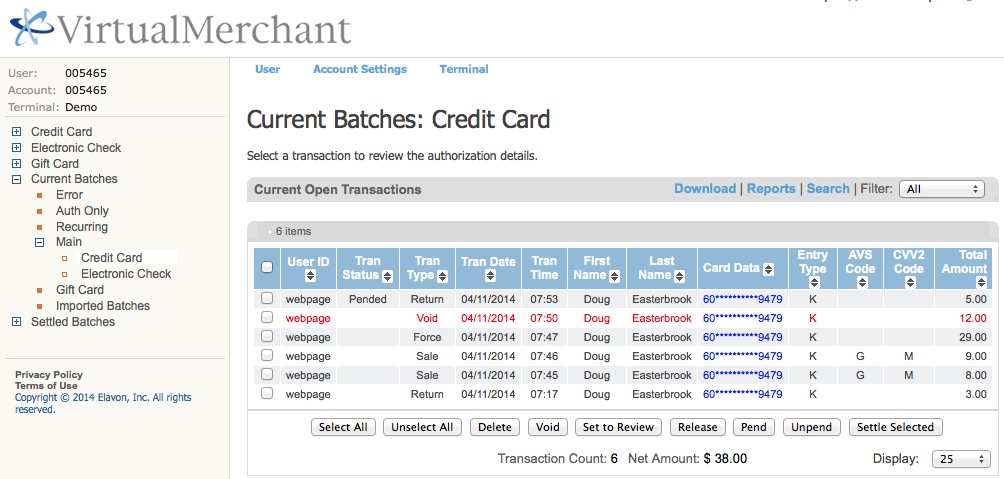
- Click on the Credit Card link and you will see a page like below showing the 'Current Batches: Credit Card' page
|
Elavon may have some items in the list above marked as pending or set to review in the 'Tran Status' column, especially for returns.
You should:
|
- Look at the bottom of the screen. You may (or may not) wish to alter the number of lines to display at the bottom right.
At the bottom centre, look for the following information:
- Transaction count - in the example it says 6. However, there is one VOID in the list that Theatre Manager will no longer know about. Subtract the voids from the total and enter that as the transactions count.
Example 6 (total) - 1 (voids) = 5 (net transactions)
- Net Amount - in the example, it is $38.00
- Transaction count - in the example it says 6. However, there is one VOID in the list that Theatre Manager will no longer know about. Subtract the voids from the total and enter that as the transactions count.
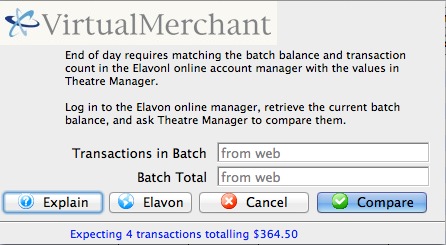
- When you have both those values, place them into the dialog window of the Theatre Manager Deposit process in the window show below and click Matches.
These values may be zero if there are no credit cards waiting to be settled.
If you do not know the balances or have already forced settled a batch, click No Match (this is not the normal practice).