Counting Tickets Printed on Printers/from Inventory
Counting Tickets Printed on Printers/from Inventory
|
If you are looking at reminders to manage inventory, TM will track each ticket printed and tell you when you reach a threshold based on settings in Company preferences -> Ticket Faces. You will need to update the inventory count when you get a new batch of tickets. |

Run the reports that best fit your organization based on the types of tickets your organization prints.
How many tickets has a specific printer printed
If you are looking for how many tickets have come out of a specific printer, you can ask the ticket printer for its Print count to do this:
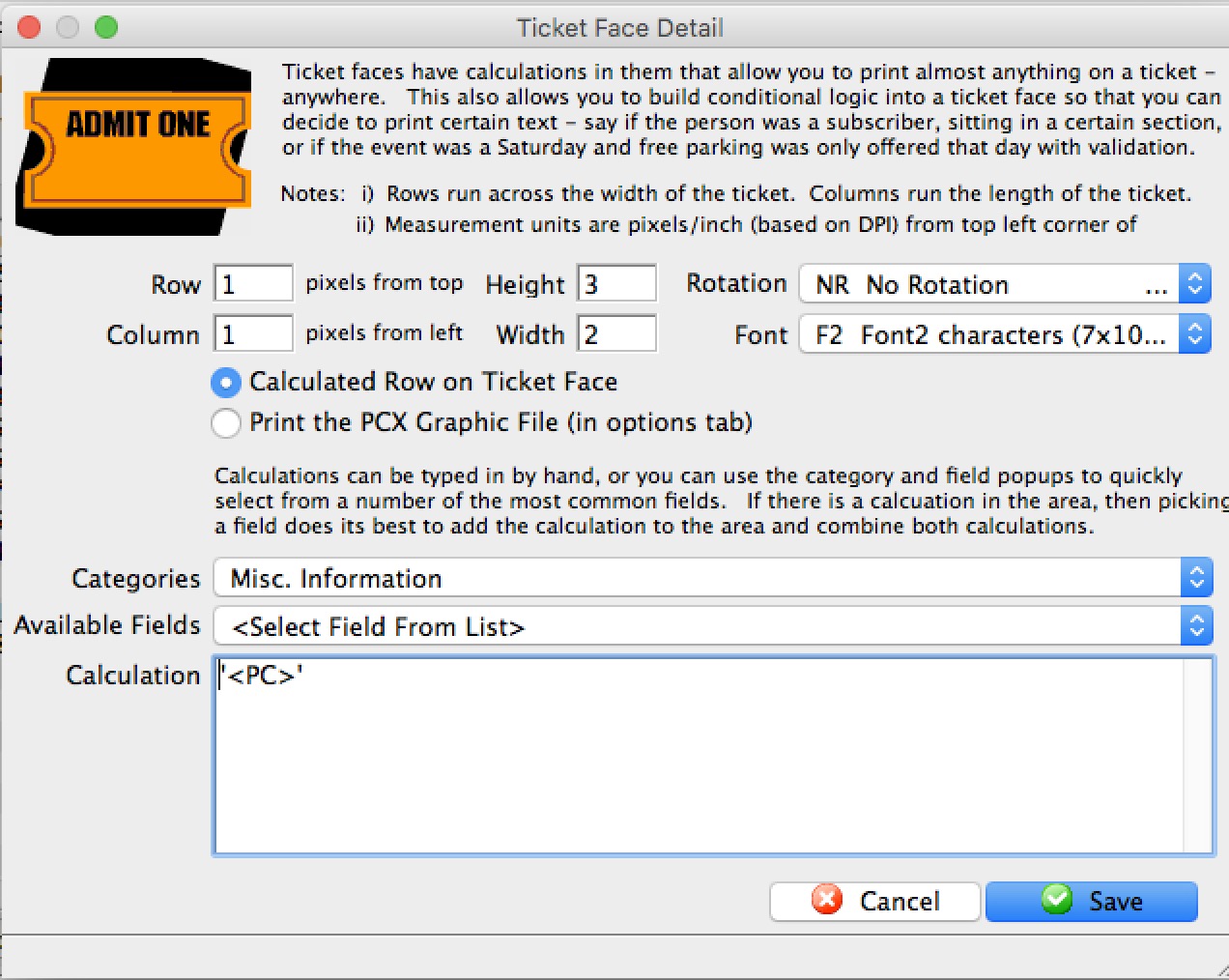
- Make a dummy ticket face
- Add the following code to it (the field is under the misc category and is called the internal ticket number) -and-
- Run a test ticket
The number on the ticket that is printed will have the total number of tickets that the printer has ever printed, including test tickets, real tickets, diagnostic tickets, etc.
How Many EVENT Tickets Have Been “PRINTED” Over A Specific Time
| Report | Ticket Printing, Invoicing and Inventory Analysis >> Revenues by Promotion (doesn’t matter which one you choose) |
| Criteria | Ticket Data For Patron >> Ticket Date Bought >> is between (define your specific time period) AND Ticket Data For Patron >> Ticket Date-Printed is NOT EMPTY |
Using this criteria, from the report criteria window, click  – this will give you a record count, which is the number of TICKETS printed. Record this number and continue with additional reports based on the types of tickets your organization prints.
How Many EVENT Tickets Have Been “UNPRINTED” Over A Specific Time
| Report | Transaction History Reports >> Transaction History List |
| Criteria | Patron Transactions >> Tran Code is one of TU (Ticket Unprint) AND Patron Transactions >> Trans Date is between – (Critical to match this date with the Ticket Date Bought) |
Using this criteria, from the report criteria window, click – this will give you a record count, which is the number of TICKETS UNPRINTED. Record this number and continue with additional reports based on the types of tickets your organization prints.
How Many PAYMENT RECEIPT Tickets Have Been Printed Over A Specific Time
| Report | Order and Payments >> Payment Summary |
| Criteria | Payment Data >> Payment Date – Received is between (define your specific time period) AND Payment Data >> Payment Date – Receipt Printed is NOT EMPTY |
Using this criteria, from the report criteria window, click – this will give you a record count, which is the number of PAYMENT RECEIPT tickets. If your organization prints multiple credit card receipts for a payment, this will not be included in this record count. Record this number and continue with additional reports based on the types of tickets your organization prints.
How Many MEMBERSHIPS, PASSES, GIFT CERTIFICATES Tickets Have Been Printed Over A Specific Time
| Report | Report Category: Membership Reports >> Membership Summary |
| Criteria: | Membership Data >> Membership Date First Entered is between (define your specific time period) AND Membership Data >> Membership Date Card Printed is NOT EMPTY |
Using this criteria, from the report criteria window, click – this will give you a record count, which is the number of MEMBERSHIP, PASS, GIFT CERTIFICATE tickets. Record this number and continue with additional reports based on the types of tickets your organization prints.
How Many ADDRESS Tickets Have Been Printed Over A Specific Time
This data is tricky to use a report to get results. Instead of a report, we use an assumption that if you print a credit card receipt, then you probably printed an address label too. With that assumption, record the number of Payment Receipts for the number of ADDRESS tickets printed and continue with additional reports based on the types of tickets your organization prints.
If you print WILL CALL tickets in batch mode for each performance and print an address header ticket for each patron, then that will increase the overall number of tickets. This number of address header tickets will need to be estimated based on the average number of will call used for each performance, and the number of performances that occurred during the time period you are tracking the number of tickets printed.
How Many SECOND PROMOTION Tickets Have Been Printed Over A Specific Time
| Report | Ticket Printing, Invoicing and Inventory Analysis >> Revenues by Promotion |
| Criteria: | Ticket Data For Patron >> Ticket Date bought >> is between (define your specific time period) AND Ticket Data For Patron >> Ticket Date-Printed is NOT EMPTY AND Promotion Discount >> Promotion # is one of (select ALL the promotions that are set to print a second ticket if this sales promotion is selected.) |
Using this criteria, from the report criteria window, click – this will give you a record count, which is the number of SECOND PROMOTION TICKETS printed. Record this number and continue with additional reports based on the types of tickets your organization prints.
The Fudge Factor Tickets
Add in 5% +/- tickets that cannot be accounted for in the above reports. Things such as: - Test tickets, when using/developing a new ticket face
- Multiple credit card receipts
- Waste during the loading of new ticket stock
- Crumpled tickets due to improper stacking/storage over time