Enable a Promotion
Enable a Promotion
To Enable a batch of promotions, you perform the following steps:
- Select the promotion you want to enable.
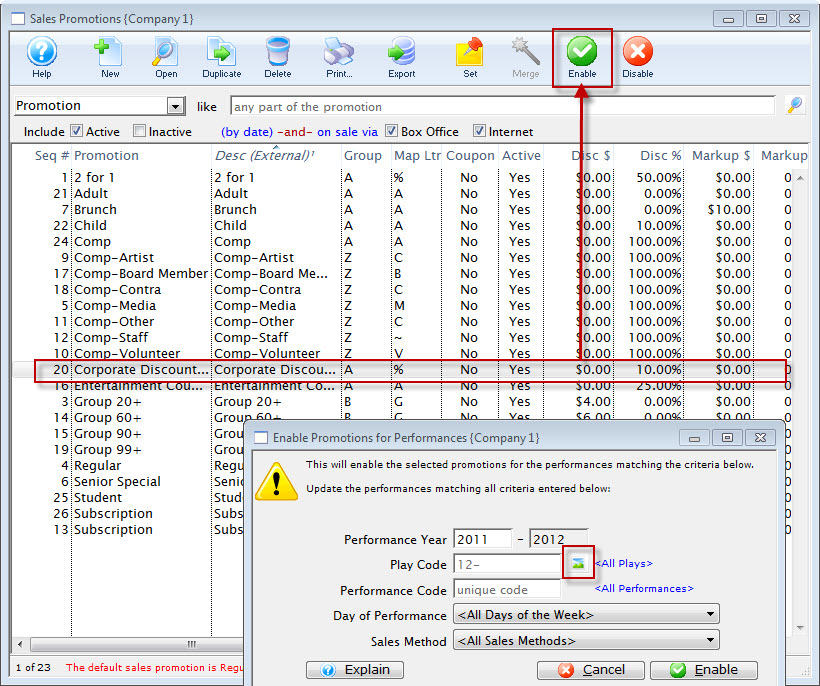
- Click the Enable
 button.
The Enable Promotions for Performance dialog opens.
- To enable for a series of performance, click the Play Code
 button.
The Play List window opens.
- Highlight the Event / Play you want to add the promotion to and click the Select
 button.
- Cloose the Day of Performance from the drop down list (if the promotion is only for a specific day of the week).
- Cloose the Sales Method from the drop down list (if the promotion is only for a specific Sales Method).
- When complete, click the Enable
 button.
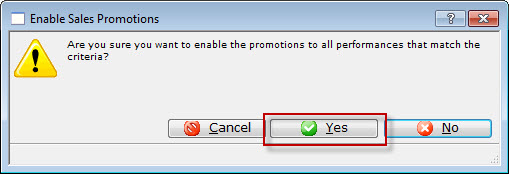
- Click the Yes
 button.
|
You can not add multiple Plays / Events at the same time. They need to be added individually. |

The Enable Sales Promotion confirmation dialog opens.