Filter Context Menu
Filter Context Menu
To open the context menu, right click when your mouse is in the Filter Pane. The following flyout opens.
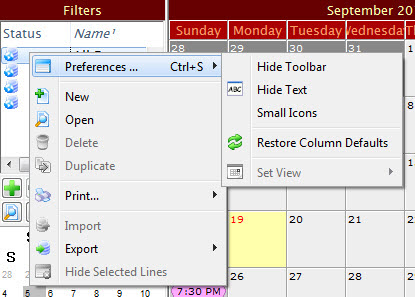
Parts of the Filter Context Menu
| Preferences | Hide Toolbar / Show Toolbar - Toggles between displaying and hiding the Calendar window toolbar.
Hide Text / Show Text - Toggles between showing and hiding the text underneth the icons in the Calendar window toolbar. Small Icons / Normal Icons - Toggles between showing large or small icons in the Calendar window toolbar Restore Column Defaults - If you have moved or changed the width of any colmns in the Filter display, this selection restores them to the default. Set View - Not available in this window. |
| New | Opens the Edit Filter window. Click her for more information. |
| Open | Opens the selected filter for editing. |
| Delete | Deletes the selected filter. You cannot delete the 4 basic filters. |
| Duplicate | Duplicates the selected filter. You cannot duplicate the 4 basic filters. |
| Prints the list of filters as shown. | |
| Import | Not available in this window. |
| Export |
Exports the selected filter in the following formats:
|