Ticket Detail Tab
Ticket Detail Tab
The ticket detail window allows you to view the specific details surrounding the sale of the selected ticket.
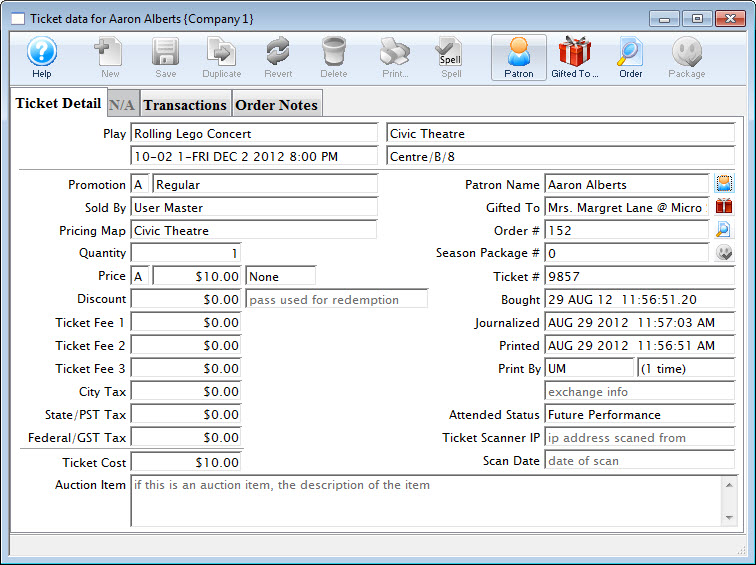
Parts of the Ticket Detail Tab
Play |
Information about the selected ticket - Event Name, Venue, Performance Date and time and seat |
Promotion |
Letter and Internal description of the promotion code |
Sold By |
Employee who sold the ticket to the patron |
Pricing Map |
Internal name of the pricing map used in the sales window |
Quantity |
Number of tickets. It is always 1 for reserved seating. It maybr more than one for festival events sold as group tickets. |
Price |
Price Code, The base price before markups, taxes discounts. and Tax Codes |
Discount |
Total amount the ticket was discounted due to the promotion used. And the control number and type for the pass g.c. used to discount the price. |
Ticket Fees 1,2 & 3 |
Values for each of the fees added to the ticket. |
Taxes |
Amount of the taxes added to the ticket. |
Ticket Cost |
The total amount of the ticket including discounts, markups, taxes and fees. |
Auction Item |
If this is an auction item, the descripption of the item. |
Patron Name |
Name of the patron who purchased the ticket. Clicking the Patron |
Gifted To |
Name of the patron who the ticket was gifted to. Clicking the Gift |
Order # |
Order number the ticket is part of. Clicking the Search |
Season # |
The Subscrition the tickets are associated with. |
Ticket # |
The internal number of the ticket, assigmned by the system. |
Bought |
The Date and time the ticket was bought. |
Journalized |
The date the ticket was journailzed by the create sales entry process. |
Printed |
The date the ticket was last printed |
Printed By |
The initials of the employee who printed the ticket and how many times the ticket has been printed. |
Attended Status |
Sets to YES if the patron attended. |
Ticket Scanner IP |
The IP Address of the scanner used to scan the ticket |
Scan Date |
The date the ticket was scanned |
 icon opens the Patron Record.
 icon opens the Patron Record.
 icon opens the Order Detail window.