Policy Additions for ADA
Box Office Policies
Box Office Policies
- You cannot require people who buy accessible tickets online to visit the box office to pick up the tickets if you do not require abled people to do the same thing (same rules for all). However, you can monitor who uses your accessible seats by having ushers greet people in the accessible area. You are also allowed to reseat people in the accessible seats under some circumstances.
- You may have to adjust season subscription policies for renewing seats the following year if the subscription includes accessible seats. It appears that you can ask subscribers to attest in writing that they need accessible seating (but not for single tickets)
- If you allow an able person to buy a group of tickets on behalf of others, then you must also allow that same privilege to people who buy accessible seating. Such policies would mean you cannot require accessible seating to be returned to the box office for resale. It would also mean that a fully able person may end up in the accessible seating, if those tickets are bought by a disabled person and given away - and that means the abled person is fully entitled to sit in the accessible seating.
- Ticket holders of normal seating are allowed to change to accessible seating in a comparable location if seats are available when the individual presents the tickets.
Guarding against Fraudulent use of ADA seats
Guarding against Fraudulent use of ADA seats
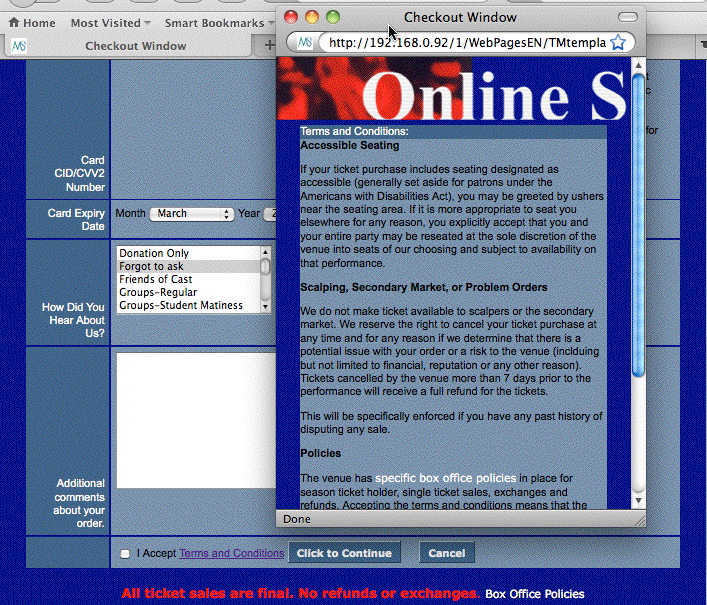 You can, however, use a feature in Theatre Manager web sales process to require people, at time of checkout, to read terms and conditions prior to accepting the credit card and completing the sale. Theatre Manager records that the person has validated reading the conditions.
In those terms and conditions, you may put a policy wording that is supported by the act such as people 'attest' that they need the ADA seats if they purchased some and that they agree they may be moved under circumstances provided for in the act.
You may also want to put wording about scalpers, secondary sales, a link to your your box office policies, etc in the terms and conditions. Theatre Manager records that people clicked the checkbox on the web detail screen.
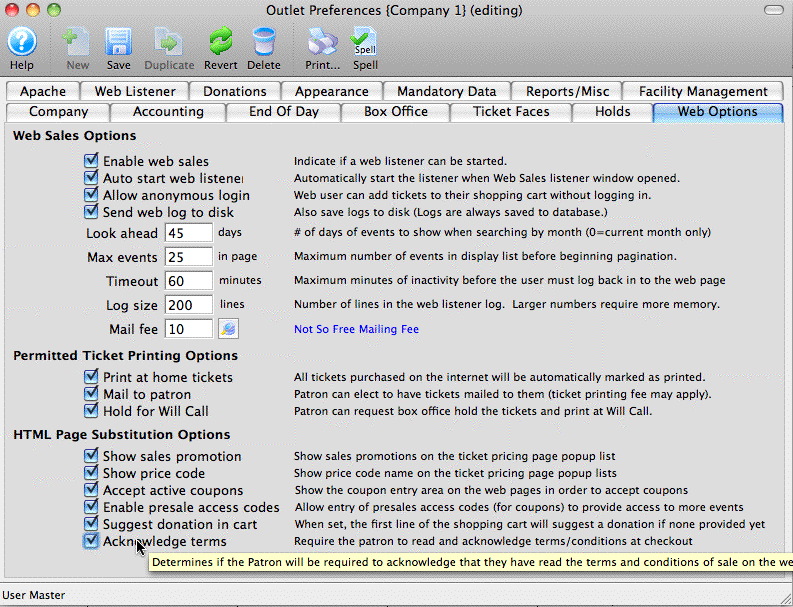 Requiring people to 'accept terms and conditions' of the sale is done by:
- ensuring that all standard web page changes have been made on the TM checkout page as per version 9.05 release notes
- That you are using version 9.05 or later of Theatre Manager
- That you have enabled the 'read terms and conditions' checkbox on the company preferences window as per the picture to the right.