
Main menu
You are here
Search Criteria Tab

The Search Criteria tab is used to add the criteria to the report to find the specific information in the database that is needed. All reports need to have criteria selected or the report will pull all information from the database. This can take a very long time and make a very long report. By adding criteria, the reports only finds the specific information needed. Click here for detailed information on adding criteria.
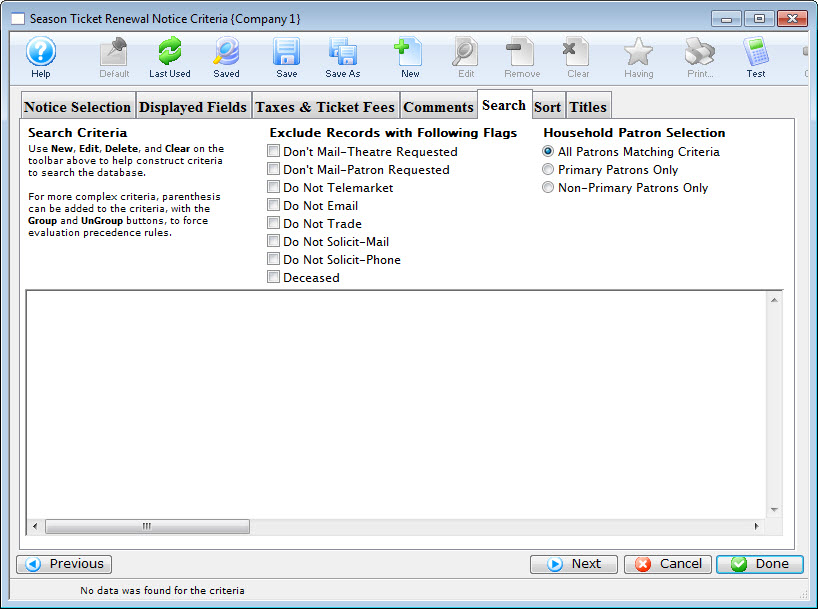
Parts of the Season Ticket Renewal Notice Search Criteria Tab
 |
If available, uses the default search criteria for this report. |
 |
If this report has previously been run, this button will add theprevious criteria. |
 |
Opens a list of saved criteria for this report. |
 |
Saves the current criteria to be used later. |
 |
Saves the current criteria to be used later and opens a dialog to name this criteria. |
 |
Opens the Add/Edit Parameter window to facilitate adding new criteria. Click here for more information on the Add/Edit Parameter window. |
 |
Opens the currently selected criteria in the Add/Edit Parameter window to allow adjustments. |
 |
Deletes the currently selected criteria. |
 |
Deletes all criteria from the Search tab. |
 |
Tests the current criteria to see how many records will be returned. A message will appear at the bottom of the window showing the number of records to be returned. |
 |
Prints a listing of the criteria currently in the Search tab. |
 |
Groups the currently selected criteria. This forces the criteria to take precedence in the search. |
 |
Ungroups the currently selected criteria. |
 |
Cancels that adding of criteria and returns the user to the Report window. |
 |
Completes the addition of criteria and the sorting of data, and begins to generate the report. Click here for more information on the Finished Report window. |
 |
Completes the addition of criteria and the sorting of data, and takes you to the next page of information for the selected report. |
|
Quick reference information for Reports Criteria |

