
Main menu
You are here
Header Tab

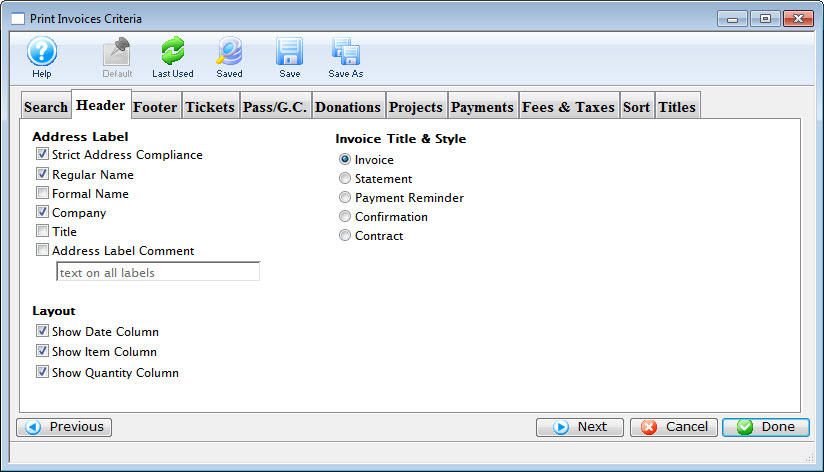
Parts of the Header Tab
 |
If available, uses the default search criteria for this report. |
 |
If this report has previously been run, this button will add the previous criteria. |
 |
Opens a list of saved criteria for this report. |
 |
Saves the current criteria to be used later. |
 |
Saves the current criteria to be used later and opens a dialog to name this criteria. | Address Label |
| Strict Address Compliance | Standardized address information enhances the processing and delivery of mail. |
| Regular Name | When checked, the regular name of the patron is used on the label. |
| Formal Name | When checked, the formal name of the patron is used on the label. |
| Company Name | When checked, the company name of the patron is included on the address label. |
| Title | When checked, the title of the patron is included on the address label. |
| Address Label Comment | When checked, the text entry box becomes active, allowing for an additional comment to be added to the address label. |
Invoice Title & Style |
|
| Invoice | When selected, the invoice style will be used for generating the report. |
| Statement | When selected, the statement style will be used for generating the report. |
| Payment Reminder | When selected, the payment reminder style will be used for generating the report. |
| Confirmation | When selected, the confirmation style will be used for generating the report. |
| Contract | When selected, the contract style will be used for generating the report. |
 |
Returns to the previous tab. |
 |
Moves to the next tab. |
 |
Cancels that adding of criteria and returns the user to the Report window. |
 |
Completes the addition of criteria and the sorting of data, and begins to generate the report. Click here for more information on the Finished Report window. |
Diataxis: