
Main menu
You are here
Pass/G.C. Detail - Type Remaining

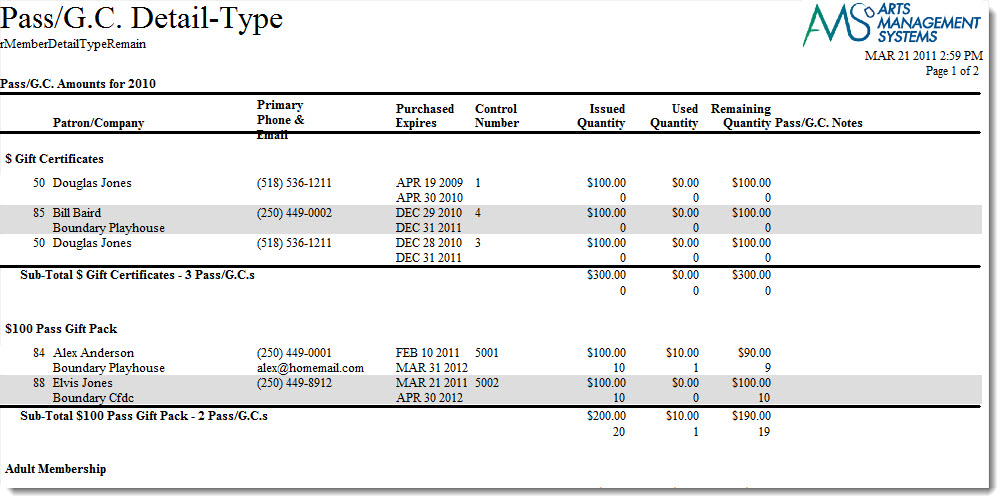
The Pass/G.C. Detail - Type Remaining report can be found under the Membership Reports category. Below the image are detailed notes to help you in using the report.
Click here for information on generating a report. Click here for information on the Finished Report window.
Purpose of the Report
This report generates a detailed listing of memberships purchased by type of membership and the amount left on the membership.
Departments Who Benefit From This Report
| Box Office | Use this report to see how many patrons have purchased each membership and have remaining balances. This is useful if memberships need to be written off after a certain time frame. |
Criteria Hints
It is recommended that this report be run for a specific fiscal year and/or with a specific group of memberships as the criteria.
| Parameter Field | Condition | Value |
| Membership Fiscal Year | = | (Fiscal Year) |
| Member Type Seq # | is one of | (Membership) |
| Membership Remaining - $ Amount | is greater than | 0 |
Use the SHIFT key to select a series of memberships, or the OPTION key (Mac) or CTRL key (Windows) to select multiple individual memberships.