
Main menu
You are here
Notifications

When you look at the Calendar, they show the time, task title & participant(s), and they show the participant status.
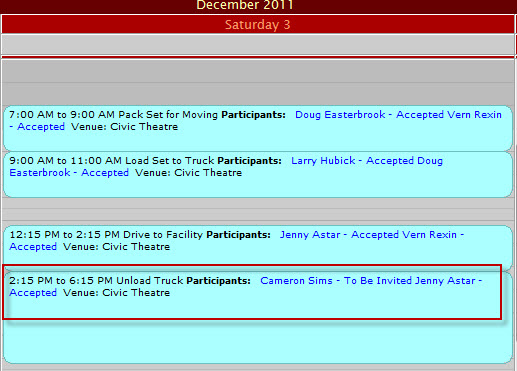
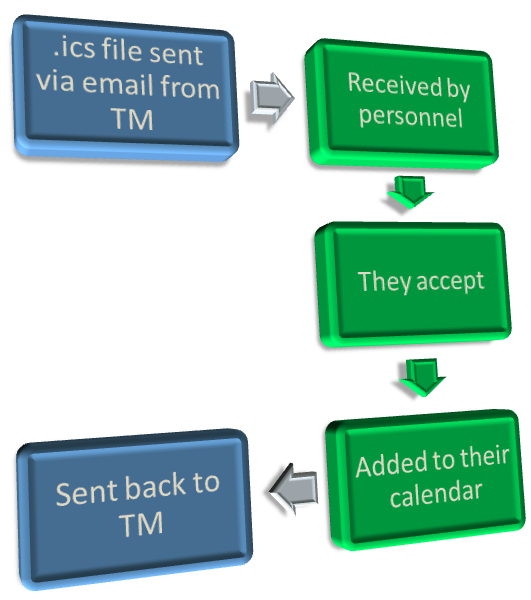
Status can be set by the user (that is, you talk to the person and they confirm) or the task can be sent to the patron via email.
 |
|
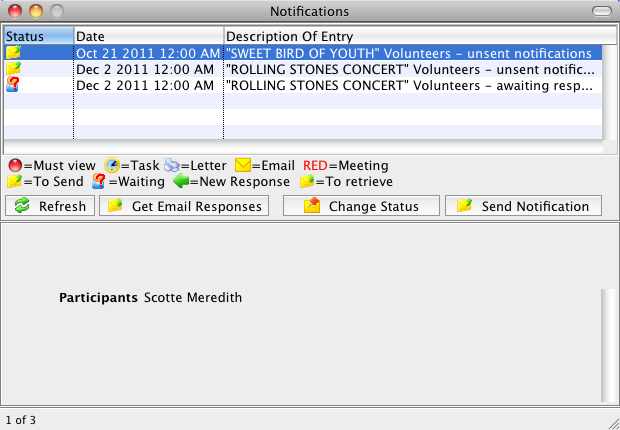
You can open the Notification window any time via Patron Sales >> Pending Notifications. There are other circumstances detailed below that may cause the Notification window to be displayed.
 |
Some of the items below may also appear in macOS Notification Centre as well (if enabled in preferences). |
The Notifications window displays 4 types of information:
| Startup Warnings |
At startup, several warnings can display, including whether backups
have been running properly, whether the credit card server can be
connected to, whether there are Email responses back from volunteers or
task participants that need to be responded to, and if there are important Theatre Manager
software updates that should be reviewed. Except for the line
indicating that there are Email responses waiting, these only display when
logging in.
Click here for more information on General Startup Warnings. |
| Information about tasks assigned to you |
The Notification window will also tell you when certain events occur
relating to your association with a task. If you have been included as a
task participant in some task and you have not responded.
Click here for more information on Tasks Assigned to you. |
| Letters or Emails |
The notification window displays the information about:
Click here for a full description of how Notifications can tell you more about Letters or emails. |
| Information about volunteers you have scheduled or are working on scheduling. |
There are a number of different notifications around volunteers. These
include:
Click here for a full description of Volunteer Notifications. |