Main menu
You are here
Limited Profile Patron Implications (Guest Checkout)

 |
Using the Limited Profile feature is a venue choice. While it allows the patron to specify less information during checkout, it also:
|
 |
Guest Checkout causes a NEW Limited Profile Patron to be created each time the patron purchases, unless the patron chooses to supply all the mandatory information of their own volition along with password when buying online.
The reason a new patron is created is to allow theatre manager to provide absolute privacy between online purchases, since the patron has not provided enough identification to allow accounts to be merged automatically. If two people just happen to use the same email address, allowing each to access the others information and tickets is a privacy violation - so Theatre Manager keeps them separate If you use Guest Checkout, the box office will then need to MERGE all patrons in the same household with the same name and email on a periodic basis after determining that they are, in fat, the same patron. |
Limited Profile Patrons are enabled in System Preferences->Mandatory Data tab. If enabled, it allows for Web sales checkout on the web site as an option. The limited patron profile creation and checkout web pages note which fields (e.g. name, address, etc) a venue expects the user to enter.
There are some general pro and cons to using the feature that we've heard from Theatre Manager users that we've listed below. Most venues that try it realize that the burden of data management shifts to the venue and eventually disable it. Most web sites that deal with any sort of shopping cart require full identification these days for fudiciary responsibility to the credit card issuers.
| Pro's | Con's | |
| Full Profile |
|
|
| Limited Profile |
|
|
To enable limited profile patrons/guest checkout:
- Choose Setup >> System Preferences and choose the Mandatory Data tab.
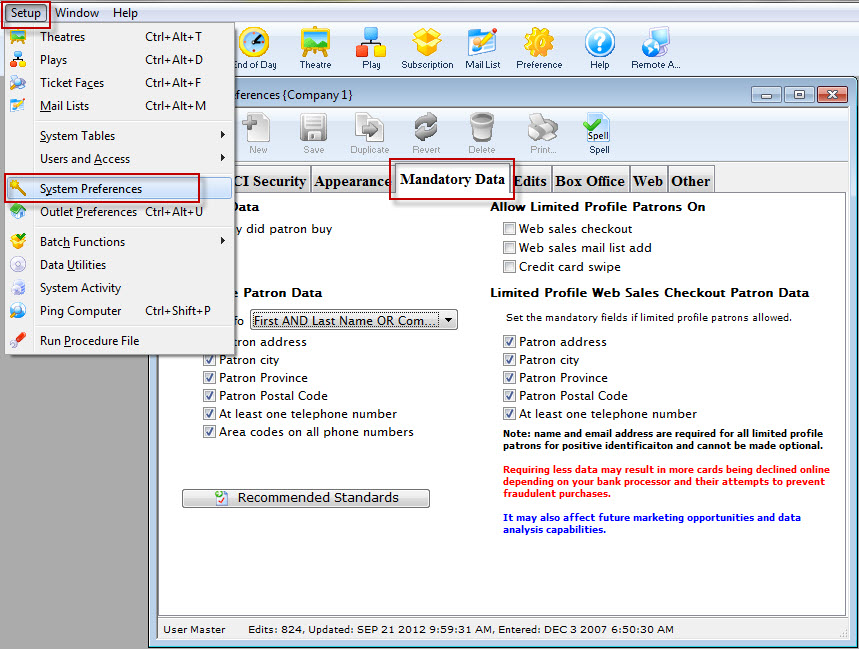
- Under Allow Limited Profile Patrons On there are the following selections:
- Web sales checkout - checking this box enables patrons with limited patron data to buy tickets.
- Web sales mail list add - checking this box enables patrons to sign up for mail lists giving only essential information (email address, name). Click here for more information about this feature.
- Credit card swipe - checking this box will enable patrons to purchase using the information on their credit card (name on the card). This is most useful for auctions and is described further here.
- Make the appropriate selections for your organization's needs.
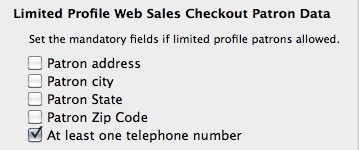
- Next, you define the mandatory fields you want limited profiles to contain in the Limited Profile Web Sales Checkout Patron Data section.
This is where you set the minimum data patrons must provide to access the web sales checkout.
If you mail tickets, please make patron address, city, state and zip code mandatory.
If all tickets are held for will call or print at home, then set as many of these options as you'd like (even none).