You are here

Parts of the Mail List Window

Subscribe to Syndicate

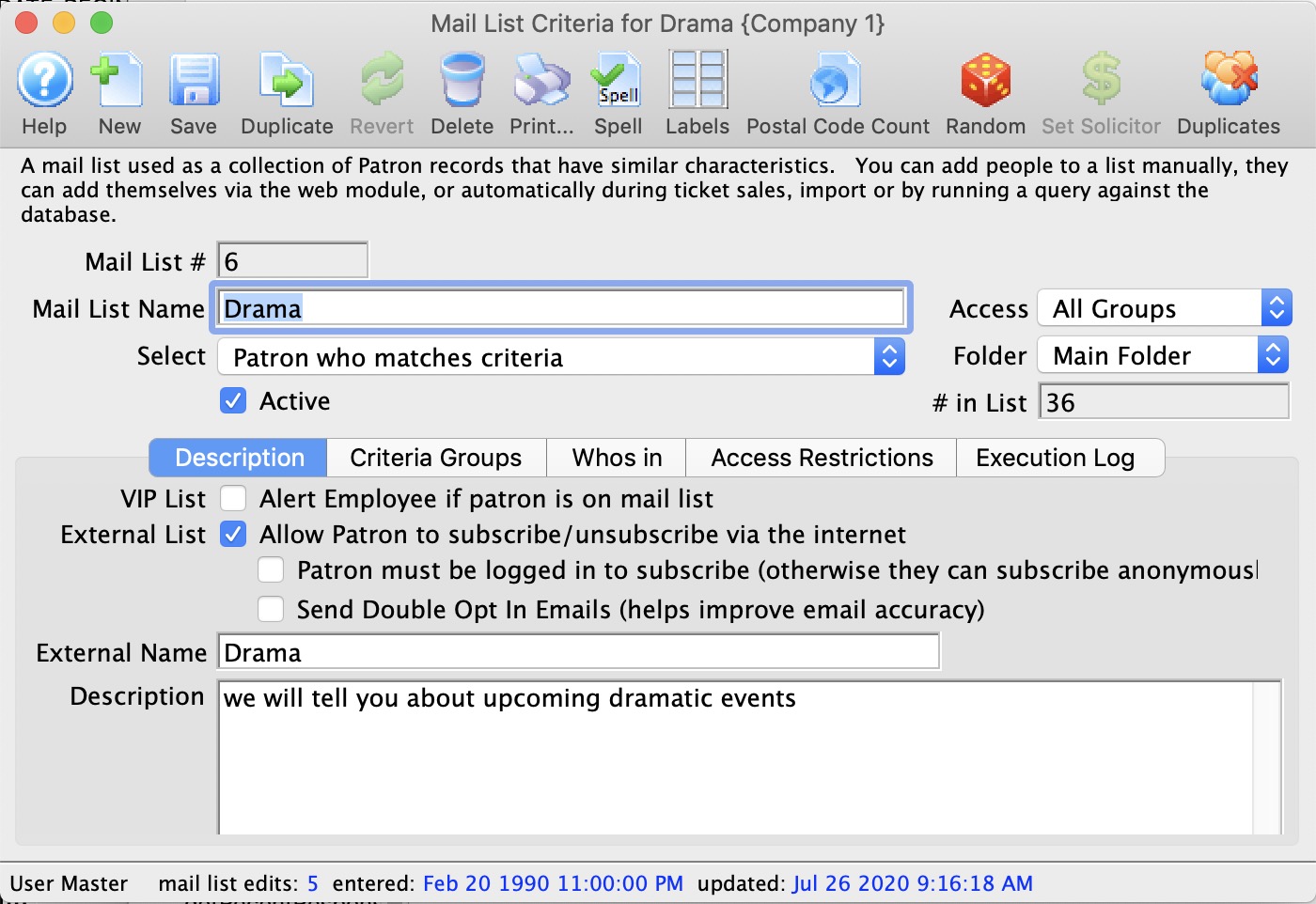
Opens a new Mail List window.
Saves changes made to the Mail List.
Creates a copy of the open Mail List.
Reverts back to the last save point.
Deletes the open Mail List.
Generates a report to the screen or default print location displaying the details of the Mail List.
Checks the spelling of typed items within the current tab.
Opens the mailing label window to create mailing labels for patrons included in the Mail List.
Provides a report by zip code of all patrons in the Mail List.
Mail List #
Computer generated number for the Mail List.
Name
Brief name of the Mail List
Outlet
Outlet that created the Mail List.
# in List
Number of patrons currently in the list.

Description Tab

Allow Patrons to subscribe/unsubscribe via the internet
Provides access to the Mail List via the internet allowing patrons to subscribe and unsubscribe to the list.
Description
Detailed description on the Mail List.

Criteria Tab

Inserts criteria for a Mail List.
Removes the selected criteria.
Opens the parameter window for the selected criteria.
Processes the Mail List.
Verifies the number of patrons in the Mail List.

Who's In Tab

Type
Customizable field that allows for classification of patrons by type (Individual, Student, Staff, etc.)
Patron #
Unique number assigned to a patron.
Patron Name
Patrons first, last name and business .
Primary Phone
Patron primary contact telephone number.
Manually add a patron to the list. For more information on adding patrons to a list click here.
Opens the patron window of the selected patron.
Manually remove patron from a list. For more information on removing patrons from a list click here.
Export the contact information from a Mail List.
Search options for finding patrons within the selected Mail List.
Search's the selected Mail List for patrons matching the selected search criteria.

Access Restriction Tab

First
First name of the employee.
Last
Last name of the employee.
E-mail
E-mail address for the employee.
Grants an employee access to the Mail List.
Removes an employee from having access to a Mail List.
Opens the employee data window for the selected employee.

Execution Log Tab

First
First name of the employee who ran the mail list.
Last
Last name of the employee who ran the mail list.
Start Count
Number of patrons in the list before the list is executed.
Stop Count
Number of patrons in the list after the list is executed.
Time (Sec)
Amount of time in seconds the mail list took to populate.
Status
The method chosen to populate the mail list (either Proceed or Rebuild).
Start
The date and time at which the instance of the mail list was begun.
Finish
The date and time at which the instance of the mail list finished running.