
Main menu
You are here
Gifting Tickets During Purchase

Tickets can be gifted to another household member or another patron during the initial ticket sale. To gift a ticket, you perform the following steps:
- Add or select the purchaser in the database.
Click here for information on finding a patron in the database.
- Select the "Buy Tickets" option.
- Pick the Performance in the Performance Selection tab.
- Choose the seats in the Seat Selection tab.
- In the Ticket Review Tab, highlight the ticket(s) to be gifted and right-click or control-click to bring up the Context Menu.
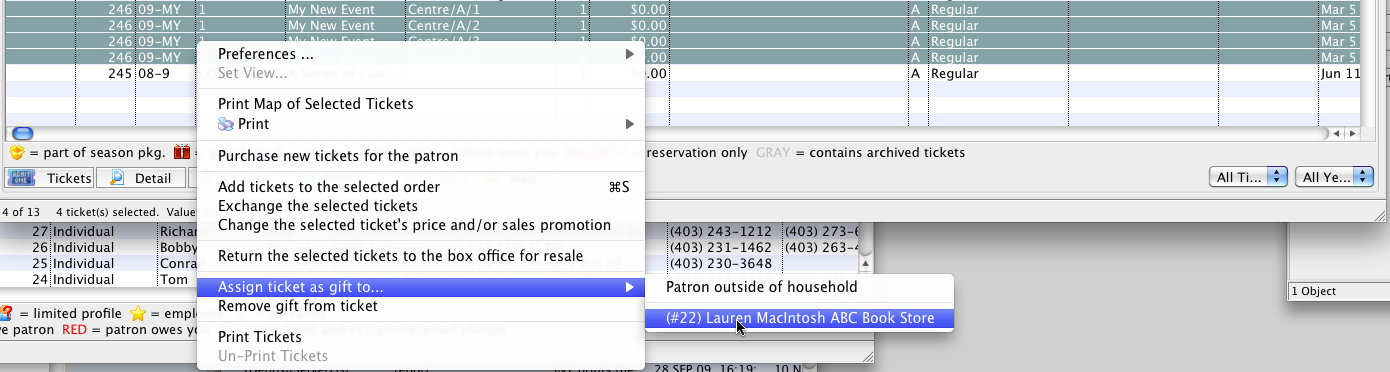
- Select "Assign ticket as gift to..."
You have the option to assign the tickets to household members or to a "Patron outside of household"

If you want to assign one ticket to one household member or patron and another ticket to a different household member or patron, you just have to do them one at a time.
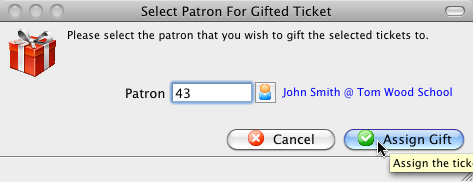
If you select a Patron outside of the household, a window opens to enter the patron number or use the lookup to find a patron in the database:
- Proceed to the Payment screen to finish the transaction.
| The following quick reference information is available for selling a Ticket |
Reference Guide (pdf) |
Cheatsheet (pdf) |
Flash ScreenCast |
MP4 ScreenCast |


Diataxis: