
Main menu
You are here
Merge Parameters Window

The Merge Parameters window is the final step in the Form Letter Merge process.
This window is used to determine when the letters are either printed or emailed.
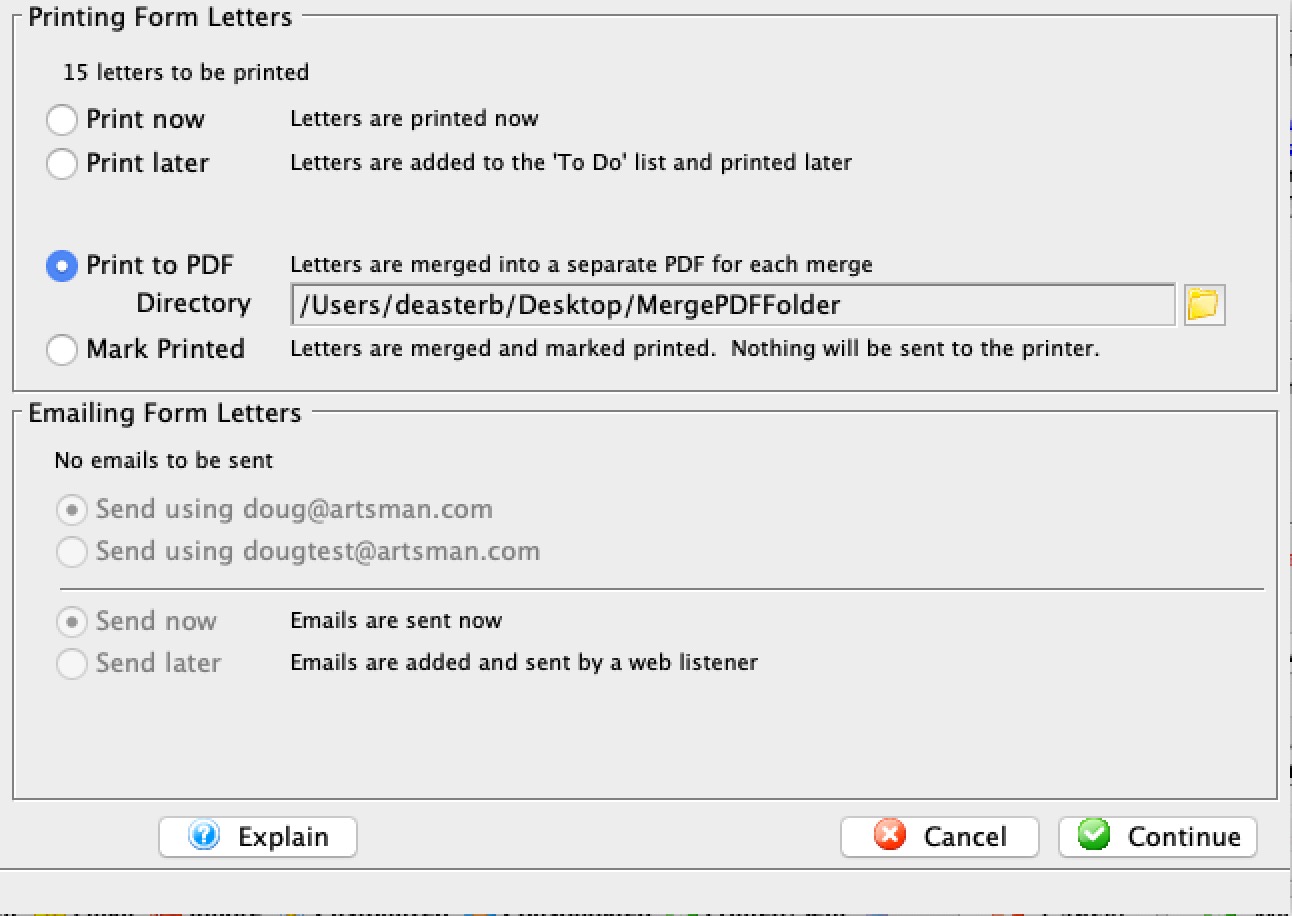
Printing Form Letters |
|
| Print Now | When this radio button is selected, all letters will be printed immediately. |
| Print Later | When this radio button is selected, all letters will be added to the To Do list to be printed later. For more information on printing from the To Do list, click here. |
| Print on/at | When this box is checked, the letters will be printed at the
date and time set in the field. This is for automating the printing process
during a later time such as after-hours. Remember that a user must be logged
in for the letters to print.
If selected, you can specify a date that the letter is due:
|
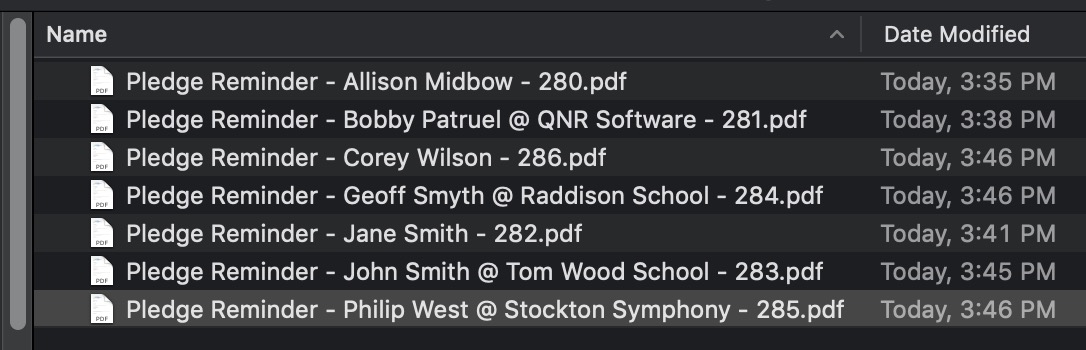
| Print to PDF | This option will merge each letter into a separate file and place them in a folder of your choice. Use this option if you want a letter - such as a donation receipt letter - for emailing the patron, while also maintaining a file-based copy that you can keep for yourself.
You will need to provide a folder into which the letters will be merged. After the merge, the files will look like the list below. The name of the file consists of:
 |
| Mark Printed | This is designed to allow the form letter to be added to the patron record for tracking. You might do this if you used a print-house/graphic arts company to print, merge, and mail letters or brochures to patrons in large numbers.
Merging and not printing against the same set of patrons would result in a letter on the patron record that is marked printed, yet it is never actually printed. This can be used for tracking and subsequent building of mail lists for customers that do not respond. |
Emailing Form Letters |
|
| Send using <User> address | This radio button will contain the e-mail address of the user currently creating the batch. When selected, all e-mails will be sent using the user's e-mail address. |
| Send using <Organization> address | This radio button will containt the e-mail address of the company. When selected, all e-mails will be sent using the organization's e-mail address. |
| Send Now | When this radio button is selected, all letters will be emailed immediately. Based on the setting of the Merge Letter window, patrons without e-mail addresses may also begin printing. |
| Send Later | When this radio button is selected, all letters will be added to the To Do list to be emailed later. For more information on emailing from the To Do list, click here. |
| Send on/at | When this box is checked, the letters will be emailed at the date and time set in the field. This is for automating the emailing process during a later time such as after-hours. Remember that a Web Sales Listener must be logged in for the letters to be emailed. |
 |
Opens the mini-calendar for selecting a later date to email the letters. |
| Batch Size | When the Send on/at feature is enabled, a batch size can be set in this field to limit the number of emails sent per hour. This is useful if the organization's ISP has a limit on the number of emails that can be sent per hour. Theatre Manager will take the total eblasts being sent and divide them into 10 minute groups.
You can set a default in Company Preferences->Web Listener tab or you can enter it each time you do an eblast. |
 |
Closes the Merge Parameter window without completing the merge. |
 |
Continues the Merge process based on the parameters set. |