
Main menu
You are here
Insert Custom Field Window

The Create Custom Field Menu is a sublevel of the Insert Menu under Form Letters. The Create Custom Field Menu allows for the creation of custom fields
to be added to a letter using selected text.
|
Custom fields are different than calculated fields in a document. A custom field is used for conditional documents and paragraphs. In some cases, they can be built from any text, fields or calculated fields. |

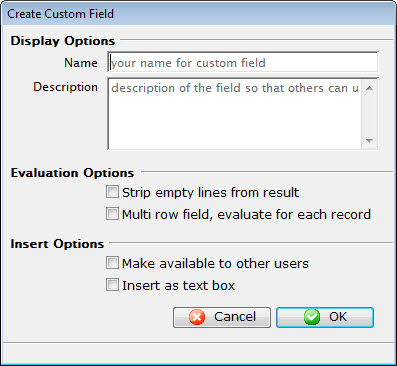
Parts of the Insert Custom Field
Display Options |
|
| Name | Enter a name for the custom field. |
| Description | Enter a description of what the custom field does. |
Evaluation Options |
|
| Strip empty lines from result | When checked, Theatre Manger will remove any empty lines from the data returned. |
| Multi row field, evaluate for each record | When checked, Theatre Manager will remove any empty lines from the data returned, and check on a line by line basis. |
Insert Options |
|
| Make available to other users | Makes the custom field available to other users. |
| Insert as text box | Inserts the custom field as a text box. |
 |
Cancels the current operation. Closes the window and performs no action. |
 |
Performs the current operation. This will add or alter the custom field that has been created. |