
Main menu
You are here
Employee List

The Employee List window can be accessed through Setup >> Users and Access >> Employee List and is used to quickly locate an employee record or to generate a quick list of employees that can be printed.
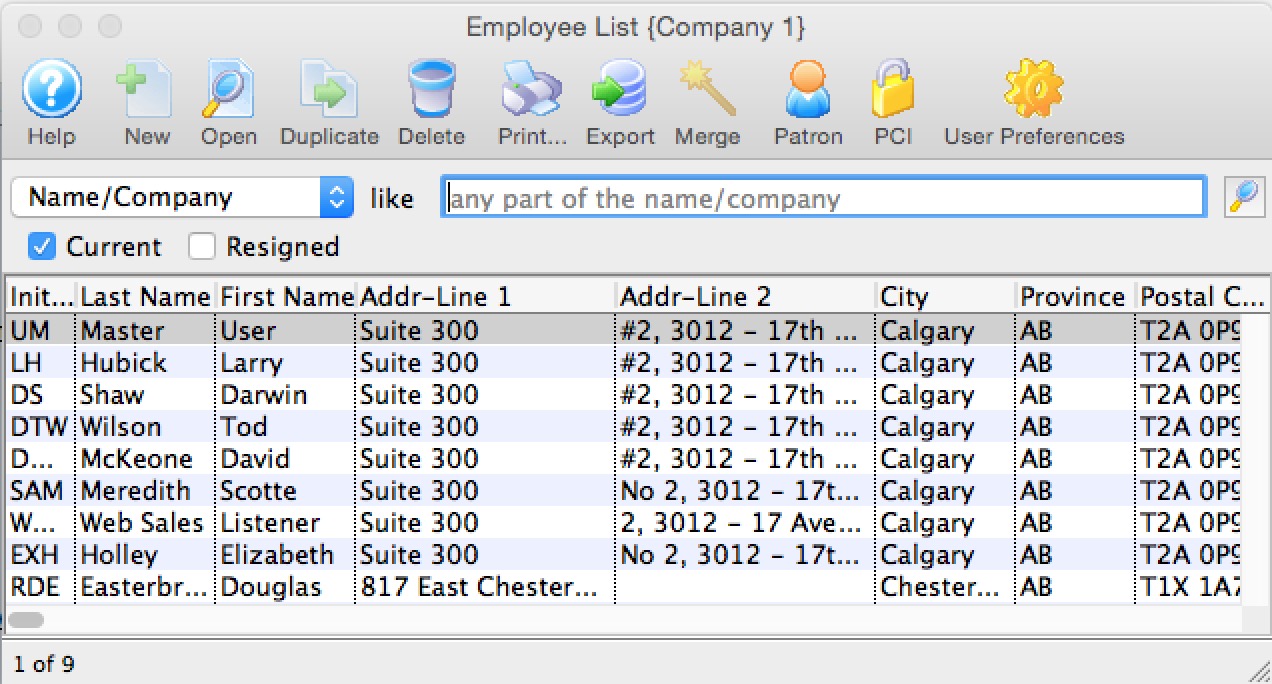
Parts of the Employee List Window
 |
Opens the Theatre Manager online help. |
 |
This button is not accessible because new employees must be added through the Patron Window. It is on the window for consistency. For more information on adding employees click here. |
 |
Opens the selected employee record for editing. For more information on editing employee access click here. |
 |
This button is not accessible because new employees must be added through the Patron Window. It is on the window for consistency. For more information on adding employees click here. |
 |
Deletes the selected employee. This button is only accessible if the employee can be deleted (if they have no history tied to their login). |
 |
Generates a report of the employee list to the screen or default print location. |
 |
Exports out the employee list in a tab-delimited format. |
 |
Opens the Patron Window. For more information on the Patron Window, click here. |
 |
Open the selected Employee Preferences for the selected employee. For more information on Employee Preferences, click here. |
 |
Merges the selected employee records into one. If you are trying to merge two patrons together that are employees, you must do a two step process:
|
| Initials | Unique employee initials. |
| Last Name | Last name of the employee. |
| First Name | First name of the employee. |
| Address Line 1 | Employee address. |
| Address Line 2 | Employee address. |
| City | City the employee resides in. |
| Province | Province or State the employee resides in. |
| Postal Code | Postal or Zip Code for the employee. |
| Title | Job title of the employee. |
| Tran Source | Department within Theatre Manager the employee is assigned to. |
| Outlet-Owner | If using outlet edition, the outlet the user is assigned to. |
| Primary Phone | Primary telephone number for the employee. |
| Primary E-Mail | Employee's primary email address. |
| Primary Fax | Employee's primary fax number. |
| Web | Employee's web site. |
| Patron # | Employee's patron #. |