
Main menu
You are here
Data Tab

This is where a Normal employee's access to different data areas in Theatre Manager is set up. An employee can have various combinations of four (4) levels of access to particular areas of data within Theatre Manager. These level's are View, Insert, Edit and Delete. Uncheck all boxes next to an item to completely disable access (or just uncheck View, since no access to View precludes access to any of the other three actions).
 |
Master users and Outlet Admins cannot access this tab for their own user id because changing any permissions would cause them to lose Master user or outlet admin status.
They can, however, affect settings in these tabs for other users. |
|
Use the filter function to highlight words of interest within the list |
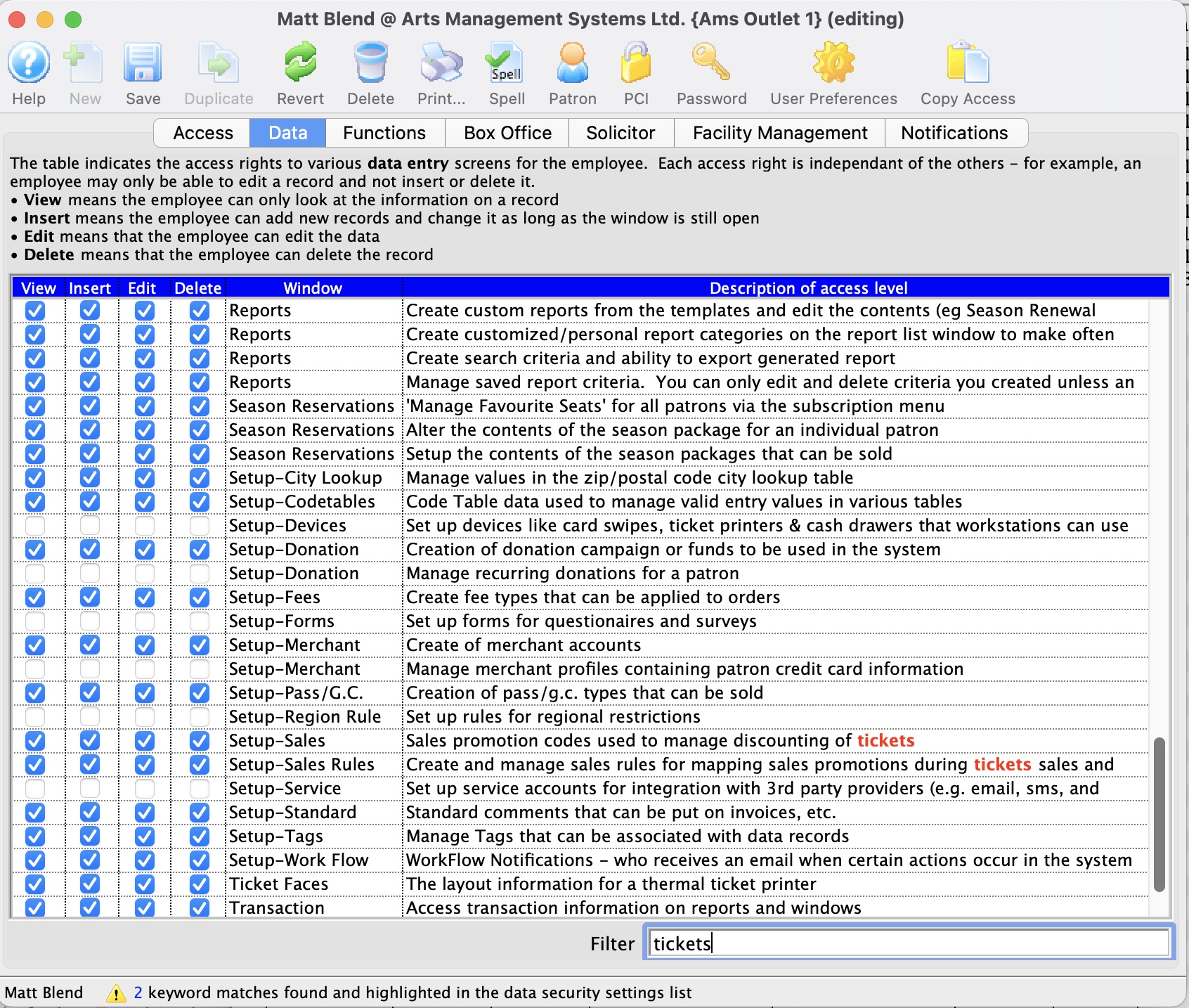
| View | The employee can only look at the information in a record |
| Insert | The employee can add new information and change it as long as the window is open. |
| Edit | The employee can edit information in the specified window. |
| Delete | The Employee can delete the record. |
List of Data/Windows that can be Accessed
| Accounting | A/P-Enter payables and expenses | |
| A/P Write cheques | ||
| G/L Budget information | Provides access to the setup of general ledger budgets for each general ledger account. Details on how each account is compared to the budgeted amount can be viewed | |
| Chart of account set up | ||
| G/L Entries, whether manually created or generated by the system | Provides access to the general ledger entries. For an employee who may need to 'close' or 'cash out' at the end of the day, it is recommended that 'view' access be granted. With 'view' access, the employee will be only able to view the sales and deposit entry created by the End-of-Day wizard, and if required print the desired reports. | |
| G/L tax table setup - so they can be used for sales | Provides access to setup tax tables, to define the table and enter/edit the percentage of tax levied and the g/l account tax will be allocated to | |
| Attendance | View and set patron attendance status to a performance | |
| Coupons | Set up discount coupon codes that can be redeemed at the box office or via the web | |
| Credit Cards | Patron Credit Card Tab | |
| Default Data | Company Policy information (manage rules about how the system works) | Provides access to Default Data settings such as Company name, mandatory data fields, data appearances (custom labels on fields), default fees on ticketing etc. |
| Donor |
Attach or remove pledge reminder letters to a Donation to be sent at a future date |
|
| Donation information for any donor record (on patron or order window-see function access) | ||
| Manage Donor asset tracking | Provides a list on the patron window where you can enter/track patron assets for the purposes of wealth management. | |
| Manage Donation receipts | ||
| Manage Donation soft credits | ||
| Manage DonorSearch Analytic Analysis Results | Provides access to the DonorSearch Analytic List Window, the DonorSearch Analytic Results Detail Window, and to the DonorSearch Importing Analytic Results process. At minimum View access is required to access the DonorSearch context menu, the DonorSearch menu button in Donation Campaigns, and to query the data in mail lists and data exporting. | |
| Employee | Change personal preferences in the employee preference window | |
| Manage employee data and access rights | ||
| Facility Management | Edit the contents of a task such as date, time, and participants | |
| Enter the resource component of a sale | ||
| Manage filters that are used to decide what is displayed on a particular calendar view | ||
| Manage projects and associated tasks | ||
| "Hot Seat" analyzer to determine which seats have been used the most | ||
| Manage task dependencies in a project using the Gantt chart | ||
| Manager tasks that will appear on the background of a calendar such as corporate holidays or special locations | ||
| Open/manipulate the calendar of events and to-do list items on the main calendar window | ||
| Set or edit an alarm on a task for themselves | ||
| Setup task resources that can be associated with a theatre or other tasks | ||
| Fees | The fee component of a sale (eq mail fee, order fee, subscription fee) | |
| Form Letters | Create and change the form letters (anybody can use them) | Provides access to the form letters module. Creating form letters and performing letter merges with information from Theatre Manager's database |
| Manage form letters and letter security from the pass/g.c. window | ||
| Manage form letters and letter security from the patron window | ||
| Mail Lists | Saved results of a query against the database used in reports or finding patrons | Provides access to the setup of mail lists and the patrons who are on each of the mail lists |
| Order | Order information such as ticket printing status and comments | |
| View and edit items in the order window | ||
| Outlet |
Creation of outlets (or departments) as a functional business entity | Provides access the setup of the outlet locations and which employee is assigned to which outlet |
| Set up the Currency Exchange records for multi currency web usage | ||
| Setting up of the commission structure for sales at an outlet | ||
| Packages | Manage Packages of salable items. | |
| Pass GC | Pass/G.C. cards to assign any number of pass/g.c. | |
| Patron | Basic Patron information such as name and address | |
| Favorite seats and season subscription packages, including on the order window | ||
| Manage and Relationships between one or more patrons | Provides access to Relationship tab on the patron window, to establish relationships between two or more patrons | |
| Media information in the tab on the patron window |
Provides access to the setup of media information on individual patron's accounts | |
|
Pass/G.C. detail component of a sale (on the patron or order window-see function access) |
||
|
Pass/G.C. detail component of a sale (on the patron or order window-see function access) |
||
| Patron payment information and prior payments on the order window | Provides access to the patron payments after they have been created | |
| Play | Accounting information and setup for postings & taxes | Provides access to the Accounting area in the play setup |
| Add task resources pertaining to Facility Management | ||
| Main window containing the play & date information | Provides access to the Attendance area in the play setup | |
| Performance dates & management of sales parameters | Provides access to the Performance area in the play setup | |
| Play maps and attendance information | ||
| Play revenue and cash flow information | ||
| Set prices and valid sales promotions | Provides access to the Prices and Promotion area in play setup | |
| Plug-in Code | Import or edit Custom Plug-in Code modules into Theatre Manager | Provides access to Plug-ins, custom coded prices strategies. A Plug in is a system table setting and custom coding by Arts Management Systems to manage unique pricing structures |
| Report Cards | Manage report card templates to be used for course grading | |
| View and edit reportcards assigned to patrons and used for course grading. | ||
| Reports | Create custom reports from the templates and edit the contents (e.g. Season Renewal Notices) | |
| Create search criteria and ability to export generated reports | ||
| Items added to the report queue for later printing and customized report category detail windows | Provides access to the setup of reports to be created and printed during non prime time hours | |
| View and edit saved report criteria | ||
| Season Reservations | 'Manage Favorite Seats' for all patrons via the subscription menu | |
| Alter the contents of the season package for an individual patron | ||
| Setup the contents of the season packages that can be sold | Provides access to the Season Subscription Renewal Notice
process | |
| System Setup | ||
| City Lookup | Manage values in the zip/postal code lookup table | |
| Codetables | Code Table data used to manage valid entry values in various tables | Provides access to the setup of code table settings in the System Table area of Theatre Manager. This area is best restricted to Master Users of Theatre Manager |
| Donation | Creation of donation campaign/funds to be used in the system | Provides access to the set-up of Donation Campaigns and Giving Levels matrixes |
| Fees | Creation of fee types that can be applied to orders | |
| Merchant Account |
Creation of merchant accounts | |
| Pass/G.C. | Creation of Pass G.C. types that can be sold | Provides access to setup Membership types, to enter/edit membership styles and g/l accounts associated with each membership |
| Sales Promotions | Sales promotion codes used to managing discounting if tickets | Provides access to the setup of ticket sales promotions and discount offers |
| Sales Rules | Create and manage sales rules for the discounting of tickets | |
| Standard Comments | Standard comments that can be put on invoices, etc. | Provides access to the setup of standardized comments for ticket invoicing |
| Workflow | Workflow Notifications - who receives an email when certain actions occur in the system | Provides access to the setup e-mail notifications |
| Theatre | Manage theatre capacity, layout and seating names | |
| Ticket Faces | The layout information for a thermal ticket printer | Provides access to the setup of customized ticket face coding for the thermal ticket printers |
| Transaction | Access transaction information on reports and windows | |
| Volunteer | Manage volunteer recognition awards | |
| Manage volunteer time availability | ||
| Volunteer activity history - record of each instance of working in the position (from volunteer or play window) | Provides access to the historical information for each personnel position. Such as each individual time the personnel was an actor, producer, or usher and the unique responsibilities for each position | |
| Volunteer overview information and data entry window | Provides access to the general personnel information on the patron window and on the personnel window | |
| Volunteer positions - the activities that they will do when asked | Provides access to the personnel positions each of the personnel may have held | |
| Volunteer template setup that will be used to let people sign up for positions on the web | ||
| Web Sales | Manage shopping carts for internet sales | Provides access to Web Cart tab on the patron record |
| View and reset web performance statistics gathered from the apache server by the web listener | ||