
Main menu
You are here
Installation - Motorola MC50, MC55, MC55A, MC5590

 |
As of 2019, these scanners are no longer supported (5 years after original notice). Refer to Linea-Pro IOS based scanners
In early 2014, the MCxx family reached a technological end of life after many years of being the standard for scanning in the industry. They do not support any of the latest end to end security and the windows mobile operating system is defunct Recognizing this, we added support for Linea-Pro IOS based scanners (far easier to set up on networks, use and offer more capability). If you have existing MCxx scanners, we can provide support and replacement parts on as-available basis. |
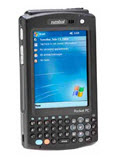
Following are the key functions of the scanner and how to set it up.
- Description of the Motorola MC50 and the buttons on it.
- Downloading and Installing the AMS Ticket scanning program on the scanner using Active Sync.
Note: he link on this installer has been removed as it is no longer supported
- Setup of the scanner and mating of the scanner with your router and network.
- Setup of the login information and some key communication parameters before scanning can occur
Description of the Motorola MC50/MC55/MC55A/MC5590 Buttons
Theatre Manager supports the MC50, MC55, MC55A or similar wireless scanners for tracking people entering and leaving a venue.
The scanner operation buttons are:
- The yellow scan buttons are on both sides at the top of the scanner. They are interchangable so you can use either for scanning.
- When you are using the Theatre Manager AMS Ticket program, all functions are accessed by clicking on the touch sensitive screen using a stylus or your finger.
- The orange button at the bottom left of the keyboard is the numlock button. Pressing it once allows entry of a number. Pressing it twice turns on num-lock. Pressing it again, turns the keyboard back to alpha. It is handy when entering information to set up the device.