
Main menu
You are here
Merging Patrons Into Same Person

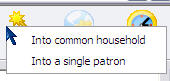
The Merge button on the patron list window gives you the option of combining the highlighted patrons:
- Into a single patron when the majority of the information indicates that the two records are for the same person -or-
- Into a common household (for example you searched for the same address and are merging patrons into a household record)
 |
 Employees cannot be merged together as patrons (see image) unless you have previously merged their employee records first.
|
Rules that prevent patrons from being merged are:
- They are marked 'do not delete'
- They are an employee in any outlet
- They have an order in the middle of being sold
- They have shopping carts that have one or more of the following status codes
- Active
- Auth button clicked
- Processing a payment
- Filling the order after payment accepted -or-
- The cart has a partially completed checkout with some error condition that must be fixed before the patron can be merged.
- You cannot merge a patron with complete information into a limited profile patron record - but you can merge as many limited profile patrons into each other or into a full patron record.
|
Limited profile patrons are not recommended - but you can enable the feature
Setup->System Preferences->Mandatory Data if desired |
Merge into a single patron
When the 'merge' button (above) is clicked and into a single patron is selected, you will see a dialog similar to below asking you to confirm the merge. In the example below, it looks like Jim and James are the same person.
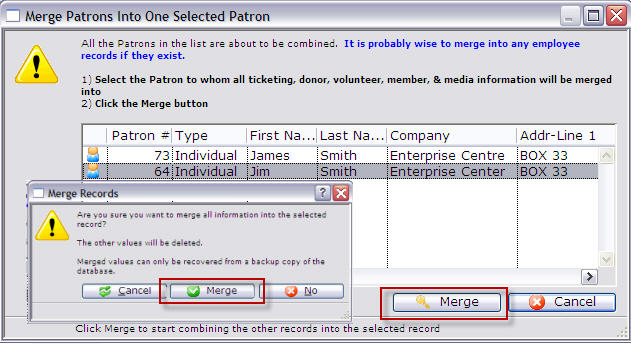
- Select the Patron to which appears to have the most correct information and click the Merge
 button.
The Merge Records dialog opens.
- The dialog asks you to confirm your choice.
Click the Merge
 button.
You are returned to the Contact List window and the Primary patron remains In our example, there is now a single patron record for Jim Smith, containing the data added and tickets purchased with the other Patron number.
Diataxis: