
Main menu
You are here
Using the Context Menu during a Merge

The Context Menu is available by right-clicking in the Merge Letter window. This menu gives the user access to additional operations that can be performed prior to the merge.
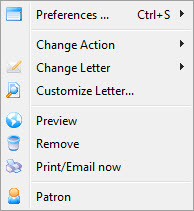
| Preferences | Allows access to window Preference options. |
| Change Action | Allows access to the Action sub-menu. See below for more information on this menu. |
| Change Letter | Will display a sub-menu of all letters available in the system. Allows for changing the letter being sent to the selected patron. |
| Customize Letter | Allows the selected letter to be customized. A letter is customized to an individual patron and will not affect other patrons in the same merge. |
| Preview | Previews the selected letter with all fields filled. The letter can also be customized from this view. |
| Remove | Removes the letter from the merge operation. |
| Print/Email now | Immediately prints or emails the letter based on the icon in the status column of the Merge Letter window. | Patron | Opens the patron record of the selected letter recipient. |
Change Action Menu
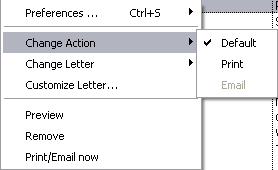
| Default | Leaves the status of the letter as the default action in the Merge Letter window. |
| Changes the status of the letter in the Merge Letter window as marked for printing. | |
| Changes the status of the letter in the Merge Letter window as marked for emailing. |