Outlet Management
The advantage of the Outlet Edition is that it allows the linking of independent companies into a cohesive consortium to co-promote the sale of individual events. Based on the underpinnings of Theatre Manager's Enterprise Edition, each Outlet will contribute Patron contact information into a single Theatre Manager database. The care and responsibility of the database will be the responsibility of a consortium Master Administrator, and both Outlets must follow specific cross-outlet rules.
All Outlets will have remote access to the common database via Citrix, Windows Terminal Server or some other similar technology. Only limited data is sell tickets for another Outlet, charge commissions of a dollar amount or percentage for those ticket sales, and use common hardware such as an Apache server to minimize investments in duplicate assets.
Examples of who might make use of the Outlet Edition include:
- A University theatre and the Campus Athletic Centre
- A major Ticket Centre and a smaller local venue without a full time box office
- A group of performance venues in a geographic area, serving different genres of events (an opera company, a symphony, a community theatre, a ballet troupe, etc.)
- Two (or more) organizations sharing a single venue (summer theatre/winter theatre)
- A dinner theatre with multiple locations
- And many many more
Outlet Preferences
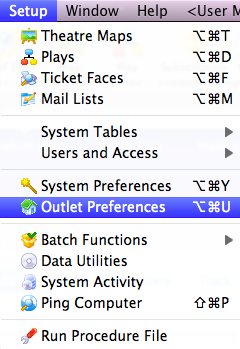
To access Outlet Preferences, click the menu item Setup >> Outlet Preferences.
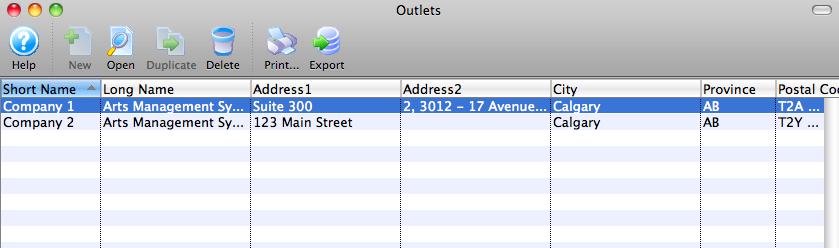
If you have Master User privileges,the Outlet List Window opens. Each company that has been created as an outlet will be displayed. Choose the appropriate company from this list to edit that outlet's preferences.
If you are not a Master User, the Company Preferences window for your venue opens. Click here for more information on Company Preferences.
Selection of an Outlet will lead to the main Outlet Preferences Window for that Outlet.
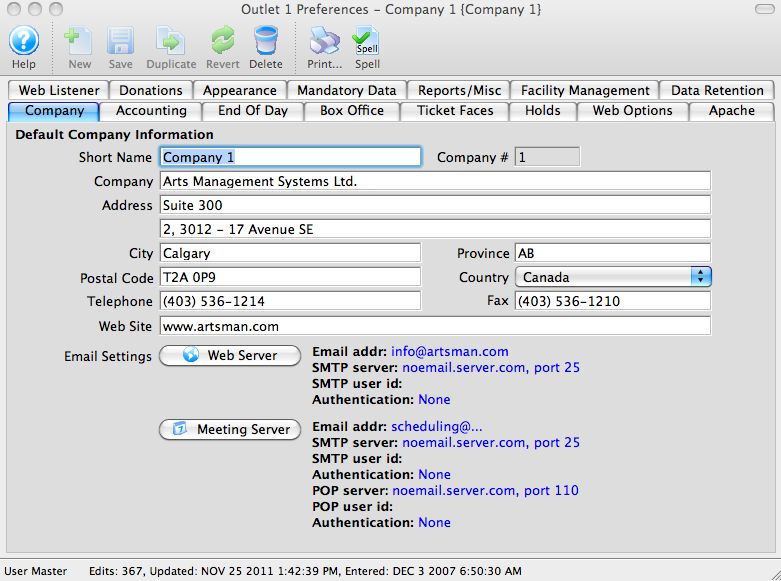
At this point, setting up Outlet Preferences is the same as setting up Company Preferences for sites not using the Outlet Edition of Theatre Manager.
Cross Outlet Policies and Rules
- There should only be one Master User account. The Master User is a "know all/sell all" account - that account can see all data, regardless of Outlet or "allow to sell at other Outlets" flag settings for performances. The Master User password should only be known by the Primary Outlet, and within the primary Outlet provided only to employees who are authorized to see potentially sensitive data for every Outlet (in other words - not many people should have this password).
- Only the Master User can add a new Outlet up to the license count.
- The Master User will be used to setup an Outlet Administrator to complete the main setup options for each respective Outlet. It is expected that Outlet sites will rarely need to use the Master User account after the initial setup of the following options, except to edit or change the Outlet Administrator accounts when necessary.
- Each Outlet requires an Outlet Administrator account.
- It is recommended that the Master User account is never used for selling tickets/donations/memberships or altering data (other than Outlet setup and new Outlet Administrator employees). If a high access level is required to alter/setup data, use the Outlet Administrator employee for that Outlet.
- Outlet Administrator accounts should be used to create employee accounts for his/her respective Outlet and to edit choices and setup preferences via Outlet Preferences for each outlet.

'Outlet Preferences' is the same as 'Company Preferences' in a single-outlet environment. Outlet Preferences are accessed through the Setup Menu
- If an employee works for multiple Outlets, then that employee should have an employee record (still only one patron account) created for each Outlet.
- That employee will be required to log into the proper Outlet's employee record to have their activity and transactions recorded correctly.
- Only certain data is visible across Outlets (patron name and address, but not marketing data) to Outlet Administrator or Normal employee accounts. Click here for a specific list of which data is shared.
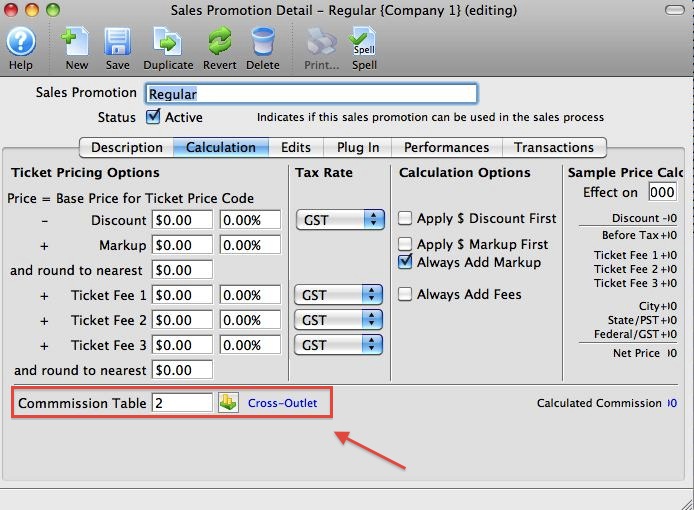
- A commission structure must be assigned to the sales promotions (even if the commission is set to $0.00) that are to be used for other Outlets selling the owning Outlet's tickets.
- Selling tickets for another Outlet requires the use of 'allow to sell at other outlet' on the Performance setup on an Event.
- Selling cross Outlets requires setup of some A/R accounts in the Default Posting Accounts in the Code Tables for 'Payments due from other Outlets', and various income accounts for other Outlets.
- Selling cross Outlets requires periodic reconciliation of sales from other Outlets.
- We recommend that a Refund or Exchange be done from the outlet where the ticket was originally purchased. Meaning that if a ticket for an event at Outlet A is sold by Outlet B, Only Outlet B should Exchange or Refund that ticket to avoid discrepancies across outlets (EOD Imbalance).
- An Outlet is able to Exchange or Refund the tickets that it sold for another Outlet - it is unable to Exchange or Refund a ticket that another Outlet sold.
- If a ticket sold by a Outlet A for an event owned by Outlet B is returned by Outlet B, any commission payable is cleared from the transaction and is no longer owed by Outlet B to Outlet A.
- Outlet A can refund any ticket it sold (for other outlets) and outlet B can refund any tickets that it owns
- Outlet A can sell an Outlet B ticket and take a payment. Outlet B can return the ticket but MUST USE THEIR OWN MONEY to do so. Only the Outlet's own money is in the their own till. That means you should use cash, check or credit card for payments to items that are for another Outlet. Using your own gift in kinds (contra, swag, pass or other non-physical cash), to pay for tickets for another Outlet isn't a suggested business practice.
For example, 'Sure, we'll give you a ticket to the Outlet B -- and yes, we will let you use your Outlet A credit from your gift certificate.' This really means, however, that Outlet A will be 'out' the contra amount because, in the end, they will owe Outlet B real money for tickets they just gave away.
- Outlets cannot sell tickets and put them On Account for another Outlet. Either outlet must make sure outlet sales are completely paid for each time tickets are added or refunded.
- Theatre Maps are shared. They CAN be used among the various Outlets. But only the "owning" Outlet is allowed to change the setup (price codes, seat names, zone pricing, etc.). However, the Master User can duplicate a Theatre Map and re-assign the duplicated map to another Outlet. This will save the other Outlet from having to re-create an existing map that another Outlet has already created. This will then allow the other Outlet to alter the map for their own purposes.
- Tickets Faces are not shared, but the Master User account can be used to duplicate the ticket face and assign the duplicate to the other Outlet (just like with Theatre Maps, above). Then the other Outlet can alter the duplicated ticket face if they wish.
Shared Data Among Outlets
The Outlet Edition was written with privacy in mind; privacy from the point of view of the customer and each of the Outlets. Guiding principles are things like:
- Another Outlet should not be able to figure out how important a patron is to you or what they've paid you. Another Outlet has no business knowing anything about a patron's interaction with you for any reason unless the other Outlet sold the ticket to them, in which case it is reasonable that they should be able to return it. This rule exists because it is to the customer's convenience to return the ticket at the place of purchase. For details on what information is available to cross-outlet sales (and how you can find tickets sold to your events by other Outlets), click here.
- Everything is biased in favor of the customer and privacy. Laws are reasonably strict in Canada and are progressing that way in a number of states in the U.S., so Arts Management Systems wanted to make sure that we were on the right side of reasonable, not the wrong side.
The following is a list of data that is shared among Outlets:
Patron Data
- The data on the Patron contact information window which is basically:
- Patron names
- Phone numbers
- Address
- Note: primary contact settings like (phone, address, fax, email) are unique to each outlet.
- For example: if a patron tells Outlet A that their home address is their primary address, then it is their primary address for ONLY for Outlet A. Outlet B may know the same person, but the nature of their relationship says that the primary address is a work address for that patron. It doesn't have to match.
- If there is only one address for the patron, it is the primary address in both outlets.
So if you are Outlet B, for example, and Outlet A has put the patron in first, or it is in their database already and has two addresses, you get Outlet A's primary address as your primary address until you change it to be different for you. Changing the primary address selection in your Outlet will not change Outlet A's selection.
Changing the primary address setting can be done on the  tab of the patron record or by opening the patron Contact Card.
The same goes for phone numbers. You can have different primary phone, web, fax and email addresses for a patron than another Outlet does. Changing the patron's primary contact information in your Outlet does not affect the primary contact information choices set by the another Outlet.
System Setup Data
All other data is unique to each Outlet and needs to be maintained by each Outlet independently of the Primary Outlet.
Data that is not shared among Outlets
- Donations, Memberships, Mail lists, and Patron marketing data
- Orders cannot be seen by other Outlets unless those orders contain tickets sold to performances flagged as 'allow to be sold to other Outlets'.
- An Outlet cannot edit another Outlet's order.
- An Outlet cannot edit/delete another Outlet's payments.
- An Outlet is only able to sell 'Regular' type, priced tickets for another Outlet (i.e. no season subscriptions, no comps)
- An Outlet is able to Exchange or Refund the tickets that it sold for another Outlet - it is unable to Exchange or Refund a ticket that another Outlet sold. Another Outlet has no business knowing anything about a patron's interaction with you for any reason unless the other Outlet sold the ticket to them, in which case it is reasonable that they should be able to return it. This rule exists because it is to the customer's convenience to return the ticket at their place of purchase.
- Each Outlet can manage the permissions and privileges (Data and Functions within the Employee Profile) of their own employees, but cannot manage employees of other Outlets. If an employee works for multiple Outlets, then that employee should have an employee record (still only one patron account) created for each Outlet.
- Another Outlet cannot search for your events in the Event List window. Therefore they cannot see the Sales or Revenues tab (or any tab for that matter) in the Event setup for your events.
Allow Ticket Selling at Other Outlets
The Outlet Edition was written with privacy in mind; privacy from the point of view of the customer and each of the outlets. Everything is biased in favor of the customer and privacy. Laws are reasonably strict in Canada and are progressing that way in a number of states in the U.S., so Arts Management Systems wanted to make sure that we were on the right side of reasonable, not the wrong side.
Having said that, as an Outlet sharing a database with another outlet, you have access to some of the information during the sales process. Examples include:
- If an outlet can sell tickets for another outlet,
then they can see the sales map. This is required as sales agents need to know
what is available to seat the person.
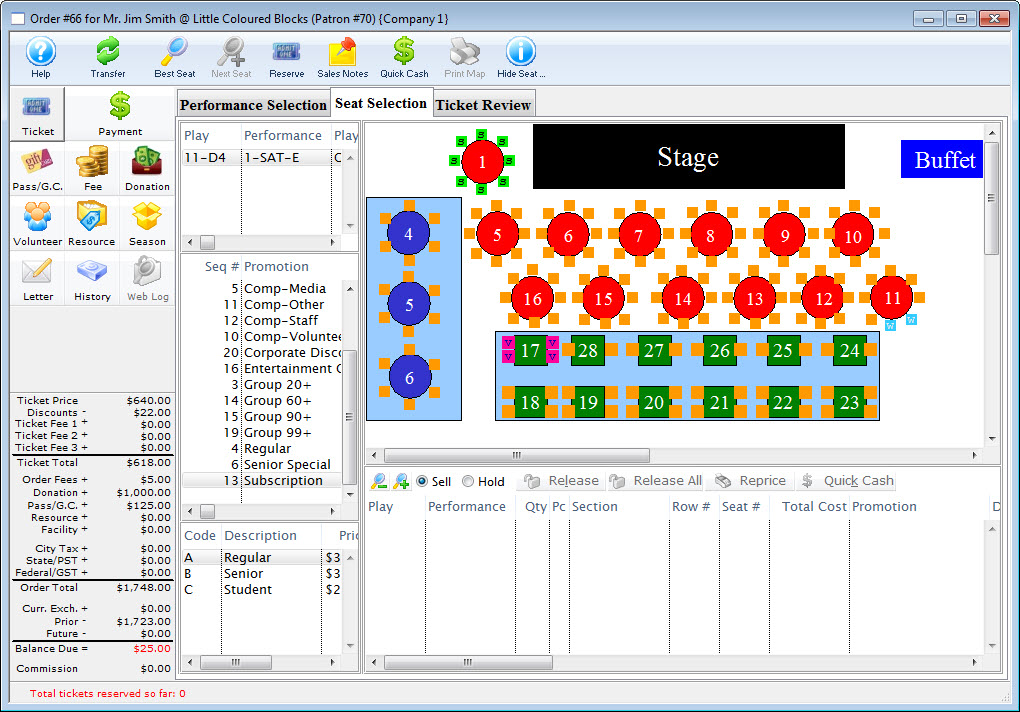
- Design your seat letters in a way that makes sense -- for instance, S for subscriber or G for group. For more information on Map Display Letters, click here.
- Tooltips work across outlets. As you run your cursor across the seats, the tooltip will display which patron is seated where. Alternatively, you can right click on the seats and 'find all other seats in the order' highlighting where the person and their party are seated. This is more helpful for large groups.
- In the Outlet version of Theatre Manager, occasionally you may need to locate a patron's seat, sold by another outlet to accommodate a seating request for a new buyer.
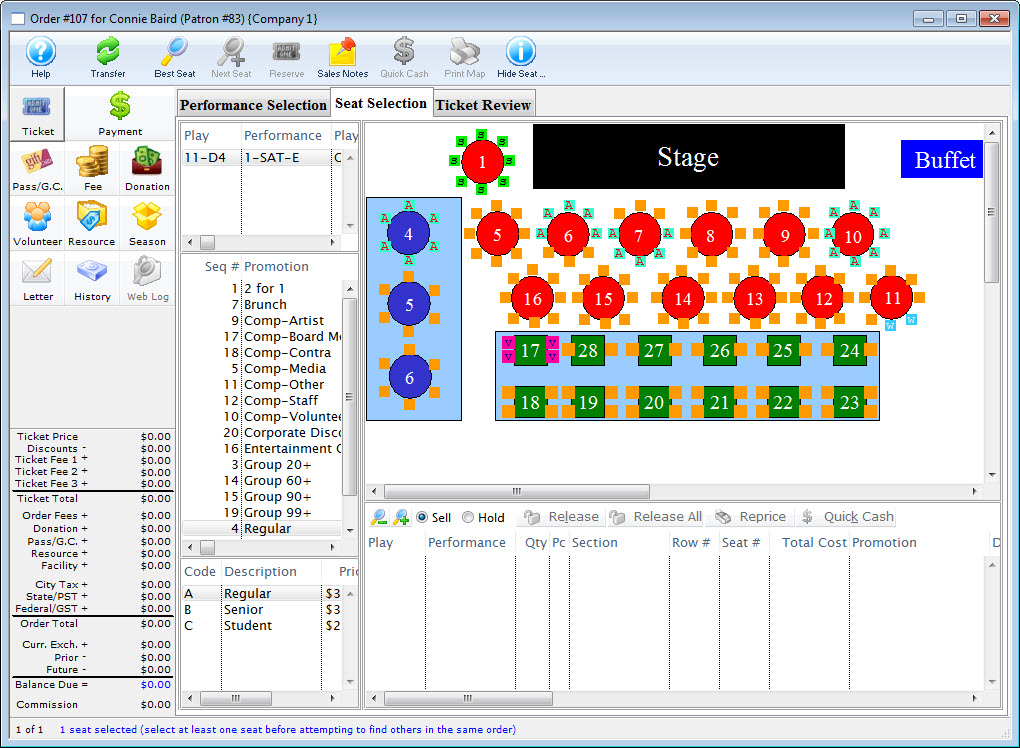
|
While another outlet can sell tickets to your events (if you allow them to), they do not have access to the financial data for that event. They cannot search for your events in the Event List window, and cannot view Revenues, Sales or any of the Event setup tabs. |
Allowing sales at other outlets
- Setup a commission table (even if it's $0.00) that will be applied to sales promotions used at other Outlets.
- Apply the newly created commission table to the sales promotions being used at other Outlets on the Calculation Tab.
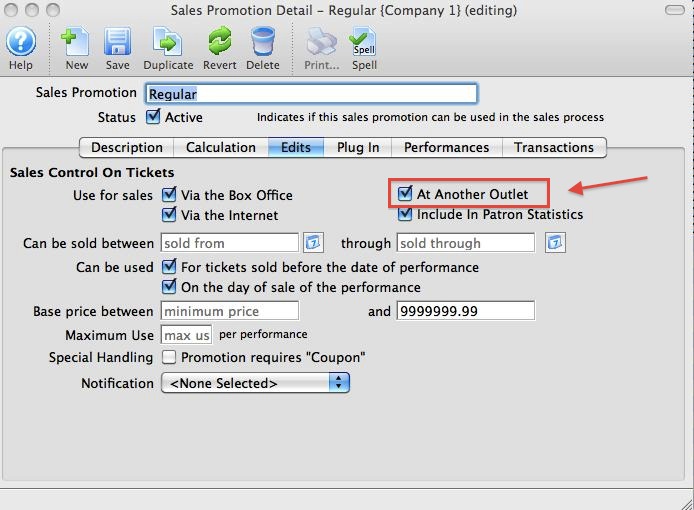
- The 'At Another Outlet' checkbox on the
 tab, allows the Sales Promotion to be used at another Outlet must be checked.
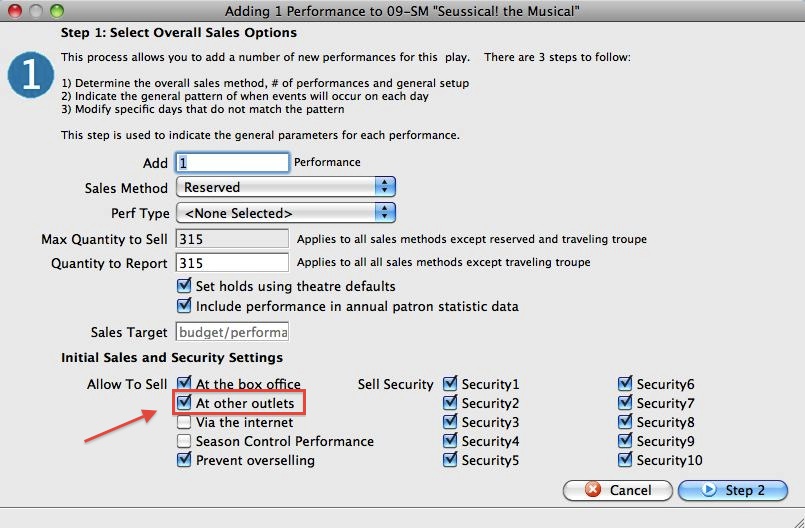
- Setup the new event.
Click here to follow the steps.
- In step one of Adding a Performance, enable the check box to allow selling At Other Outlets.
(Step 9. - Decide where you want the performance available for sale. You can sell the performance at the Box Office, on the Internet, or at an Outlet.)
- On the Promotions Tab, enable the promotions you
set up with the commission table created in Steps 1 and 2 above.
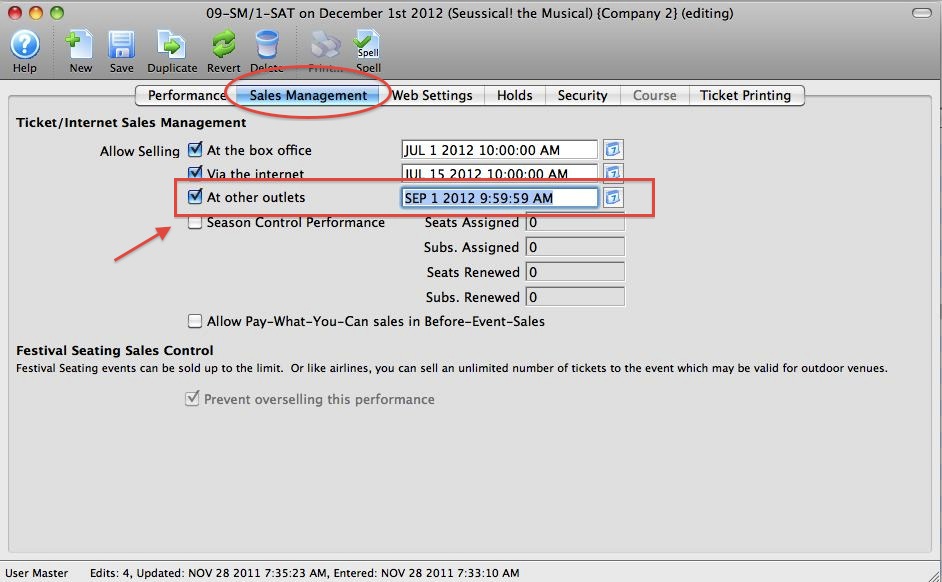
Optionally, you may also want to edit the 'on-sale' date for other Outlets. This lets you change the date tickets go on sale at other Outlets to be different from yours. You can use this to your advantage by restricting the best seats to your venue, and setting a 'public' on sale date for sometime after you have had a chance to handle your members and other customers of your venue.
By opening the performance after it is built, you can edit the Sales Management dates for your Box Office, the Internet and Other Outlets.
Web Sales in Outlet
In an Outlet environment, some Outlets may choose to have web sales, while others may choose not to. In addition, Outlets share a TM server set up with different domains and TLS Certificates to reduce costs for hardware assets.
Each Outlet has their own web pages to give their ticket sales site their own look and feel so that the branding of their ticket sales web pages matches their home website.
Scanner Setup for Outlet
|
Scanners use the same URL as ticket sales. If you have web sales set up for an Outlet, they will be able to scan tickets.
Refer to scanner setup for the URL |