Creating an Invoice through the Payment Window
While taking the payment for an order it is easy to create an invoice. All invoices can then be printed as a batch at the end of the day.
- In the Payment Tab of the Order window, check the Send Invoice box.
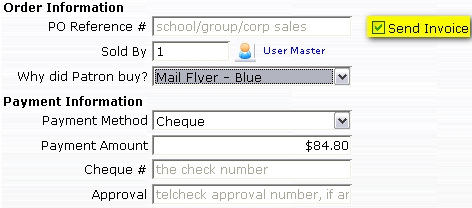
This places the invoice in the Print Ticket Invoices batch.
- When a batch of invoices is ready to be printed, go to Setup >> Batch Functions >> Print Ticket Invoices.
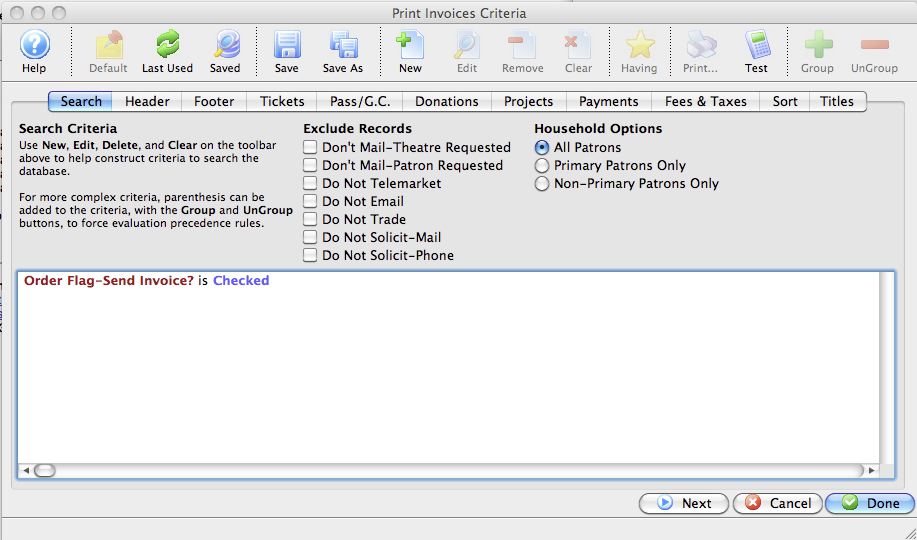
The Print Invoice Criteria window opens.
For more information on the Print Invoice Criteria window, click here.
- Use the criteria of 'Order Flag - Send Invoice' equals Yes.
This will finds all unprinted invoices that have been listed as 'Send Invoice' in the Payment window.
- Either adjust the options on the tabs, or click the Done
 button to display all invoices to be printed.
The invoices are printed to the screen before being routed to the printer.
- Click the Print
 button to print the invoices.
Diataxis: