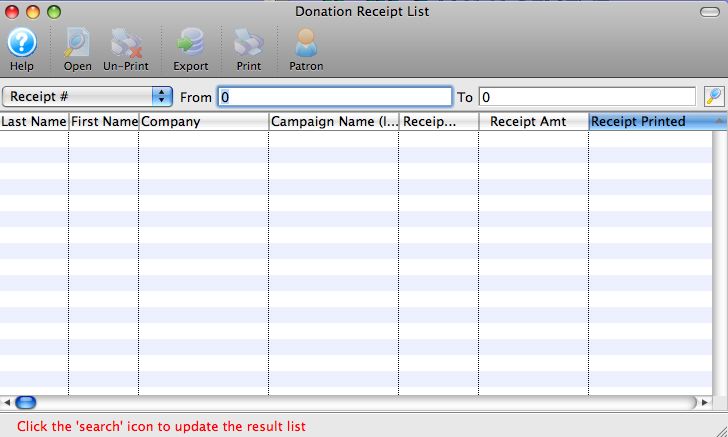
Unprinting a Donation Receipt from the Donation List Window

This window opens when the "Un-print Batch of Charitable Receipts" batch function is selected. You can also search for a specific donation using the search function on the bottom of the window.

Parts of the Donation Receipt List Window

Last Name
The patron's last name.
First Name
The patron's first name.
Company
The patron's company name.
Campaign
The campaign the patron's donation was given to.
Receipt #
This column displays the official charitable tax receipt number of the donation receipt. If the receipt number is zero, then no receipt has been created for the donation, or the receipt has been Un-printed.
Receipt Amt
This column displays the amount of the donation the has been receipted to date.
Receipt Printed
This column displays the date that the donation receipt was printed.

Search Function

You may search for donation receipts using a variety of fields. The search fields can be selected from the drop down list located in the upper left portion of the window.

Patron #
Use this search field to locate donation receipts for a range of, or a specific patron number.
Name/Company 
Use this search field to locate donation receipts for a particular patron, or a range of patrons based on letters in their last name or company name.
Last Name 
Use this search field to locate donation receipts for a particular patron, patrons with the same last name, or a range of patrons based on letters in their last name.
Company 
Use this search field to locate donation receipts based on the company a patron works for.
Fiscal Year 
Use this search field to locate donation receipts based on the fiscal year that the donation was received.
Donation Date 
Use this search field to locate donation receipts based on the actual date that the donation was received.
Campaign Name (Internal)
Use this search field to locate donation receipts based on the internal name of the campaign type assigned to them.
Receipt #
Use this search field to locate donation receipts based on the receipt numbers that were assigned to them.
Receipt Printed  
Use this search field to locate donation receipts based on the actual date that the donation receipts were printed.
From and To 
Use these fields to enter in search parameters based upon the field you are using to search.
This button will begin a search for donation receipts that match the specific search criteria set in the from and to fields.
Opens the selected Donations Detail window.
Unprints the receipt for the selected Donation.
Exports the data from the Donation Receipt List out of Theatre Manager as a tab-delimited file to be used in other programs.
Generates the Donation Receipts List as a report with the results of the searched for patrons found in the displayed list.